
Introduction
JavaScript is a language of Web. This series of articles will talk about my observations learned during my decade of software development experience with JavaScript. I hope this series on JavaScript is giving you a good understanding and you are enjoying most parts of it.
Before moving further let us look at the previous articles of the series:
- Voice of a Developer: JavaScript Data Types - Part One
- Voice of a Developer: JavaScript Objects - Part Two
- Voice of a Developer: JavaScript Engines - Part Three
- Voice of a Developer: JavaScript Common Mistakes - Part Four
- Voice of a Developer: Editors - Part Five
- Voice of a Developer: VSCode - Part Six
- Voice of a Developer: Debugging Capabilities of VSCode - Part Seven
- Voice of a Developer: JavaScript OOP - Part Eight
- Voice of a Developer: JavaScript Useful Reserved Keywords - Part Nine
- Voice of a Developer: JavaScript Functions - Part Ten
- Voice of a Developer: JavaScript Functions Invocations - Part Eleven
- Voice of a Developer: JavaScript Anonymous Functions - Part Twelve
- Voice of a Developer: JavaScript Pure And Impure Function - Part Thirteen
- Voice of a Developer: JavaScript Closures - Part Fourteen
- Voice of a Developer: JavaScript Currying - Part Fifteen
- Voice of a Developer: JavaScript Chaining - Part Sixteen
- Voice of a Developer: JavaScript Array Methods - Part Seventeen
- Voice of a Developer: JavaScript ECMAScript 6 - Part Eighteen
- Voice of a Developer: JavaScript ECMAScript 6 Features v1 - Part Nineteen
- Voice of a Developer: JavaScript ECMAScript 6 Features v2 - Part Twenty
- Voice of a Developer: JavaScript Web Workers - Part Twenty One
- Voice of a Developer: JavaScript JSLint v1 - Part Twenty-Two
This is a continuation of the last article on JSLint, we will start with Options and command-line utility of JSLint. Connect the dots where we left now, but read the last article (link) before reading this one otherwise you will feel nausea, drowsiness, and feel unhappy.
Go to URL: http://www.jslint.com/
You can fiddle with JSLint and customize your warnings via Options below:
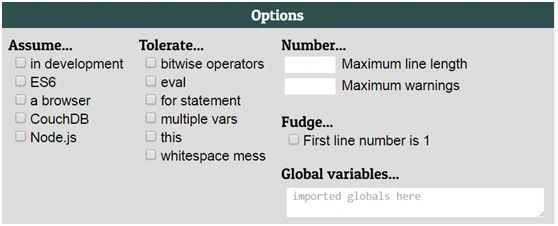 I am going to show commonly used options here:
- Assume=> in development: select this when you are using debugging code, troubleshooting and code includes statements like console, alert, etc.
- var array = [2,4,16];
- var output = array.map(Math.sqrt);
- alert(output);
If ‘in development’ is unchecked, you will get below warning:
- Assume=> ES6 checkbox: if you’re using ES6 features in your code and you try it without selecting this checkbox it’ll give you a warning, ex-
- let array = [2,4,16];
- var output = array.map(Math.sqrt);

- Assume=>a browser: your code is leveraging global variables accessible in browser ex- window, the document then you can click this checkbox and mention these specifically in global variables, refer snapshot below:
Code
- function f1() {
- var array = [2,4,16];
- var output = array.map(Math.sqrt);
- window.alert(output);
- }
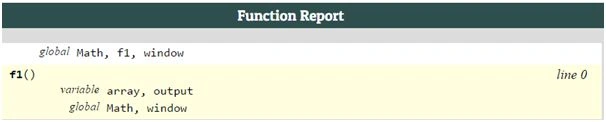

Function report
What is the biggest problem in JavaScript?
Command-line support
- Open GIT bash and goto NodeJS repository.
- Run below command to install jslint.
npm install jslint -g

- Run jslint from the command line to lint your code.
Example lets revistrevisit our script we wrote on JSlint.com and save as ‘script.js’
- 'use strict';
- function f1() {
- var x ={a:1, b:2};
- alert(x);
- }
 Above Warnings we have seen at web applications are now appearing on the command line. The benefit of the command line is integration with your code and during continuous integration & deployment.
 - We could pass Options in command-line utility as well, but before that check syntax:
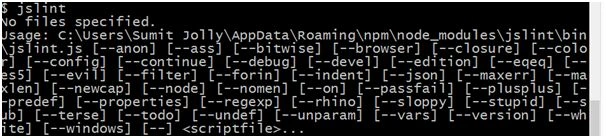
- In order to remove above Warnings we could pass on Options as following:

Rajib Das GuptaPosted Jun 10, 2016, 7:22 AM
Nice
Bhuvanesh MohankumarPosted May 17, 2016, 2:22 PM
Good one
Kuppurasu NagarajPosted May 17, 2016, 10:58 AM
Nice sharing..
Guest UserPosted May 17, 2016, 3:25 AM
I hope it helps... please let me know incase you've any more questions... Thanks for asking
Guest UserPosted May 17, 2016, 3:25 AM
Now JSLint gives you wanring using these is because you need to mention window in Global variables to use functions which are associated with any Global object in parsing.. try at http://www.jslint.com/
Guest UserPosted May 17, 2016, 3:24 AM
In JSLint or JavaScript, there is no difference if you use alert or window.alert...
Guest UserPosted May 17, 2016, 2:23 AM
Dear Manju lata Yadav I am not clear on your question? Can you please elaborate?
Manju lata YadavPosted May 17, 2016, 2:08 AM
Why it shows undeclared alert when we do not choose in development as both alert and window.alert() are same.
Guest UserPosted May 16, 2016, 11:31 PM
thnx! good day'
Sonu ChaudharyPosted May 16, 2016, 3:24 PM
good one...
Debasis SahaPosted May 16, 2016, 1:52 PM
Nice One..