
Introduction
Before moving further, let us look at the previous articles of the series
- Voice of a Developer: JavaScript Data Types - Part One
- Voice of a Developer: JavaScript Objects - Part Two
- Voice of a Developer: JavaScript Engines - Part Three
- Voice of a Developer: JavaScript Common Mistakes - Part Four
- Voice of a Developer: Editors - Part Five
- Voice of a Developer: VSCode - Part Six
- Voice of a Developer: Debugging Capabilities of VSCode - Part Seven
- Voice of a Developer: JavaScript OOP - Part Eight
- Voice of a Developer: JavaScript Useful Reserved Keywords - Part Nine
- Voice of a Developer: JavaScript Functions - Part Ten
- Voice of a Developer: JavaScript Functions Invocations - Part Eleven
- Voice of a Developer: JavaScript Anonymous Functions - Part Twelve
- Voice of a Developer: JavaScript Pure And Impure Function - Part Thirteen
- Voice of a Developer: JavaScript Closures - Part Fourteen
- Voice of a Developer: JavaScript Currying - Part Fifteen
- Voice of a Developer: JavaScript Chaining - Part Sixteen
- Voice of a Developer: JavaScript Array Methods - Part Seventeen
- Voice of a Developer: JavaScript ECMAScript 6 - Part Eighteen
- Voice of a Developer: JavaScript ECMAScript 6 Features v1 - Part Nineteen
- Voice of a Developer: JavaScript ECMAScript 6 Features v2 - Part Twenty
- Voice of a Developer: JavaScript Web Workers - Part Twenty One
- Voice of a Developer: JavaScript JSLint v1 - Part Twenty-Two
- Voice of a Developer: JavaScript JSLint v2 - Part Twenty Three
- Voice of a Developer: XMLHttpRequest API - Part Twenty Four
- Voice of a Developer: Web Storage API - Part Twenty-Five
- Voice of a Developer: Application Cache API - Part Twenty-Six
- Voice of a Developer: Javascript WebSocket - Part Twenty-Seven
- Voice of a Developer: Parse JSON - Part Twenty-Eight
- Voice of a Developer: Save Coding Time With Lodash.js - Part Twenty Nine
- Voice of a Developer: ChakraCore JavaScript Engine by Microsoft - Part Thirty
- Voice of a Developer: JavaScript Web App Performance Best Practices - Part 31
- Voice of a Developer: ECMAScript Promises - Part Thirty-Two
- Voice of a Developer: Browser Runtime - Part Thirty-Three
JavaScript
JavaScript is a language of the Web. This series of articles will talk about my observations learned during my decade of software development experience with JavaScript.
Unit testing is a software development process in which the smallest parts of the Application, called units, are tested. It can be done manually orthe process could be automated. Unit Testing is a level of software testing where the individual units/ components of the software are tested. The purpose is to validate that each unit of the software performs as designed.
I see a lot of advantages in Unit tests, I have listed all of them as per my experience,
Unit tests
Advantages of Unit tests
- It allows you to make big changes to the code quickly.
- Improves the design of the code, especially with Test-Driven Development.
- It makes it easier to change and refactor code.
- Saves your development time.
Unit tests and TDD go hand-in-hand. The concept of TDD is to first write a failing test, then we write enough code to pass the test and refactor the code. Generally, as a developer, we write fast code that works goodwell, but we don’t think to write Unit tests.
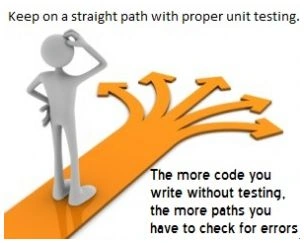 Unit tests are the safety nets and test whether the code is working or not by just running it.
A list of all the unit test frameworks is available here.
Few popular frameworks are:
Unit tests are the safety nets and test whether the code is working or not by just running it.
A list of all the unit test frameworks is available here.
Few popular frameworks are:
Source http://www.juancarbonel.com/
- Jasmine
- Mocha
- Chai
Other concepts
A CLI based tool requires you to run your tests. As developers, we shall love command-line interface and integrate our scripts with it. In an automation, it is of great help and we can integrate the test runner tool with the various environments too. There are many test runner software available. For e.g. Karma, Grunt, Gulp, Nrunner.
It means to validate the condition or the output. We can determine the output; whether a test makes your code fail or pass depends on the assert condition. Different test suites/automation tools syntax can vary but the purpose is the validation, e.g. Assert.IsTrue (true);
You need to install NodeJS to enable the unit tests in JavaScript. You can refer to the article given below, by clicking it.
Test runner
Assertion
Pre-requisites
- Jump Start Node.js by Sanjay Kumar.
Let us do Unit testing now. To do that, we will install some node packages, i.e, Jasmine and Karma.
There are two ways to install things in NodeJS
- Global
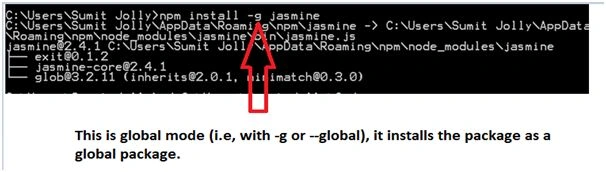
It installs the node modules in the global space. Hence, you do not need to install it every time for different projects. This is done using –g parameter; while installing. If you are creating your Application to test whether it's fine or not, you should have in dev dependencies, which is the next option.[Note for this article, I’ll show –g option for the installation]
- Save local
It installs the node modules in the project directory. Hence, it is a part of the developer dependencies in Package.json [configuration file of NodeJS dependencies] project. If you’re in a hurry to create package.json; then there are various ways you can download a sample using curl command.Sample package.jsoncurl -O

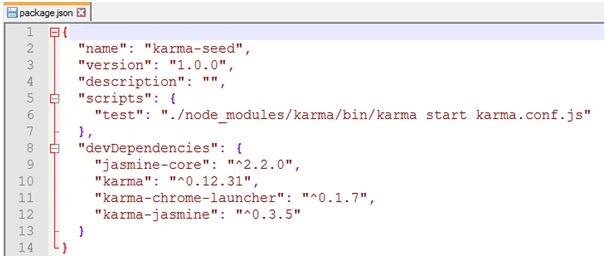
- Jasmine
Jasmine is a test-driven development framework to test JavaScript code. For more details, you can see here.Now, we will install Jasmine framework, using the command shown below,npm install –g jasmine
- Karma
Karma is a spectacular test runner for JavaScript. It allows you to execute JavaScript code in the multiple real Browsers. I am emphasizing real Browsers, because it does not run Fake/stubs, but executes tests on the real Browsers. For more details, you can find which Browser, it supports.
Installing Karma and plugins
Karma-Jasmine
Chrome launcher
Although we can leverage any supported Browser by Karma, I will show the tests via most popular Browser Chrome. Hence, install Chrome-launcher,
Karma CLI
- Create a directory, md testJS
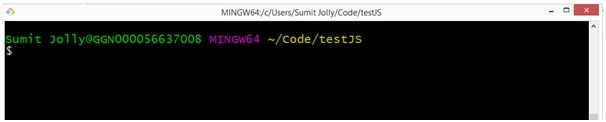
- Create tests folder and underneath unitTests.js,
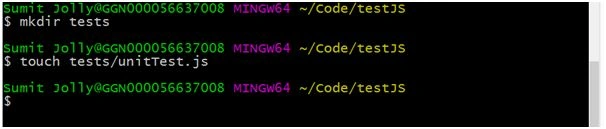
- Open file unitTests.js in your favorite editor and paste the code, shown below:
- describe("UnitTests", function()
- {
- it("First Unit test", function()
- {
- expect(2).toEqual(2);
- });
- });
Let us dive deep into the various components of this.describeA test suite begins with describing what accepts the title of the suite and a function. This function is going to be tested.itSpecs are defined, using it. You can write any number of test specifications. A test can be true or false and it depends upon the condition.expectIt takes a value and matches against the expected value. - Configure the test runnerTo create this file, quickly download sample karma.conf.js from the location, given below:curl -OReview karma.conf.js for now, we’ll modify it later.
- module.exports = function(config)
- {
- config.set(
- {
- basePath: '',
- frameworks: ['jasmine'],
- files: [
- 'build/js/**/*.js',
- 'build/tests/**/test_*.js'
- ],
- exclude: [],
- preprocessors: {},
- reporters: ['dots'],
- port: 9876,
- colors: true,
- logLevel: config.LOG_INFO,
- autoWatch: true,
- browsers: ['PhantomJS'],
- singleRun: true
- });
- };
- Create the folder app and add code file unit.js. The folder structure may look like,
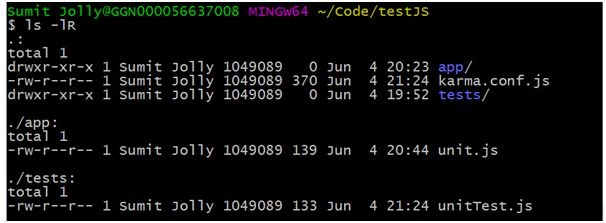
- Modify some key-value pairs, according to your code:
- browsers: ['Chrome'],
- files: [
- 'app/*.js',
- 'tests/*.js'
- ],
- Run the basic test using karma. Start and it will also open the Chrome Browser and run the test in unitTest.js,
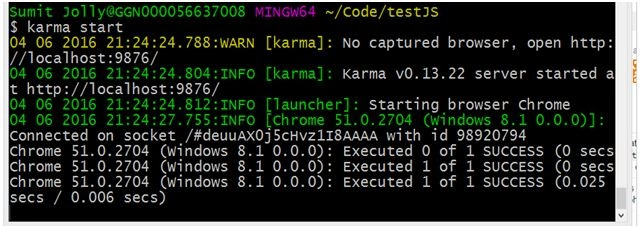 Launch Chrome too.
 InfoYou may get an error that Chrome is not properly configured, so please update the path accordingly,On the command prompt, you could see - it runs your test and print,Executed 0 of 1 SUCCESS
Executed 1 of 1 SUCCESSThis happens because our expect statement results in true.
TDD principles
- First write the fail test (RED)
- Write the minimum code so the test can pass (GREEN)
- Improve the code (Refactor)
- Revisit unitTest.js and we want to create a global library, where we can perform simple mathematical operations like sum, product. I assumed the global object and two functions with it:
- describe("UnitTests", function()
- {
- var g = global;
- it("Sum test", function()
- {
- expect(g.sum(2, 3)).toEqual(5);
- });
- it("Product test", function()
- {
- expect(g.product(2, 3)).toEqual(6);
- });
- });
NoteFollow TDD principle, I will first fail my tests.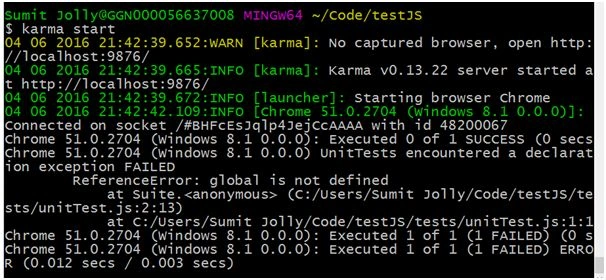 At the terminal, it says, “global is not defined”, that means my test is in RED.
 - Next step to writing minimum code is to turn it into GREEN,
Update the code in unit.js, as shown below:
- var global =
- {
- sum: function(a, b)
- {
- return a + b;
- },
- product: function(a, b)
- {
- return a * b;
- }
- };
- Again, run karma start command,
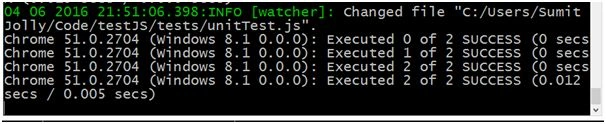 Nice, we can see both tests, that passed.
 - Refactor code by using the “use strict” and replacing var with let keyword inside test will ensure:
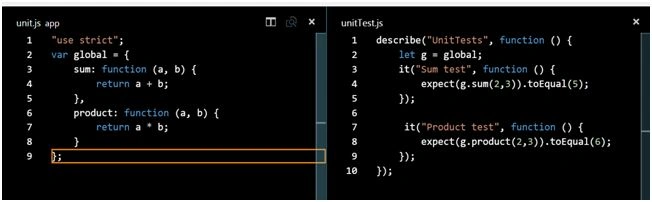
I committed this code at GitHub and from here you can download or clone it.
We can go more in-depth if we want by understanding Karma configuration, Jasmine, and other frameworks. I believe this article must have given you the context of Unit test in JavaScript. Please share your feedback/comments.
Guest UserPosted Jun 9, 2016, 2:12 AM
Thanks Santhakumar Munuswamy
Santhakumar MunuswamyPosted Jun 9, 2016, 12:30 AM
Thank you for nice share
Vignesh ManiPosted Jun 7, 2016, 6:59 AM
Nice
Debasis SahaPosted Jun 7, 2016, 12:57 AM
Nice share..
Guest UserPosted Jun 6, 2016, 9:07 PM
Thanks Sonu! you give comments on almost all my articles... thankx for supporting
Sonu ChaudharyPosted Jun 6, 2016, 1:52 PM
good one