
Introduction
JavaScript is a language of the Web. This series of articles will talk about my observations learned during my decade of software development experience with JavaScript.
Before moving further let, we look at the previous articles of the series:
- Voice of a Developer: JavaScript Data Types - Part One
- Voice of a Developer: JavaScript Objects - Part Two
- Voice of a Developer: JavaScript Engines - Part Three
- Voice of a Developer: JavaScript Common Mistakes - Part Four
- Voice of a Developer: Editors - Part Five
- Voice of a Developer: VSCode - Part Six
- Voice of a Developer: Debugging Capabilities of VSCode - Part Seven
- Voice of a Developer: JavaScript OOP - Part Eight
- Voice of a Developer: JavaScript Useful Reserved Keywords - Part Nine
- Voice of a Developer: JavaScript Functions - Part Ten
- Voice of a Developer: JavaScript Functions Invocations - Part Eleven
- Voice of a Developer: JavaScript Anonymous Functions - Part Twelve
- Voice of a Developer: JavaScript Pure And Impure Function - Part Thirteen
- Voice of a Developer: JavaScript Closures - Part Fourteen
- Voice of a Developer: JavaScript Currying - Part Fifteen
- Voice of a Developer: JavaScript Chaining - Part Sixteen
- Voice of a Developer: JavaScript Array Methods - Part Seventeen
- Voice of a Developer: JavaScript ECMAScript 6 - Part Eighteen
- Voice of a Developer: JavaScript ECMAScript 6 Features v1 - Part Nineteen
- Voice of a Developer: JavaScript ECMAScript 6 Features v2 - Part Twenty
- Voice of a Developer: JavaScript Web Workers - Part Twenty One
- Voice of a Developer: JavaScript JSLint v1 - Part Twenty-Two
- Voice of a Developer: JavaScript JSLint v2 - Part Twenty Three
- Voice of a Developer: XMLHttpRequest API - Part Twenty Four
- Voice of a Developer: Web Storage API - Part Twenty-Five
- Voice of a Developer: Application Cache API - Part Twenty-Six
- Voice of a Developer: JavaScript WebSocket - Part Twenty-Seven
In this article, we will understand JSON in detail as a Data Interchange format. Douglas Crockford as “The Fat-Free Alternative to XML” introduced it. We will also understand the difference with XML and how could we access it using JavaScript.
JSON is an easier-to-use alternative to XML. As we know, XML has been there for many years as a data-interchange format. XML was better than SGML. We will compare JSON & XML shortly, but before it is good to understand the JSON in detail.
It is built on two structures:
JSON (JavaScript Object Notation)
JSON structure
- A collection of name/value pairs.
- An ordered list of values like an array, list
JSON syntax
- The data is written as name/value pairs, like JavaScript object properties, e.g.,
- {“fname”:”sumit”}
- JSON objects are inside curly braces {}, separated by “,”
- {“fname”:”sumit”, “lname”:”jolly”}
- Arrays are written inside square brackets
- {'students': [
- {'name':'Ravi','year':'1st'},
- {'name':'Abhishek','year':'1st'},
- {'name':'Neha','year':'2nd'}]};
Comparison between JSON and XML
| JSON | XML |
| JSON is less verbose | XML has a lot of baggage and has a lot of opening and closing tags |
| Easily readable format by humans | Complex to read large XML files |
| JSON is data-oriented | XML is document-oriented |
| JSON notation is built in JavaScript | XML needs the extra library to process it |
| JSON is just a data interchange format | XML is more than interchange format, it’s like a language |
| No namespace concept, each object is its own namespace. So names can be repeated | XML supports namespaces and prefixes |
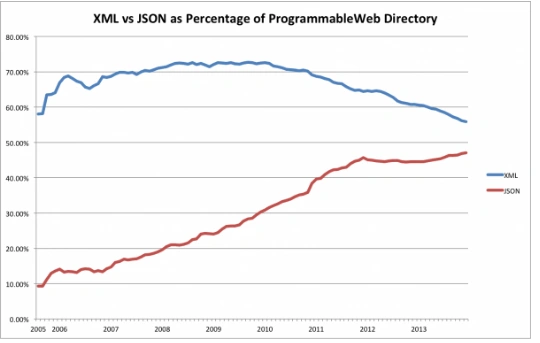
Each has its own advantages and disadvantages, but JSON is definitely rising for the last many years. There is a popular chart depicting the usage of XML vs JSON released by http://www.programmableweb.com/,
 JavaScript contains window.JSON object for parsing JavaScript Object Notation and converting values to JSON. There are two methods associated with it:
It can be used to convert a JSON text into Object, e.g.
JavaScript contains window.JSON object for parsing JavaScript Object Notation and converting values to JSON. There are two methods associated with it:
It can be used to convert a JSON text into Object, e.g.
JavaScript JSON parsing
JSON.parse()
- var json = '{"result":true,"count":1}',
- obj = JSON.parse(json);
- console.log(obj);
- JSON.parse(text[, reviver])
reviver (optional)
- JSON.parse('{"fname": "sumit", "lname":"jolly"}', function(k, v) {
- if (k === '') { return v; } // if topmost value, return it,
- console.log(v);
- return v.toUpperCase();
- }); // output will be name in upper case
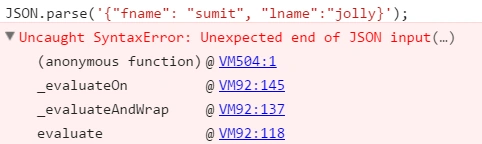
Syntax Error
JSON.stringify()
- JSON.stringify(value[, replacer[, space]])
- value: The value to convert to a JSON string
- replacer (optional): This second argument is used to screen and modify the results like reviver in JSON.parse. It accepts KVP name-value pair:
-
space (optional): We can add number of whitespace characters also,
- var numberJson = ['one', 'two', 'three'];
- var json = JSON.stringify(numberJson, function(k,v){
- if (k === '') { return v; }
- console.log(v);
- return v.toUpperCase();
- }, 4);
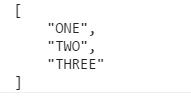
- console.log(json); // I added 4 characters as whitespace, so below output will be generated
Prasanna MuraliPosted Jun 9, 2016, 12:35 AM
Nice share....
Vignesh ManiPosted May 21, 2016, 4:29 PM
nice one
Kuppurasu NagarajPosted May 18, 2016, 1:41 PM
Nice Sharing..
Neeraj KumarPosted May 18, 2016, 12:58 PM
Nice
Debasis SahaPosted May 18, 2016, 10:21 AM
Good One..
Guest UserPosted May 18, 2016, 9:21 AM
Thanks Ketak!
Ketak BhalsingPosted May 18, 2016, 8:20 AM
Very Well Written.....
Guest UserPosted May 18, 2016, 4:16 AM
Thanks Bhuvanesh!
Bhuvanesh MohankumarPosted May 18, 2016, 3:47 AM
awesome as usual