

In this article, I am going to show how to use Authorization and Authentication using a WCF service in Enterprise Architecting standards. This article is of Advanced WCF concepts. I am using an error driven approach for better experience with the problems and the solutions.
The core aspects we cover here are:
- WCF
- ASP.NET Authentication Service
- Custom Authentication
- HTTP Cookies
- Authorization PrincipalPermission Attribute
- Thread CurrentPrincipal
- Message Interceptors
You will be wondering what the above are. In a quick summary the following are the activities involved.
- Create a WCF Service Application
- Add an AuthenticationService.svc reusing ASP.NET Authentication Service
- Create User Validator class
- Enable Custom Authentication in Global.asax
- Return Cookie if valid User
- Modify service configuration
- Try accessing the Authentication Service in Browser
- Create a UtilityService.svc with one method named GetData(int)
- Decorate the GetData(int) with PrincipalPermission attribute for Authorized Access only
- Decorate UtilityService class with AspNetCompatibilityRequirements attribute
- Set Utility Service constructor to set CurrentPrincipal from cookie
- Create the client application and add references to both services
- Create Authentication Service instance and invoke the Login() method
- Receive the cookie and store it
- Create a UtilityService instance and invoke GetData()
- Attach the Cookie to the UtilityService client
- Test the application and ensure the proper functioning
- Move the cookie attaching code to Interceptors in the Client Application
- Move the identity setting code to Interceptors in the Service Application
- Modify the service-side code to include Role instead of Name
- Use Encrypted Ticket for storing User Name and Roles
- Retest the Application
Authentication and Authorization
Before starting, we should have a clear understanding of Authentication and Authorization:
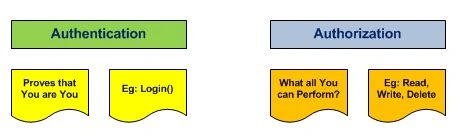
So to simplify, Authentication proves who the user is using his/her credentials or certificates.
Authorization deals with the rights the user has. For example, the Admin user will have Read, Write, Delete privileges but an ordinary Clerk will have Read permissions.
In WCF we are using the Membership infrastructure of ASP.NET to implement Authentication and Authorization.
Now we can start with the steps above.
Step 1: Create a WCF Service Application:

Step 2: Add an AuthenticationService.svc reusing ASP.NET Authentication Service.
Add a new WCF Service and name it AuthenticationService.svc. Delete the associated files since we are going to expose the ASP.NET Authentication Service.
- Delete AuthenticationService.cs
- Delete IAuthenticationService.cs
Replace the contents of AuthenticationService.svc with the following:
- <%@ ServiceHost
- Language="C#"
- Service="System.Web.ApplicationServices.AuthenticationService"
- Factory="System.Web.ApplicationServices.ApplicationServicesHostFactory" %>
The Authentication Service supports the following methods:
- Login()
- Logout()
- ValidateUser()
Each of these methods work with the Membership Provider to perform the functionalities. We can also customize these aspects by providing our own database of user credentials and controlling the cookie creations.
Step 3: Create User Validator class
The Authentication Service will be receiving User Name and Password. We need to validate this with a Custom Provider. (We are not using ASP.NET Membership provider here.)
The following is the class definition of it. For the time being, we are hardcoding a user name as tom and password as chicago12.
- public class UserValidator
- {
- public bool IsUserValid(string userName, string password)
- {
- bool result = (userName == "tom") && (password == "chicago12");
- return result;
- }
- }
Step 4: Enable Custom Authentication in Global.asax
Add a new item Web > Global Application Class into the project.
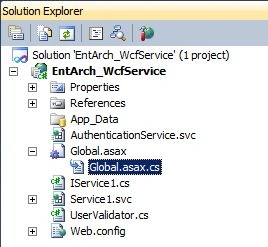
Replace the Appilcation_Start event as follows:
- protected void Application_Start(object sender, EventArgs e)
- {
- System.Web.ApplicationServices.AuthenticationService.Authenticating +=
- new EventHandler<System.Web.ApplicationServices.AuthenticatingEventArgs>(
- AuthenticationService_Authenticating);
- }
- void AuthenticationService_Authenticating(object sender, System.Web.ApplicationServices.AuthenticatingEventArgs e)
- {
- e.Authenticated = new UserValidator().IsUserValid(e.UserName, e.Password);
- e.AuthenticationIsComplete = true;
- }
The property Authenticated represents true / false if a user is valid or not respectively.
Step 5: Return a Cookie if valid user.
Now we need to send back a Cookie if the user is valid. For this add the following code in the above method:
- if (e.Authenticated)
- {
- // Create Cookie
- HttpCookie cookie = new HttpCookie(FormsAuthentication.FormsCookieName);
- cookie.Value = e.UserName;
- // Attach Cookie to Operation Context header
- HttpResponseMessageProperty response = new HttpResponseMessageProperty();
- response.Headers[HttpResponseHeader.SetCookie] = cookie.Name + "=" +cookie.Value;
- OperationContext.Current.OutgoingMessageProperties
- [HttpResponseMessageProperty.Name] = response;
- }
The above code performs the following:
- Create a cookie with default name (.ASPXAUTH)
- Set value to the User Name
- Add the cookie to the WCF Operation Context message property
Step 6: Modify the service configuration.
Now we need to modify the web.config file to include the following:
- Enable Authentication Service
- Enable ASP.NET Compatibility
Replace the contents of web.config with the following:
- <?xml version="1.0"?>
- <configuration>
- <system.web>
- <compilation debug="true" targetFramework="4.0" />
- </system.web>
- <system.web.extensions>
- <scripting>
- <webServices>
- <authenticationService enabled="true"/>
- </webServices>
- </scripting>
- </system.web.extensions>
- <system.serviceModel>
- <behaviors>
- <serviceBehaviors>
- <behavior>
- <serviceMetadata httpGetEnabled="true"/>
- <serviceDebug includeExceptionDetailInFaults="true"/>
- </behavior>
- </serviceBehaviors>
- </behaviors>
- <serviceHostingEnvironment multipleSiteBindingsEnabled="true" aspNetCompatibilityEnabled="true" />
- </system.serviceModel>
- <system.webServer>
- <modules runAllManagedModulesForAllRequests="true"/>
- </system.webServer>
- </configuration>
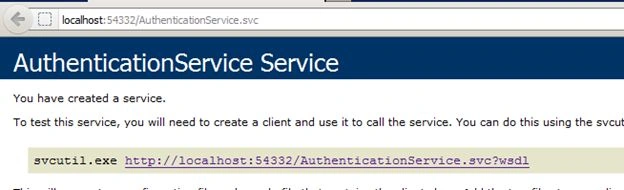
Now build the project and try accessing the AuthenticationService.svc in a browser. If you are able to see the following page then you are on the right track. (Otherwise, please check the steps above for any corrections / use the attached source code.)
Step 8, 9, 10: Create a UtilityService.svc with one method named GetData(int).
Add a new WCF service named UtilityService.svc into our service application. Delete the existing methods inside the resulting classes and interfaces.
- // IUtilityService.cs
- [ServiceContract]
- public interface IUtilityService
- {
- [OperationContract]
- string GetData(int i);
- }
- // UtilityService.svc
- using System.ServiceModel;
- using System.Security.Permissions;
- using System.ServiceModel.Activation;
- namespace EntArch_WcfService
- {
- [AspNetCompatibilityRequirements(RequirementsMode = AspNetCompatibilityRequirementsMode.Allowed)]
- public class UtilityService : IUtilityService
- {
- [PrincipalPermission(SecurityAction.Demand, Name = "tom")]
- public string GetData(int i)
- {
- string result = "You Entered: " + i.ToString();
- return result;
- }
- }
- }
The [PrinicalPermission] ensures that only user with name tom is authorized to access the method GetDat(). In the real world applications we will be using the Role property to authorize a group of users.
The [AspNetCompatibilityRequirements] ensures that the service can be run in ASP.NET compatibility mode as we are using this mode for our Authentication infrastructure needs.
Authorization can be applied in 2 ways:
- Imperative: Example: if (Roles.IsUserInRole())
- Declarative: PrincipalPermission
Step 11: Set the Utility Service constructor to set the CurrentPrincipal from the cookie.
The WCF Authentication Service had sent a cookie to the user. This cookie will be returned back to the Utility Service (and any new services in the future) by the client. We need to retrieve the cookie and extract the user name out of it. This user name has to be set to the current thread principal. In real projects, you need to set the Roles as well.
The following are the activities involved in this step:
- Retrieve Cookie from Operation Context Income Message Properties
- Extract the User Name from the Cookie
- Create a class CustomIdentity implementing IIdentity
- Set the Thread Current Principal to the CustomIdentity instance
Modify the constructor of UtilityService as following:
- public UtilityService()
- {
- // Extract Cookie (name=value) from messageproperty
- var messageProperty = (HttpRequestMessageProperty)
- OperationContext.Current.IncomingMessageProperties[HttpRequestMessageProperty.Name];
- string cookie = messageProperty.Headers.Get("Set-Cookie");
- string[] nameValue = cookie.Split('=', ',');
- string userName = string.Empty;
- // Set User Name from cookie
- if (nameValue.Length >= 2)
- userName = nameValue[1];
- // Set Thread Principal to User Name
- CustomIdentity customIdentity = new CustomIdentity();
- GenericPrincipal threadCurrentPrincipal = new GenericPrincipal(customIdentity, new string[] { });
- customIdentity.IsAuthenticated = true;
- customIdentity.Name = userName;
- System.Threading.Thread.CurrentPrincipal = threadCurrentPrincipal;
- }
- class CustomIdentity : IIdentity
- {
- public string AuthenticationType
- {
- get;
- set;
- }
- public bool IsAuthenticated
- {
- get;
- set;
- }
- public string Name
- {
- get;
- set;
- }
- }
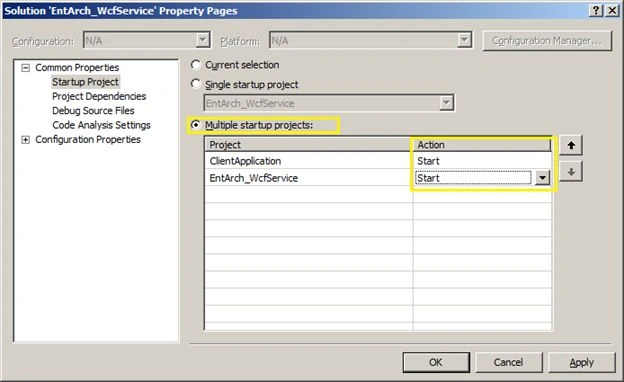
Now we are ready to create the client application to consume both the services. Add a new Windows Forms Application to our existing solution and name it as ClientApplication. Make sure you made the Solution Properties > Start Up Projects to start both our Server and Client Applications as shown below.
Now Add Service References to the following services:
- AuthenticationService.svc
- UtilityService.svc
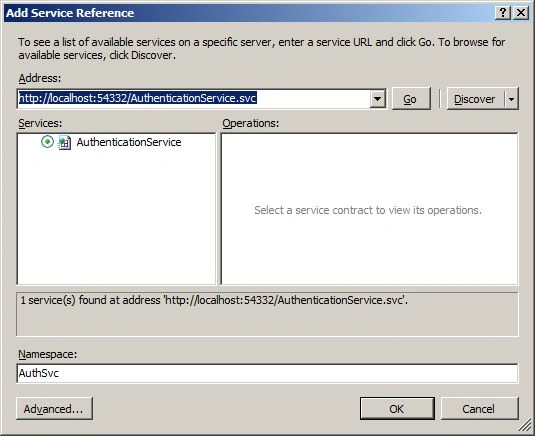
Step 13: Create an Authentication Service instance and invoke the Login() method.
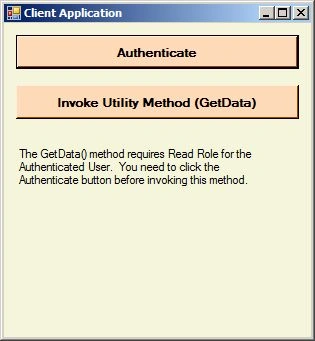
Now we are ready to test our Authentication Service. Create a button on the Main Form and name it as Authenticate. On the button click create an instance of the client and invoke the Login() method with the right credentials. You should get a result of true.
- private void AuthenticateButton_Click(object sender, EventArgs e)
- {
- AuthSvc.AuthenticationServiceClient client =
- new AuthSvc.AuthenticationServiceClient();
- bool result = client.Login("tom", "chicago12", string.Empty, true);
- MessageBox.Show(result.ToString());
- }
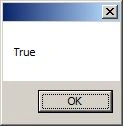
Step 14: Receive the cookie and store it.
The above code just checks the result of Login(). But we need to actually have the returned cookie in case of successful validation. For this we need to replace the above code with the following.
- AuthSvc.AuthenticationServiceClient client = new AuthSvc.AuthenticationServiceClient();
- using (new OperationContextScope(client.InnerChannel))
- {
- bool result = client.Login("tom", "chicago12", string.Empty);
- var responseMessageProperty = (HttpResponseMessageProperty) OperationContext.Current.IncomingMessageProperties
- [HttpResponseMessageProperty.Name];
- if (result)
- {
- string cookie = responseMessageProperty.Headers.Get("Set-Cookie");
- MessageBox.Show(result.ToString() + Environment.NewLine + cookie);
- }
- }
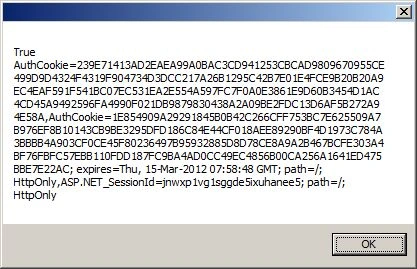
On running the client application again and clicking the button you should be getting the following output.
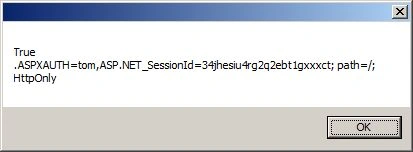
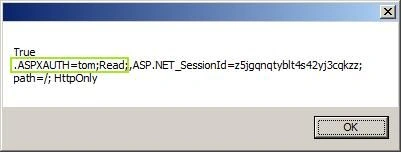
The output displays the result as well as the cookie information. You can see that the cookie name is .ASPXAUTH and the value is tom.
Step 15: Create UtilityService instance and invoke GetData() by attaching the stored cookie.
Inside the client application we can add a reference to the second service (UtilityService.svc).
Now add a new button with text as Invoke Utility. On the button click handler, add the following code:
- private void InvokeUtility_Click(object sender, EventArgs e)
- {
- UtilSvc.UtilityServiceClient utilClient = new UtilSvc.UtilityServiceClient();
- string result = utilClient.GetData(10);
- MessageBox.Show(result);
- }
"Request for principal permission failed."
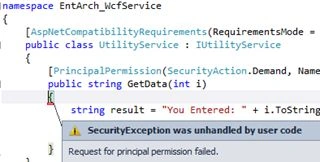
The reason for the error is that the current thread user name is not tom. This error can be solved by doing the next step.
Step 16: Attach the Cookie to UtilityService client.
In order to solve the above error, we need to attach the cookie from the Authentication Service to the current Operation Context. We need to extract the variable cookie out of the Authentication Method so that it can be used in the Utility Invocation method.
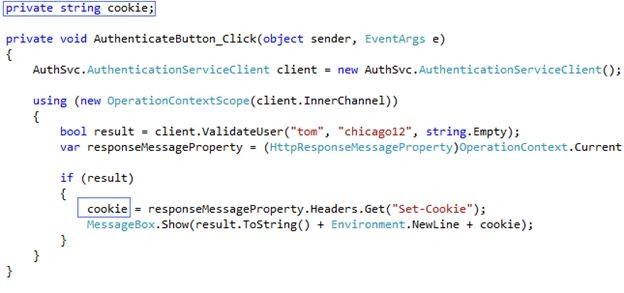
Now replace the contents of InvokeUtility_Click with the following:
- private void InvokeUtility_Click(object sender, EventArgs e)
- {
- if (string.IsNullOrEmpty(cookie))
- {
- MessageBox.Show("Please click Authenticate first.");
- return;
- }
- UtilSvc.UtilityServiceClient utilClient = new UtilSvc.UtilityServiceClient();
- using (new OperationContextScope(utilClient.InnerChannel))
- {
- HttpRequestMessageProperty request = new HttpRequestMessageProperty();
- request.Headers[HttpResponseHeader.SetCookie] = cookie;
- OperationContext.Current.OutgoingMessageProperties
- [HttpRequestMessageProperty.Name] = request;
- string result = utilClient.GetData(10);
- MessageBox.Show(result);
- }
- }
- Ensure the cookie field is has a value (Valid Authentication Service Call needed)
- Create a Http Request Message Property set to cookie field
- Attaches the Message Property instance to the Operation Context
Step 17: Test the application and ensure proper functioning.
Now we are ready with the Authentication and Authorization infrastructure. Please run the application and test the features in 2 steps:
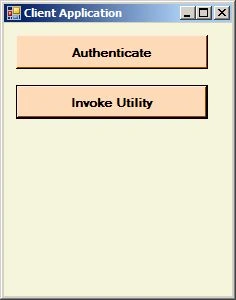
- Click the Authenticate button and wait for the response
- Click the Invoke Utility button
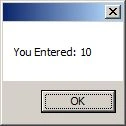
You will be getting the following Message Box on successful Authorization.
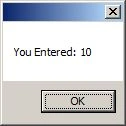
If you can see the above result.. Great!! You are done with Authentication and Authorization.
Step 18: Move the cookie attaching code to Interceptors in the Client Application.
Now we need to implement Interceptors in the client side.
Why do we need Interceptors?
This is because the above code of attaching a cookie to the Operation Context seems to be a tedious job every time we need to do a service call. We can move these tasks to the background using WCF Interceptors.
MSDN: WCF Data Services enables an application to intercept request messages so that you can add custom logic to an operation. You can use this custom logic to validate data in incoming messages. You can also use it to further restrict the scope of a query request, such as to insert a custom authorization policy on a per request basis.
The following are the activities involved in this step.
- Add Interceptor Behavior inside Client web.config
- Create the Interceptor Behavior class
- Create the Message Inspector class
- Move the code from Form to Message Inspector class
To start with that, add the following code into the Client Application app.config file. Make sure you add them just before the </system.serviceModel> tag.
- <!-- Interceptors-->
- <behaviors>
- <endpointBehaviors>
- <behavior name="InterceptorBehaviour">
- <interceptorBehaviorExtension />
- </behavior>
- </endpointBehaviors>
- </behaviors>
- <extensions>
- <behaviorExtensions>
- <add name="interceptorBehaviorExtension" type="ClientApplication.InterceptorBehaviorExtension,
- ClientApplication, Version=1.0.0.0, Culture=neutral, PublicKeyToken=null" />
- </behaviorExtensions>
- </extensions>
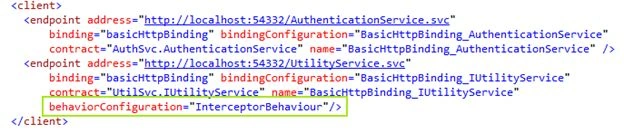
Now we need to create the Behavior Extension and Interceptor classes inside the Client Application.
Er Harjeet SinghPosted May 28, 2020, 5:07 PM
Getting error as request principle permission failed. I downloaded the project and executed client and server separately. What should I do
Bhagwati PalPosted Jul 11, 2015, 11:50 AM
Hi Paul,I want to use auth_token like facebook. can you help me on that. thanks in advance.
Sibeesh VenuPosted Apr 13, 2015, 2:00 AM
Good one :)
Vithal WadjePosted Apr 12, 2015, 1:02 PM
nice
hoakimPosted Apr 11, 2015, 6:04 PM
Nice article. Here is another option for securing WCF services using Custom Header encrypted tokens http://wp.me/p3mRWu-CI
Gowtham RajamanickamPosted Apr 11, 2015, 1:10 PM
easy understanding
Gowtham RajamanickamPosted Apr 11, 2015, 1:10 PM
simle and awesome
Santhakumar MunuswamyPosted Apr 11, 2015, 12:47 PM
Thanks for nice article
Jean PaulPosted Feb 19, 2013, 8:19 AM
Thanks for the update KurianOfBorg! I will check on this soon.
KurianOfBorgPosted Feb 19, 2013, 4:11 AM
While this works, you're still resorting to creating a fake Identity on the server side and using a crude cookie to store the user name, not to mention all the code for manipulating HTTP headers. A better solution is to use the standard Forms Authentication cookie which is the same for both a regular Forms Authentication login page for the web interface well as the WCF Authentication Service. A native client can call the WCF Authentication Service to obtain the cookie, and any AJAX controls on the web site will automatically be authenticated if the user is logged into the site. This post shows how to transfer the principal from the cookie to the WCF service using a simple custom AuthorizationPolicy: http://stackoverflow.com/a/11417296/274972
Jean PaulPosted Jun 4, 2012, 10:53 PM
Thank You Amit!
Amit PatelPosted Jun 4, 2012, 10:52 PM
Good one...
Jean PaulPosted May 29, 2012, 9:01 AM
Thank You Sreejith for the good words..
Sreejith SPosted May 29, 2012, 1:53 AM
Very Nice Article...,
Jean PaulPosted May 28, 2012, 10:07 AM
Thank You Ashok for the appreciation.
AshokPosted May 28, 2012, 2:47 AM
Nice
Tim YangeditedPosted May 14, 2012, 6:04 AMEdited May 14, 2012, 6:04 AM
May I add you MSN? This is my MSN [email protected].
Jean PaulPosted May 12, 2012, 1:44 AM
Hello Ravi.. Thanks for the good words.. About your query.. Validation and Verification terms to be in the Software Testing Arena. Verification - Am I building the right product. Validation - Am I building the product right. http://en.wikipedia.org/wiki/Verification_and_validation_%28software%29 says... According to the Capability Maturity Model (CMMI-SW v1.1), Verification: The process of evaluating software to determine whether the products of a given development phase satisfy the conditions imposed at the start of that phase. [IEEE-STD-610]. Validation: The process of evaluating software during or at the end of the development process to determine whether it satisfies specified requirements.
Ravi SaklaniPosted May 12, 2012, 12:41 AM
hi, thanks to providing this information. can u please differentiate between Validation and Verification also.?
Jean PaulPosted May 11, 2012, 3:17 AM
Thank You Tim.. Thinking about publishing the silverlight app and ADLDS.
Tim YangPosted May 11, 2012, 3:15 AM
Very good!Study.