How do you do Method Overloading in WCF? This is the most asked question in the interviews. So, I thought of writing a small article on the method overloading so it may help others. I am using Visual Studio 2008 building a WCF service and for simplicity NET TCP Binding is used.
Before digging into the code, let us understand what overloading means and whether we can overload a method in WCF.
Method Overloading
Method Overloading is a feature that allows creation of multiple methods with the same name but each method should differ from another in the context of input and output of the function. No two methods must have the same type parameters.
Either they must differ in the number of parameters or in the type of the parameters.
You can also refer to Method Overloading as a compile-time polymorphism since the calling method knows the address of the called method and the method addresses are resolved at compile time. This is also called as Early Binding.
Let us look at a small example to check how the compiler verifies if the methods are overloaded or not if two methods have the same signatures.
- namespace MethodOverloading
- {
- class Program
- {
- static void Main(string[] args)
- {
- Console.WriteLine("The sum of 4,5 is {0}", Add(4,5));
- }
- static int Add(int a, int b)
- {
- return a + b;
- }
- static int Add(int a, int b)
- {
- return a + b;
- }
- }
- }
You will see that the compiler shows an error when you call the Add(int, int) method, since it finds two methods with the same name and signatures.
Figure: Showing Ambiguous error by Compiler
Even if we change the return type of the second method Add(int, int), still you will see the error:
- static double Add(int a, int b)
- {
- return a + b;
- }
So, the possible type of overloads are as in the following:
- static int Add(int a, int b)
- {
- return a + b;
- }
- static int Add(int a, int b, int c)
- {
- return a + b;
- }
- static double Add(double a, double b)
- {
- return a + b;
- }
- static double Add(double a, int b)
- {
- return a + b;
- }
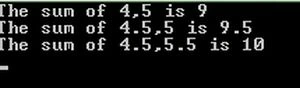
So, now if you run the following code you will get an output based on the data types that you have passed:
- Console.WriteLine("The sum of 4,5 is {0}", Add(4,5));
- Console.WriteLine("The sum of 4.5,5 is {0}", Add(4.5, 5));
- Console.WriteLine("The sum of 4.5,5.5 is {0}", Add(4.5, 5.5));
- Console.ReadLine();
Figure: Output of program
Method Over Loading in WCF
Since Overloading is possible with C# code and so we may assume that it might be possible too in WCF as we are using C# code for service methods. But, the answer is no if you implement the overloading as shown in the previous example. WSDL does not support the same overloading concepts that are supported by C#. When you are consuming a service over HTTP/SOAP, having the same method name in your contract would mean that there is no way to determine the particular method the client can invoke.
For testing the code, take the example mentioned in the resource link at the beginning of the article and modify the interface IHelloWorld as in the following:
- [ServiceContract]
- public interface IHelloWorld
- {
- [OperationContract]
- string ShowData(int value);
- [OperationContract]
- string ShowData(string value);
- }
Also modify the class HelloWorld as in the following to implement the two methods:
- public class HelloWorld: IHelloWorld
- {
- #region IHelloWorld Members
- string IHelloWorld.ShowData(int value)
- {
- return string.Format("Message received from client number {0} at {1}", value, DateTime.Now.ToString());
- }
- string IHelloWorld.ShowData(string value)
- {
- return string.Format("Message received from client number {0} at {1}", value, DateTime.Now.ToString());
- }
- #endregion
- }
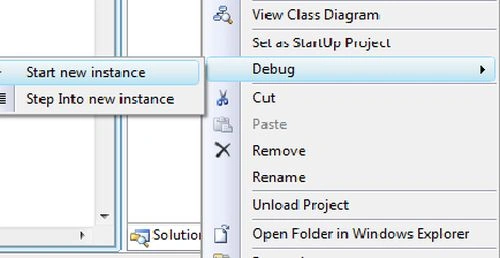
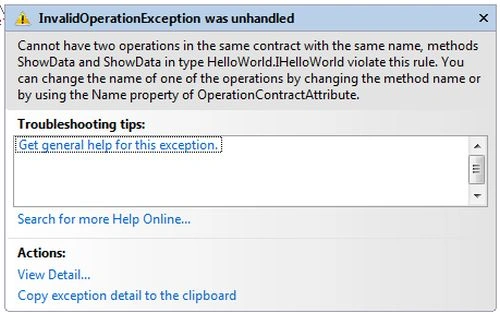
Now build the solution and run the host project and you will see the following error:
Figure: Starting a new instance of the project
Figure: Exception generated by the compiler
So, the solution to implement the overloading is to specify a name property of the OperationContractAttribute as specified in the error above.
So, our ServiceContract code should look as in the following:
- [ServiceContract]
- public interface IHelloWorld
- {
- [OperationContract(Name = "ShowIntData")]
- string ShowData(int value);
- [OperationContract(Name = "ShowStringData")]
- string ShowData(string value);
- }
Note: If you are following the exact code in the resource link provided, then you might have to modify the program.cs file in the Client project for the service contract body.
- [ServiceContract]
- public interface IHelloWorld
- {
- [OperationContract(Name = "ShowIntData")]
- string ShowData(int value);
- [OperationContract(Name = "ShowStringData")]
- string ShowData(string value);
- }
- class Program
- {
- static void Main(string[] args)
- {
- IHelloWorld proxy = ChannelFactory<IHelloWorld>.CreateChannel(new NetTcpBinding(), new EndpointAddress("net.tcp://localhost:9000/HelloWorld"));
- Console.WriteLine(proxy.ShowData("Hello World From Client"));
- Console.ReadLine();
- }
- }
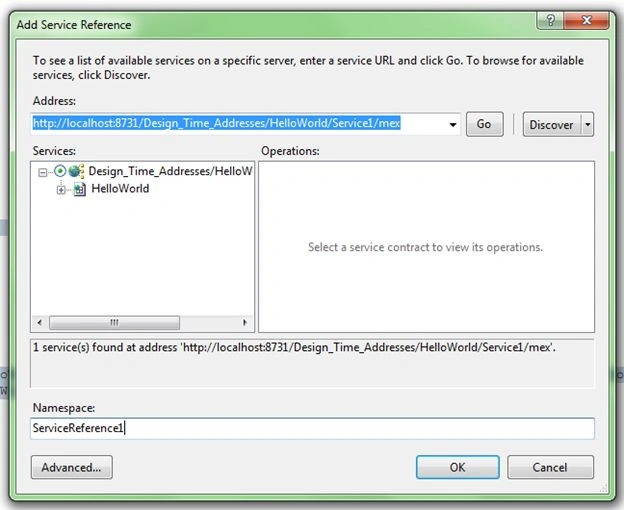
Name and click "Add Service Reference" item. Now click on the "Discover" button and you will see the address generated by Visual Studio for you. Click OK and the service will be added to your client project.
Figure: Adding a service reference using MEX
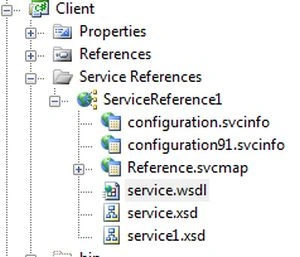
Figure: Showing the tree structure of service reference
You should see the following in your WSDL:
Figure: Operation names in the WSDL
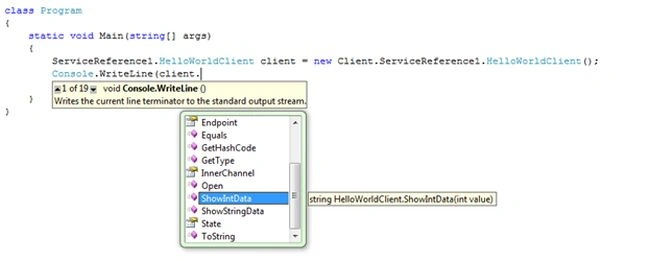
Now go to the Program.cs file in the Client project and change the code as in the following:
Figure: Intellisense showing the available methods of the client
- namespace Client
- {
- class Program
- {
- static void Main(string[] args)
- {
- ServiceReference1.HelloWorldClient client = new Client.ServiceReference1.HelloWorldClient();
- Console.WriteLine(client.ShowIntData(2));
- Console.WriteLine(client.ShowStringData("string data"));
- Console.ReadLine();
- }
- }
- }
Now if you run the program you should see the output without error. So, Overloading is not the same as when we write code for normal classes and it can be done for WCF services using a Name attribute in the OperationContract.
Hope you liked this article and happy coding!!!




Fawaz ChughtaiPosted Aug 5, 2020, 5:45 PM
In this case whats the point in creating overloading method if we need to use different method names when calling
Prasad BhokarePosted Jul 17, 2017, 3:41 PM
Hi, I want to try above solution but my interface is in the different assembly than the implementation of assembly. Can you please suggest a way to refer service contract in my client which is all the way in the different assembly and I need to compile my client using the command prompt. Thanks, Prasad