

This is the "Web API with AJAX" article series. In this article series we are talking about AJAX operations using the Web API. We have explained various concepts and you can read them here:
- Web API with AJAX: Understand POST request in Web API
- Web API with AJAX: Understand GET request in Web API
- Web API with AJAX: Make PUT Request in RESTful Web API Service
- Web API With AJAX: Understand DELETE Verb in Restful Web API
- Web API With AJAX: Use GetJSON() Function to Get JSON Data
- Web API with AJAX: Understand Method Name and Attribute in Web API
- Web API with AJAX: Understand FormBody and FormUri attribute inWeb-API
This article explains the "AcceptVerb" attribute of the Web API. AcceptVerb is one attribute of the Web API actions. We can use it to allow a specific HTTP verb in a Web API action. Have a look at the following example.
Allow POST and GET verb in single action
In this example we will allow both of the GET and POST verbs to do certain actions in the Web API. Here is a sample presentation for our client application.
<%@ Page Language="C#" AutoEventWireup="true" CodeBehind="APICall.aspx.cs" Inherits="WebApplication1.APICall" %>
<html xmlns="http://www.w3.org/1999/xhtml">
<head runat="server">
    <script src="jquery-1.7.1.js" type="text/javascript"></script>
     <script>
         $(document).ready(function () {
             $("#Save").click(function () {
                 $.ajax({
                     url: 'http://localhost:3413/api/person',
                     type: 'POST',
                     dataType: 'json',
                     success: function (data, textStatus, xhr) {
                         console.log(data);
                     },
                     error: function (xhr, textStatus, errorThrown) {
                         console.log(textStatus);
                     }
                 });
             });
         });
    </script>
</head>
<body>
        <input type="button" id="Save" value="Save Data" />
</body>
</html> 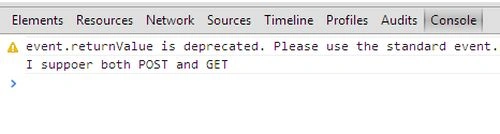
Join the conversation! Your thoughts help the community grow.