

This is the "Web API with AJAX" article series. In this series we are explaining various ways to consume the Web API's RESTful services using jQuery ajax() and other methods. You can read our previous presentation by visiting the following articles:
- Web API with AJAX: Understand POST request in Web API
- Web API with AJAX: Understand GET request in Web API
- Web API with AJAX: Make PUT Request in RESTful Web API Service
- Web API With AJAX: Understand DELETE Verb in Restful Web API
- Web API With AJAX: Use GetJSON() Function to Get JSON Data
- Web API with AJAX: Understand Method Name and Attribute in Web API
This article exlains the "FormBody" and "FormUri" attributes and how to use them with an action parameter to consume data at the client end. So, let's learn by example.
Use of FromUri attribute to send data
Using the FormUri attribute, we can pass data through a URI/URL. The value should in the form of a key value pair. Here is one example to send data through a URI. In this example we are sending one string through the URL. The name of the parameter is "Name".
<%@ Page Language="C#" AutoEventWireup="true" CodeBehind="APICall.aspx.cs" Inherits="WebApplication1.APICall" %>
<head runat="server">
    <script src="jquery-1.7.1.js" type="text/javascript"></script>
     <script>
         $(document).ready(function () {
             $("#Save").click(function () {
                 $.ajax({
                     url: 'http://localhost:3413/api/person?Name=Sourav',
                     type: 'POST',
                     dataType: 'json',
                     success: function (data, textStatus, xhr) {
                         console.log(data);
                     },
                     error: function (xhr, textStatus, errorThrown) {
                         console.log('Error in Operation');
                     }
                 });
             });
         });
    </script>
</head>
<body>
    <form name="form1" id="form1">
        <input type="button" id="Save" value="Save Data" />
    </form>
</body>
</html>
It's obvious that there are certain limitations in this method. The length of the URL in some browsers is limited to 256 characters and there might be a security loophole.
Configure Web API to get data from URI
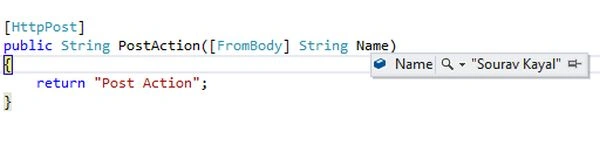
Now we need to configure the Web API to extract data from a URI. We have implemented one action named "PostAction" that will take one parameter and the parameter is specified with the FromUri attribute. This implies that the value of the Name parameter will pass through the URI. Here is the implementation of the working code.

Debasish TutuPosted Jun 22, 2016, 11:48 PM
hi Saurav .. Can you please explain [FromUri] and [FromBody] from this link http://stackoverflow.com/questions/24625303/why-do-we-have-to-specify-frombody-and-fromuri-in-asp-net-web-api
Shekhar ShetePosted Jul 1, 2015, 2:25 AM
hi nice post! i would like to inform about the wrong image that is placed in the section "Configure Web API to get data from URI" as you mentioned that it is [FROMURI] but the image in this section is of [FROMBODY] i.e while debug screen shot. Thanks Shekhar :)