

This is the "Web API with AJAX" article series. This series is explaining various important concepts related to the Web API and AJAX operations. You can visit our previous explanations here:
- Web API with AJAX: Understand POST request in Web API
- Web API with AJAX: Understand GET request in Web API
- Web API with AJAX: Make PUT Request in RESTful Web API Service
- Web API With AJAX: Understand DELETE Verb in Restful Web API
- Web API With AJAX: Use GetJSON() Function to Get JSON Data
This article explains action names and various attributes of them as well as the behavior actions corresonding to various attributes.
Action name does not make sense
Let's start with one of my small actual experiences. When I was just beginning to learn the Web API , one of my colleagues (from whom I had learned the term Web API) told me that at time of a create action in the Web API we need to provide a matching name with a HTTP verb. How? If we specify a HttpPost attribute on any action then we need to provide the action name as Post(). But the concept is totally wrong. We can choose an action name of our own. In the following example we have specified the HttpGet() attribute and chosen Post() as the action name and obviously it will work smoothly. Here is the implementation of the client code.
<%@ Page Language="C#" AutoEventWireup="true" CodeBehind="APICall.aspx.cs" Inherits="WebApplication1.APICall" %>
<head runat="server">
    <script src="jquery-1.7.1.js" type="text/javascript"></script>
     <script>
         $(document).ready(function () {
             $("#Save").click(function () {
                 $.ajax({
                     url: 'http://localhost:3413/api/person',
                     type: 'GET',
                     dataType: 'json',
                     success: function (data, textStatus, xhr) {
                         console.log(data);
                     },
                     error: function (xhr, textStatus, errorThrown) {
                         console.log('Error in Operation');
                     }
                 });
             });
         });
    </script>
</head>
<body>
     <input type="button" id="Save" value="Save Data" />
</body>
</html>
We are seeing that we are making a GET request to the ajax() function. Here is the implementation of the Web API and we are seeing that the HttpGet attribute is specified on top of the Post() action.
using System;
using System.Collections.Generic;
using System.Linq;
using System.Net;
using System.Net.Http;
using System.Web.Http;

namespace WebApplication1.WebAPI
{
    public class personController : ApiController
   {
        [HttpGet]
        public String Post()
        {
            return "Post method in HttpGet attribute";
        }
    }
}
Here is the output of the above example.
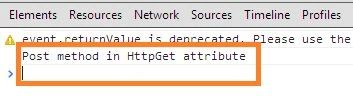
Not even for a Get() and Post() are we allowed to provide any name as the action name. Here we have chosen "PostAction" as the action name.
public class personController : ApiController
{
    [HttpGet]
    public String PostAction()
    {
         return "Post method in Diffrent Name";
    }
}
Use ActionName attribute
We can use the "ActionName" attribute to specify any name for a specific action. In this example we will see how to implement it. Here is an implementation of the client code.
<%@ Page Language="C#" AutoEventWireup="true" CodeBehind="APICall.aspx.cs" Inherits="WebApplication1.APICall" %>
<head runat="server">
    <script src="jquery-1.7.1.js" type="text/javascript"></script>
     <script>
         $(document).ready(function () {
             $("#Save").click(function () {
                 $.ajax({
                     url: 'http://localhost:3413/api/person/MyPostAction',
                     type: 'GET',
                     dataType: 'json',
                     success: function (data, textStatus, xhr) {
                         console.log(data);
                     },
                     error: function (xhr, textStatus, errorThrown) {
                         console.log('Error in Operation');
                     }
                 });
             });
         });
    </script>
</head>
<body>
    <form name="form1" id="form1">
        <input type="button" id="Save" value="Save Data" />
    </form>
</body>
</html>


Akhil MittalPosted Jan 7, 2014, 1:47 AM
usefull
Anubhav ChaudharyPosted Dec 9, 2013, 12:38 AM
Great Article, Thanks for sharing it.