

This is the "Web API with AJAX" article series. In this article series we are explaining Web API and ajax() method to consume it. We have learned the POST, GET, PUT and DELETE methods. You can read them here.
- Web API with AJAX: Understand POST request in Web API
- Web API with AJAX: Understand GET request in Web API
- Web API with AJAX: Make PUT Request in RESTful Web API Service
- Web API With AJAX: Understand DELETE Verb in Restful Web API
This article explains the getJSON() function of jQuery and how to use the getJSON() function to consume JSON data from the Web API. We know that the Web API function can any type of data, in other words the content negotiation happens very smoothly. So, let's try a few examples.
Client code to implement getJSON() function
In this example we will configure the getJSON() function that will consume data from the Web API. Have a look at the following code.
<%@ Page Language="C#" AutoEventWireup="true" CodeBehind="APICall.aspx.cs" Inherits="WebApplication1.APICall" %>
<!DOCTYPE html>
<html xmlns="http://www.w3.org/1999/xhtml">
<head runat="server">
    <title></title>
    <script src="jquery-1.7.1.js" type="text/javascript"></script>
     <script>
         $(document).ready(function () {
             $("#Save").click(function () {
                 $.getJSON('http://localhost:3413/api/person', function (data) {
                     console.log(data);
                 });
             });
         });
    </script>
</head>
<body>
        <input type="button" id="Save" value="Save Data" />
</body>
</html>
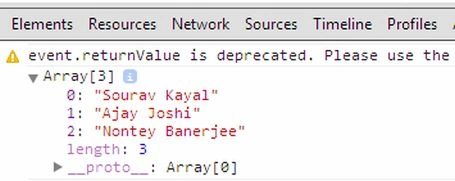
The getJSON() function takes three parameters (generally) but in this example we are passing an URL and a success callback function as an argument. So, when data is returned it will be held by a callback function and will get logged to the console.
Create Web API to return JSON data
Now we will create a Web API that will return JSON data. Here is the code example.
using System;
using System.Collections.Generic;
using System.Linq;
using System.Net;
using System.Net.Http;
using System.Web.Http;

namespace WebApplication1.WebAPI
{
    public class personController : ApiController
    {
        [HttpGet]
        public List<string> Post()
        {
            List<string> List = new List<string>();
            List.Add("Sourav Kayal");
            List.Add("Ajay Joshi");
            List.Add("Nontey Banerjee");
            return List;
        }
    }
}
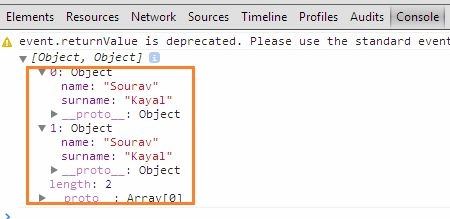
Shri chavdaPosted Sep 17, 2019, 11:54 PM
Hi Sourav, your articles are very informative. I was trying to work on an ajax call in my javascript to call apicontroller on my SharePoint site. my api controller fetches all user data using out of the box SharePoint api. Unfortunately my ajax call success data is #document , and not JSON. Do you know what could be the reason for this behaviour? I would really appreciate if there is any insight from you. I tried using dataType: "json" , but then the query fails completely.