
Introduction : The Windows Workflow Foundation framework supports Web service interoperability. This includes the ability to expose a Workflow as Web service to ASP.NET clients and to other Workflows. Windows Workflow Foundation supports publishing a Workflow as an ASP.NET Web service on a Web server or server farm running ASP.NET on Internet Information Services (IIS). The Windows Workflow Foundation base activity library contains the WebServiceInputActivity and WebServiceOutputActivity, which enable a Workflow to be used as Web service end points. A Web service receives a request, performs some appropriate processing, and returns a response.
Creating a Workflow Service :
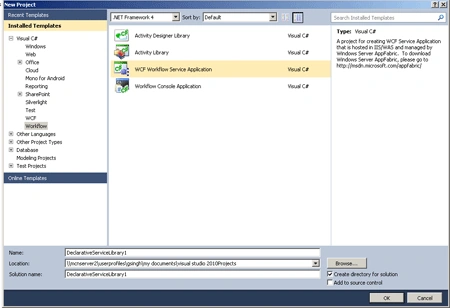
Step 1 : Open Visual Studio 2010.
- Go to File->New->Project.
- Select WCF Workflow Service Application.
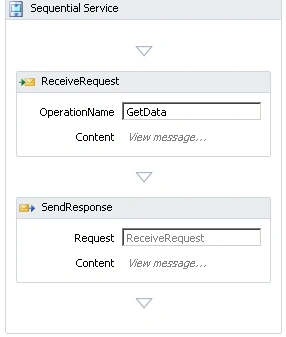
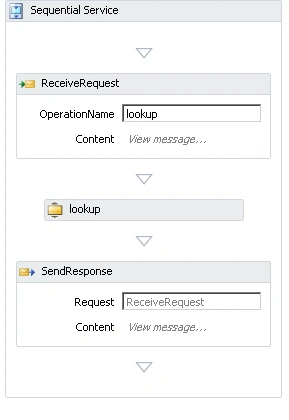
- When we click on the OK Button, the following Activities will show.
Define the Service :
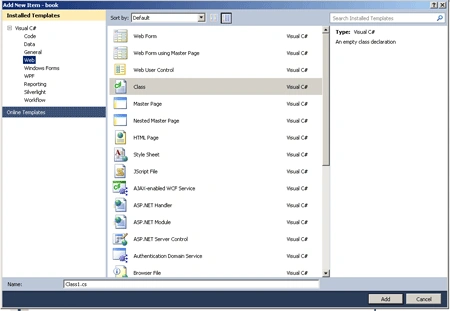
Step 2 : Go to Solution Explorer and right-click.
- Select Add->New Item->Class.
- Class1.cs file open.
- Write the below code.
Code :
using
System;
using
System.Collections.Generic;
using
System.Linq;
using
System.Web;
using
System.Runtime.Serialization;
using
System.ServiceModel;
namespace book
{
[ServiceContract]
public interface
ibook
{
[OperationContract]
binfo LookupBook(bookSearch
request);
}
[MessageContract(IsWrapped =
false)]
public class
bookSearch
{
private
String _ISBN
private
String _Title;
private
String _Author;
public bookSearch()
{
}
public bookSearch(String
title, String author,
String isbn)
{
_Title = title;
_Author = author;
_ISBN = isbn;
}
#region
Public Properties
[MessageBodyMember]
public
String Title
{
get {
return _Title; }
set { _Title =
value; }
}
[MessageBodyMember]
public
String Author
{
get {
return _Author; }
set { _Author =
value; }
}
[MessageBodyMember]
public
String ISBN
{
get {
return _ISBN; }
set { _ISBN =
value; }
}
#endregion
Public Properties
}
[MessageContract(IsWrapped =
false)]
public class
binfo
{
private Guid
_InventoryID;
private String
_ISBN;|
private
String _Title;
private
String _Author;
private
String _Status;
public binfo()
{
}
public binfo(String
title, String author,
String isbn,
String status)
{
_Title = title;
_Author = author;
_ISBN = isbn;
_Status = status;
_InventoryID = Guid.NewGuid();
}
#region
Public Properties
[MessageBodyMember]
public Guid
InventoryID
{
get {
return _InventoryID; }
set { _InventoryID =
value; }
}
[MessageBodyMember]
public
String Title
{
get {
return _Title; }
set { _Title =
value; }
}
[MessageBodyMember]
public
String Author|
{
get {
return _Author; }
set { _Author =
value; }
}

Join the conversation! Your thoughts help the community grow.