

The Web API is a platform to develop HTTP / HTTPS based services that can be used by native applications like on smartphones, tablets and browsers. The WebApi is a core part of ASP.NET and provides ways to create Restful services and can be used by any application that can understand HTTP communications.
Implementation of Restful operations using ASP.NET Web API
Before proceeding I recommend you go through with this link:
This article will cover the hosting of a WebApi in IIS using a sample demo. I hope you have gone through with the link above and now you at least understand the execution of WebApi. In this article we'll host the WebApi in IIS and execute all the CRUD operations step-by-step.
Step 1
Build your solution in release mode.
To build the solution, kindly download the sample application from the link Restful CRUD Operations in WebApi Using ADO.NET Objects and SQL Server and start working further. Please choose the release option from the dropdown list as encircled in red.
Step 2
Right-click on the project and choose the publish command to publish the Web API. Kindly look at the images shown below.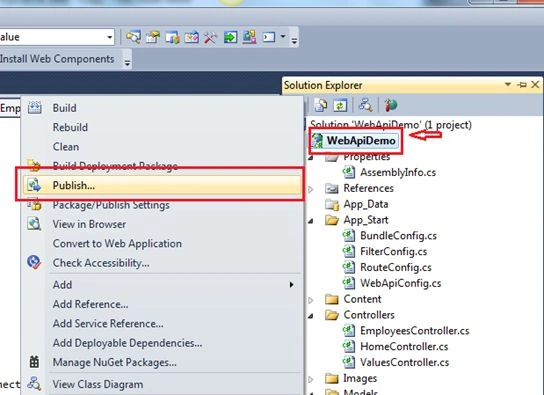

As soon as you click on the publish button it publishes the build and prompts for a message in the bottom of success as shown in the image below:
Step 3
Now type "Inetmgr” in the Start window and click on inetmgr to open IIS as shown in the image below:
Step 4
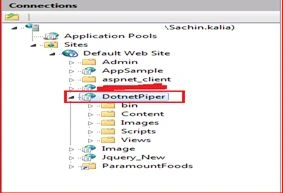
To add a new application as a virtual directory right-click on the default website and click on the Add application property. Please refer to the following image.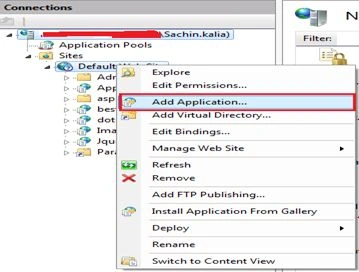
Provide an alias name of your choice and provide the physical path from your directory.
Note:
- It should be a published solution path that we've created in Step 2 above.
- Change the application pool “DefaultAppPool” to ASP.Net v4.0 after clicking on the “select” option. If you encounter an error like “unrecognized attribute 'targetframework'. Note that attribute names are case-sensitive IIS7” then here is the solution for that.
Unrecognized attribute 'targetframework'. Note that attribute names are case-sensitive IIS7.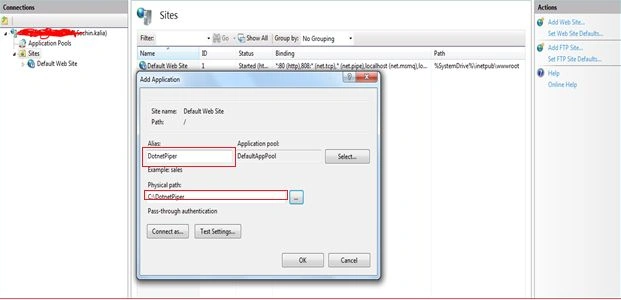



Gowtham RajamanickamPosted May 26, 2015, 9:02 AM
Good one..
Dinesh BeniwalPosted Feb 17, 2015, 8:48 AM
Thanks for sharing Sachin Kalia
Sachin KaliaPosted Feb 17, 2015, 4:50 AM
Thanks Keyur Patel for your valuable mark:)
Keyur PatelPosted Feb 17, 2015, 4:20 AM
Good Article on WebAPI hosting