

Introduction
In this article, we examine the various behaviors of internal CSS and inline CSS, illuminating their various methods of implementation and looking at the effects of their different behaviors. Experts may make smart choices to produce attractive and organized web designs by understanding the advantages and disadvantages of each technique.
What is inline CSS?
Using the style tag, inline CSS is directly applied to specific HTML components. It is the most specific and overrides all other CSS rules. The HTML tag itself contains the definition of inline styles. Inline CSS takes effect immediately and only affects the particular element to which it is applied. It isn't easy to reuse or apply to several pieces.
<h1 style="color: blue;">what is inline css</h1>
Output

What is internal CSS?
The <style> tags included in the <head> section of an HTML document define internal CSS. Based on the elements' HTML tags or class/id selectors, it impacts those elements. Internal CSS has a medium level of specificity, which is higher than inline styles but lower than external CSS stylesheets. Depending on the selectors mentioned, it applies to various items.
<head>
  <style>
    h1 {
      color: green;
    }
  </style>
</head>
<body>
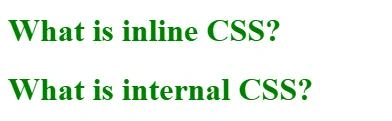
  <h1>What is inline CSS?</h1>
  <h1>What is internal CSS?</h1>
</body>
Output
What are the different behaviors of inline CSS and internal CSS?
| Inline CSS | Internal CSS | |
|
Specificity |
Inline CSS high specificity, inline CSS takes precedence over all other CSS rules, including those in internal and external stylesheets. This is due to the fact that utilizing the "style" tag, inline styles are applied directly to specific HTML components. The inline styles are given the most importance, which gives them an advantage over other styles. | Internal CSS is highly specific. All items that match the parameters given selectors are affected by their definition, which is contained within the style> tags in the head section of an HTML document. If there is a conflict between internal and inline styles, inline styles take precedence. |
|
Scope |
It only applies styles to the particular element it is applied to; inline CSS has a restricted application. A unique "style" attribute with the proper CSS rules must be supplied for each element having inline styles. Because of this, inline styles are appropriate for adding unique designs to specific elements. | The scope of internal CSS is deeper, however. All components in the document that match the provided selectors are subject to the styles defined within the <style> tags. The same rules can be applied to all matching elements across the document, enabling consistent styling across various elements. |
|
Maintenance and Reusability |
Inline styles cannot be reused and can complicate the HTML code. The inline style must be applied to each element separately if there are several of them that need the same styling. | Internal styles encourage maintainability and reusability. It is simpler to manage and update the styles across the website when you define the styles for several elements or classes in a single location. |
Join the conversation! Your thoughts help the community grow.