

Introduction
In this article we are going to explore how to work with the InputPrompt Control in Windows Phone 7. In subsequent details we will learn how it is possible to work with the InputPrompt control in Windows Phone 7. Further in this article we will talk about the InputPrompt control from the Coding4Fun toolkit in details. Here in this I will explain everything about the main features, available public API, and will provide many examples in various scenarios. Basically InputPrompt is an UI component that derives from the toolkit`s abstract PopUp<T, TPopUpResult> class. As its name implies it is a kind of extended popup that prompts the user to enter input. Basically we will see some properties of the inputprompt control such as InputScope, Value, Title and Message which will be implemented later in this article and we will see their work. So to implement this in Windows Phone you have to follow the steps given below.
Step 1: In this step first of all we have to create a Windows Phone application; let's see how to create it:
- Go to Visual Studio 2010
- File->New->Project
- Select the template named Silverlight for Windows Phone
- Select the Windows Phone application
- Give it a name as you want.

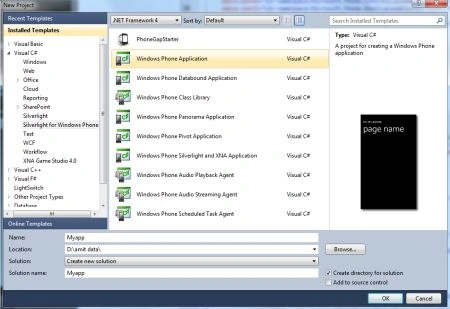
Step 2: In this step we will see from where you add the assembly reference which is shown in the figures given below.
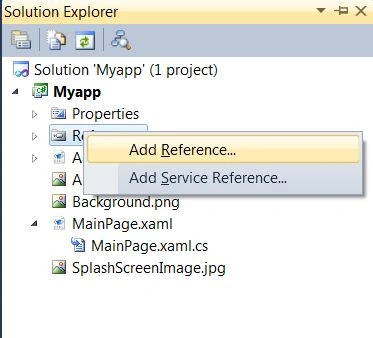
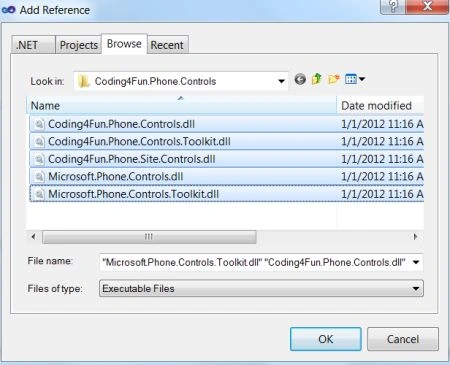
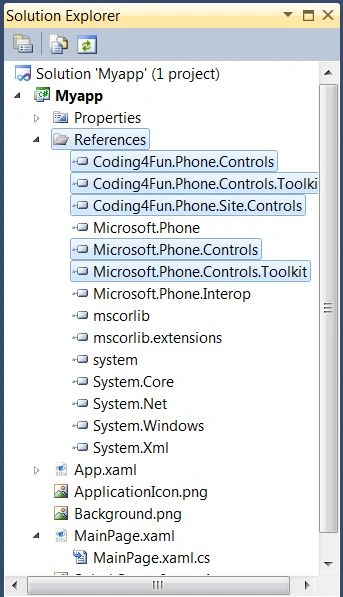
Step 3: In this step you will add a namespace to the MainPage.xaml.cs file which is shown below.

Step 4: In this step you will see the code for the button1_click which is shown below.
Code:
private void button1_Click(object sender, RoutedEventArgs e)
{
InputPrompt MyIP = new InputPrompt
{
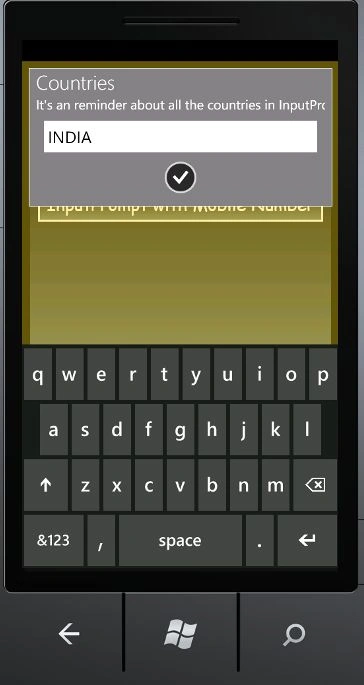
Title = "Countries",
Message = "It's an reminder about all the countries in InputPrompt!",
Background = new SolidColorBrush(Colors.Gray),
Overlay = new SolidColorBrush(Color.FromArgb(100, 255, 213, 24))
};
MyIP.Completed += MyIP_Completed;
MyIP.InputScope = new InputScope { Names = { new InputScopeName() { NameValue = InputScopeNameValue.AddressCountryName } } };
MyIP.Show();
}
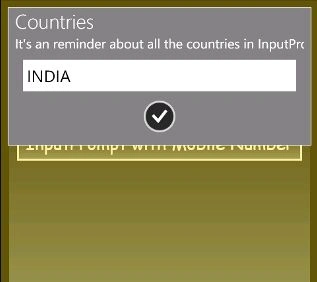
Step 5: In this step you will see the code for the button2_click which is shown below.
Code:
void MyIP_Completed(object sender, PopUpEventArgs<string, PopUpResult> e)
{
}
private void inputScopeSample2_Click(object sender, RoutedEventArgs e)
{
InputPrompt MyIP = new InputPrompt();
MyIP.Completed += new EventHandler<PopUpEventArgs<string, PopUpResult>>(MyIP_Completed);
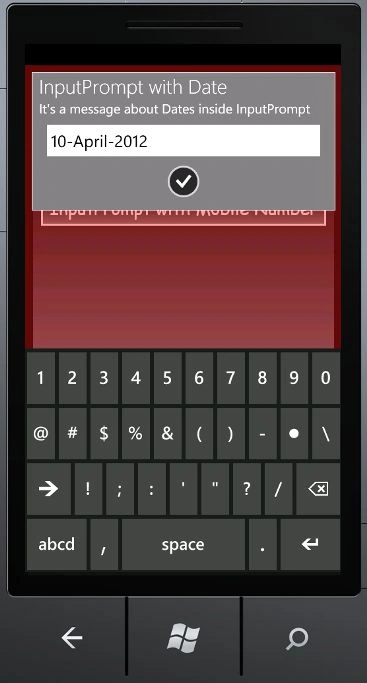
MyIP.Title = "InputPrompt with Date";
MyIP.Message = "It's a message about Dates inside InputPrompt";
MyIP.Background = new SolidColorBrush(Colors.Gray);
MyIP.Overlay = new SolidColorBrush(Color.FromArgb(100, 255, 20, 20));
MyIP.InputScope = new InputScope { Names = { new InputScopeName() { NameValue = InputScopeNameValue.Date } } };
MyIP.Show();
}
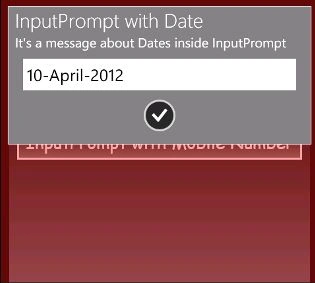
Step 6: In this step you will see the complete code for the MainPage.xaml.cs file which is shown below.
Code:
using System;
using System.Collections.Generic;
using System.Linq;
using System.Net;
using System.Windows;
using System.Windows.Controls;
using System.Windows.Documents;
using System.Windows.Input;
using System.Windows.Media;
using System.Windows.Media.Animation;
using System.Windows.Shapes;
using Microsoft.Phone.Controls;
using Coding4Fun.Phone.Controls;
namespace Myapp
{
public partial class MainPage : PhoneApplicationPage
{
// Constructor
public MainPage()
{
InitializeComponent();
}
void MyIP_Completed(object sender, PopUpEventArgs<string, PopUpResult> e)
{
}
private void button2_Click(object sender, RoutedEventArgs e)
{
InputPrompt MyIP = new InputPrompt();
MyIP.Completed += new EventHandler<PopUpEventArgs<string, PopUpResult>>(MyIP_Completed);
MyIP.Title = "InputPrompt with Date";
MyIP.Message = "It's a message about Dates inside InputPrompt";
MyIP.Background = new SolidColorBrush(Colors.Gray);
MyIP.Overlay = new SolidColorBrush(Color.FromArgb(100, 255, 20, 20));
MyIP.InputScope = new InputScope { Names = { new InputScopeName() { NameValue = InputScopeNameValue.Date } } };
MyIP.Show();
}
private void button1_Click(object sender, RoutedEventArgs e)
{
InputPrompt MyIP = new InputPrompt
{
Title = "Countries",
Message = "It's an reminder about all the countries in InputPrompt!",
Background = new SolidColorBrush(Colors.Gray),
Overlay = new SolidColorBrush(Color.FromArgb(100, 255, 213, 24))
};
MyIP.Completed += MyIP_Completed;
MyIP.InputScope = new InputScope { Names = { new InputScopeName() { NameValue = InputScopeNameValue.AddressCountryName } } };
MyIP.Show();
}
}
}
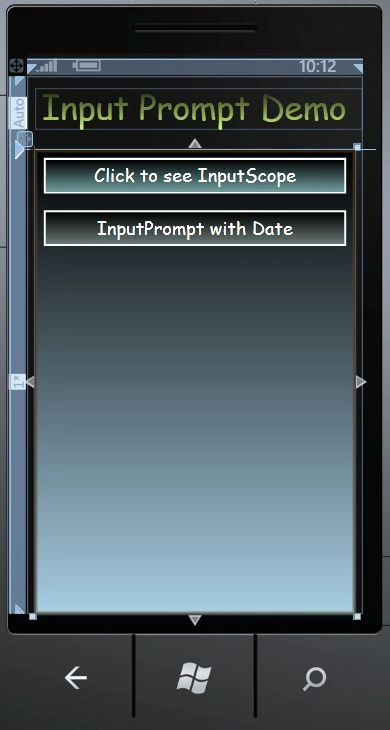
Step 7: In this step you will see the code for the MainPage.xaml file which is shown below.
Code:
<phone:PhoneApplicationPage
x:Class="Myapp.MainPage"
xmlns="http://schemas.microsoft.com/winfx/2006/xaml/presentation"
xmlns:x="http://schemas.microsoft.com/winfx/2006/xaml"
Join the conversation! Your thoughts help the community grow.