

I am here to continue the series related to C# 7.0 features. Today we will be going through another feature called pattern matching and will demonstrate its uses in an easy manner.
Pattern matching
Pattern matching is introduced in C# 7.0 to bring more logical ability in the language. Patterns are not new in the programming languages however it’s introduced first time in C# with the limited features and more is expected to come in the upcoming versions.
Pattern matching is useful in many ways however the cases are given below, which C# 7.0 currently supports.
- Pattern matching can be used with any data type including custom whereas if/else can only be used with primitive types.
- Pattern matching has the ability to extract the data from the expression.
C# 7.0 introduced two type of pattern matching, as shown below.
- With “is” expression
- With switch..case statement
Let’s go through on these patterns in detail.
Pattern with “is” expression:
To support pattern matching, a new construct has been introduced in the right side of the type in the “is” expression. The code snippet given below illustrates the same.
- //C# 7.0 extends the is expression by adding a pattern in the right side of the expression,
- //that can be a value extracted from an expression
- var myData = "My Custom Data";
- var myData2 = myData is string ? "String" : "Not a string";
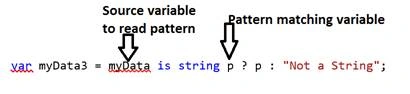
- var myData3 = myData is string p ? p : "Not a String";
- Console.WriteLine(myData2);
- Console.WriteLine(myData3);
Look at the tiny variable “p” after string type. Have you seen it earlier?
This is something, which is introduced in C# 7.0 to support pattern matching. Also just to add, I just took name “p” however it can be any permitted variable name.
Output

As you can see the second print statement has printed the value of “p” as “My Custom Data” as pattern matching and variable “p” was listening to the value of the variable myData, which is left to the “is” operator.
The screenshot given below explains the same.
Pattern with switch..case statement
Pattern matching with switch..case statement is yet another newly introduced feature.
Now, switch..case statement can work with the expressions as well.
Let’s look at example to see this in action.


Saravanakumar SekaranPosted May 5, 2017, 5:39 AM
Very nice and clear explanation
Manav PandyaPosted Mar 27, 2017, 12:15 AM
Nice one sir .......
Khaja MoizuddinPosted Mar 26, 2017, 1:25 PM
Nice article helpful for beginners........