

Introduction:
Windows Azure platform AppFabric provides us with the services to build applications that work across different networks in a secure manner. Windows Azure platform AppFabric has two main parts to it as follows:
- Access Control: Access Control part of the Azure AppFabric takes care of the authorization part. This authorization is done only for REST based web services a.k.a. RESTful web services.
- Service Bus: The Service Bus is used to facilitate communication between disparate systems across their respective network boundaries.
The "AppFabric" discombobulation:
There are primarily two products by the same name, AppFabric. So to prevent the confusion, a very short description of both the types:
- Windows Server AppFabric: It is used to build and manage applications that run on the IIS. It is a combination of two technologies with the code names 'Dublin' (for building and managing apps) and 'Velocity' (for caching) respectively.
- Windows Azure platform AppFabric: Same as explained in the introduction part. We shall discuss Azure platform AppFabric technology in this article.
For the sake of simplicity, in this article, we would be referring to 'Windows Azure platform AppFabric' as 'AppFabric'.
Scope:
The article deals with an overview about the working of the AppFabric Access Control. We shall begin with what the Access Control in Windows cloud is all about, how we can set this up to suit our requirement. We shall then conclude with a sample client code snippet which uses the Access Control to seek the token to access any RESTful web service.
In a follow-up article to this, we shall delve into the Service Bus part of the AppFabric and sample code snippets of a RESTful web service which can accept and validate the claims sent by a client and return an appropriate response.
For in-depth explanation of the Access Control Service, one can refer to a very well written paper by the name 'A Developer's Guide to Access Control in Windows Azure platform AppFabric' by Keith Brown.
Claims based authorization:
In the claims based authorization model, a client sends a service a set of claims. These claims are primarily a set of information, which helps the service to identify a client. Based on the information received in the claim, the service identifies the client and processes its request accordingly.
The claims can be anything, ranging from the 'name' of the client to the 'role' that the client plays. However, the claims desired by a particular service are pre-decided between the service and the client.
Simple Web Token (SWT): SWT is a token format developed jointly by Google, Microsoft and Yahoo. This token format is used to send claims to the RESTful web services. An example of a SWT is as follows:
MethodName=GetData&Issuer=https%3a%2f%2fsaurabhvartak.accesscontrol.windows.net%2f
&Audience=https%3a%2f%2fsaurabhvartak.servicebus.windows.net%2fService
&ExpiresOn=1273861972&HMACSHA256=nNOXnhZl4wcoUsRanEDkEGFTjOe0QKT25LyLa5mhKYw%3d
&Audience=https%3a%2f%2fsaurabhvartak.servicebus.windows.net%2fService
&ExpiresOn=1273861972&HMACSHA256=nNOXnhZl4wcoUsRanEDkEGFTjOe0QKT25LyLa5mhKYw%3d
Here, the claims appear in the key-value pairs with different pairs separated by '&'. Hence, in the above example, the keys and their corresponding values are as follows:
MethodName=GetData
Issuer=https%3a%2f%2fsaurabhvartak.accesscontrol.windows.net%2f
Audience=https%3a%2f%2fsaurabhvartak.servicebus.windows.net%2fService
ExpiresOn=1273861972
HMACSHA256=nNOXnhZl4wcoUsRanEDkEGFTjOe0QKT25LyLa5mhKYw%3d
In the above key-value pairs, an Issuer is usually the entity which issues the token (in our case it is the ACS), Audience is usually the RESTful service to which the SWT needs to be sent, ExpiresOn is the token expiry date (counted as seconds elapsed since 1/1/1970 midnight UTC). MethodName is a user defined key-type (we can have our own keys and corresponding values in SWT). The keys are referred to as 'ClaimTypes' and the values are referred to as 'ClaimValues'.
The keys 'Issuer', 'ExpiresOn' and 'Audience' are the reserved words (but optional). Every SWT token has the only mandatory key-value pair by the key name 'HMACSHA256' and its key-value.
The role of the HMACSHA256 key and its value is primarily to verify that the claims that have been sent to it are from an authentic client and no one is spoofing them. The following steps explain how the HMACSHA256 key can be used to verify the authenticity of the claims:
In our example, the SWT is :
MethodName=GetData&Issuer=https%3a%2f%2fsaurabhvartak.accesscontrol.windows.net%2f
&Audience=https%3a%2f%2fsaurabhvartak.servicebus.windows.net%2fService
&ExpiresOn=1273863096&HMACSHA256=wtgVt4ZuZ01cuk%2fvxVQxk8rCa9XQccpqm%2b6OGZrNmcw%3d
&Audience=https%3a%2f%2fsaurabhvartak.servicebus.windows.net%2fService
&ExpiresOn=1273863096&HMACSHA256=wtgVt4ZuZ01cuk%2fvxVQxk8rCa9XQccpqm%2b6OGZrNmcw%3d
Now the service which receives the SWT splits the SWT token into two parts as follows:
a. The part before '&HMACSHA256=' , which is:
MethodName=GetData&Issuer=https%3a%2f%2fsaurabhvartak.accesscontrol.windows.net%2f
&Audience=https%3a%2f%2fsaurabhvartak.servicebus.windows.net%2fService&ExpiresOn=1273863096
&Audience=https%3a%2f%2fsaurabhvartak.servicebus.windows.net%2fService&ExpiresOn=1273863096
b. The part after '&HMACSHA256=' , which is:
wtgVt4ZuZ01cuk%2fvxVQxk8rCa9XQccpqm%2b6OGZrNmcw%3d
- Now, URL decode the part b of the token. We get the value as:
wtgVt4ZuZ01cuk/vxVQxk8rCa9XQccpqm+6OGZrNmcw= - Whenever a SWT is exchanged between a client and a service, the service uses a key to verify the authenticity of the claims/client. Now for our example let this key be:
zOT21KxyIjvk299o2cIlU987B3/3KbH/cZf0W8DNO0Q= - Next we compute the local-HMAC using the 'part a' and the key (mentioned in the above point). And we later Base64 encode the HMAC. We get the following value:
wtgVt4ZuZ01cuk/vxVQxk8rCa9XQccpqm+6OGZrNmcw= - Now, the values obtained in points 2 and 3 match and hence a particular service can easily be assured that the claims sent are from an authentic client.
Details specs of the SWT format can be found in a well written white paper by Dick Hardt and Yaron Goland from Microsoft.
Now that we have discussed what the claims are and what SWT is, the question is where does Access Control fit?
AppFabric Access Control Service:
In plain simple words, Access Control Service provides the access control functionality using the claims based model to a RESTful service. ACS uses Web Resource Authorization Protocol (WRAP) to issue tokens.
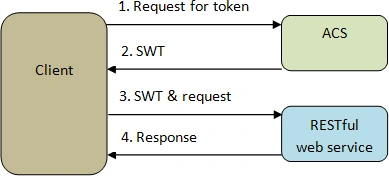
The entire authorization scene works in the following sequence:
- The client requests a token from the Access Control Service by sending input claims. The request has the username, password and the service URL (which the client wants to access).
Kindly note that there are in all three methods to request a SWT. The one which we shall use here is the Plaintext method (where we pass the username and password in plain text). The other two methods are 'SAML bearer token' method and 'HMACSHA256 encrypted token'. - The Access Control Service verifies the username and password and then sends back the SWT. The SWT comprises of all the claims that the service expects. The service is the one which the client wants to consume.
- The client then invokes the service and sends the SWT to the service in the 'authorization' header of the http request.
- On receiving the request, the service extracts the SWT, verifies it (as mentioned in section 5.) and if all is well, processes the client request.
The following diagram explains the same:
Entities involved in the Access Control Service:
The below figure gives us an idea as to how the hierarchical structure of various entities involved in an ACS looks like.
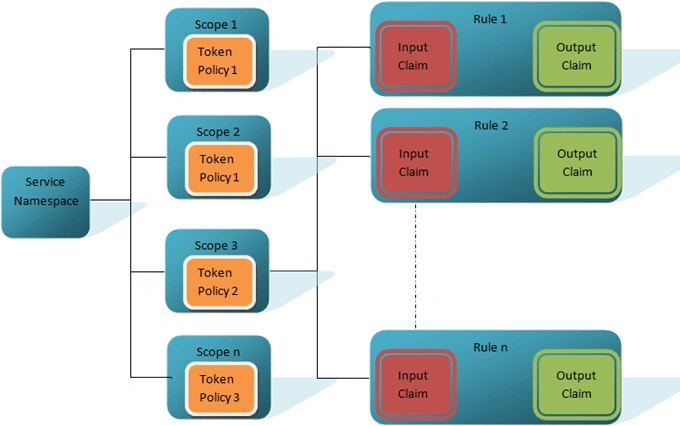
A Service Namespace can comprise multiple Scopes.
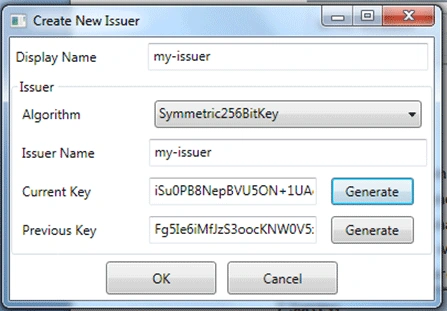
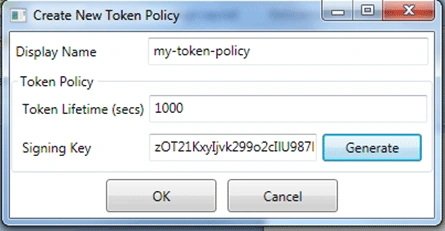
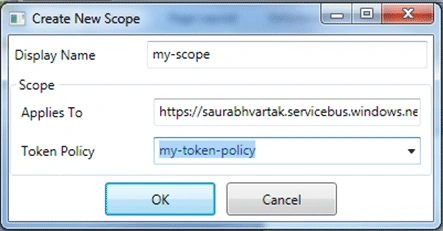
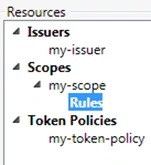
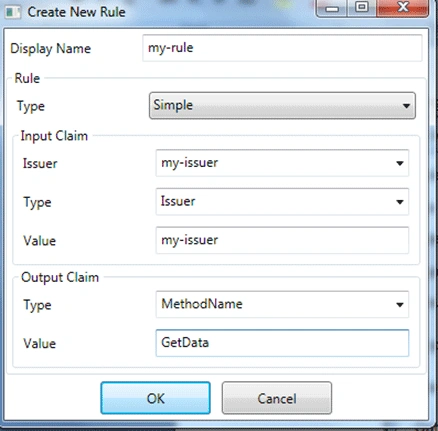
Each Scope is a collection of different Rules and one Token Policy. Usually, a Scope is applied to a RESTful web service that we want to protect using the ACS. And hence a Scope name is usually the URL of the RESTful web service.

Join the conversation! Your thoughts help the community grow.