

To create responsive gridview or Table we required onyCss file no js file is reuired,
Css Code for this is as follow,
- .EU_TableScroll
- {
- max - height: 275 px;
- overflow: auto;
- border: 1 px solid# ccc;
- }
- .EU_DataTable
- {
- border - collapse: collapse;
- width: 100 % ;
- }
- .EU_DataTable tr th
- {
- background - color: #3c454f;
- color: # ffffff;
- padding: 10 px 5 px 10 px 5 px;
- border: 1 px solid# cccccc;
- font - family: Arial, Helvetica, sans - serif;
- font - size: 12 px;
- font - weight: normal;
- text - transform: capitalize;
- }
- .EU_DataTable tr: nth - child(2 n + 2)
- {
- background - color: #f3f4f5;
- }
- .EU_DataTable tr: nth - child(2 n + 1) td
- {
- background - color: #d6dadf;
- color: #454545;
- }
- .EU_DataTable tr td
- {
- padding: 5px 10px 5px 10px;
- color: # 454545;
- font - family: Arial, Helvetica, sans - serif;
- font - size: 11 px;
- border: 1 px solid# cccccc;
- vertical - align: middle;
- }
- .EU_DataTable tr td: first - child
- {
- text - align: center;
- }
I.e.
- <divclass="EU_TableScroll"id="showData"style="display: block">
- </div>
In Gridview just write CSSClass=”EU_DataTable” full code for design view will be,
Default.aspx
- <divclass="EU_TableScroll" id="showData" style="display: block">
- <asp:GridViewID="GridView1" runat="server" CssClass="EU_DataTable" AllowPaging="true" PageSize="7">
- </asp:GridView>
- </div>
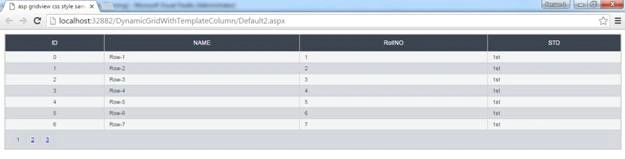
With Normal view.
Output:
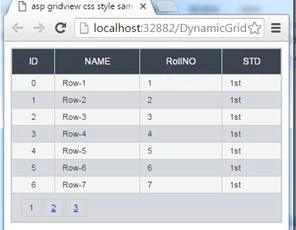
Output after reducing the size of browser.
hrushikesha bisoyiPosted Aug 16, 2016, 3:21 AM
Thanks