


In this Post, We will see How to Install Windows Phone 8 SDK. Before Installing, Have a look at System Requirements for Installing Windows Phone 8 SDK. 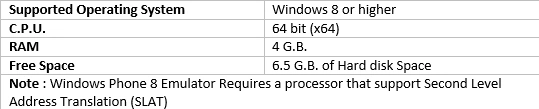
You can download Windows Phone 8 SDK from Microsoft's website in two ways:
I am going to install it using Offline Installer. Before Installing, Go to Control Panel-> Programs and Features -> Click on Turn Windows features on or off. Install/Turn on Hyper-V. (Check your PC's BIOS and make sure that hardware-assisted virtualization and hardware-assisted data execution protection turned on otherwise you can't start the Windows Phone Emulator)
Now Extract/Mount the .iso file of Windows Phone 8 SDK. and Double Click on WPexpress_full.exe and Install it.
After Successful Installation, Open Visual Studio -> Click on New Project -> Under Windows Phone Template, You will see Windows Phone Application projects.
Hope this will help you.
SubashPosted Mar 15, 2017, 12:08 AM
Interesting to know thank you anoop
Basma SHPosted Sep 15, 2015, 8:38 AM
I can’t find Hyper-V so ther is error after instalation http://im66.gulfup.com/KZSbzc.jpg
Santhakumar MunuswamyPosted Apr 19, 2015, 4:10 PM
Thanks for sharing
Anoop Kumar SharmaPosted Apr 19, 2015, 5:45 AM
Thanks Nitin Tyagi :-)
NitinPosted Apr 19, 2015, 5:41 AM
nice
Praveen KumarPosted Apr 19, 2015, 5:36 AM
Very Nice...
Sibeesh VenuPosted Apr 19, 2015, 3:44 AM
Good one .