


If you are experiencing the error below on your Windows Update.
Security Update for SQL Server 2022 RTM GDR (KB5042211)
Install Error: 0x80070643
Do this to fix.
- Download the KB from https://www.catalog.update.microsoft.com/Search.aspx?q=KB5042211.
- Try to install
- If it fails, you will get a text log file at the end of the install runs on an error. Open it and check the details to fix it.
Overall summary:
  Final result:                  The patch installer has failed to update the following instance: MSSQLSERVER. To determine the reason for failure, review the log files.
  Exit code (Decimal):           -2054422498
  Start time:                    2024-09-17 14:33:40
  End time:                      2024-09-17 14:34:19
  Requested action:              Patch

Instance MSSQLSERVER overall summary:
  Final result:                  The patch installer has failed to update the shared features. To determine the reason for failure, review the log files.
  Exit code (Decimal):           -2054422498
  Exit facility code:            1420
  Exit error code:               30
  Exit message:                  The specified directory, "C:\Program Files (x86)\Microsoft SQL Server\", for the INSTALLSHAREDWOWDIR parameter is not valid because this directory is compressed or is in a compressed directory. Specify a directory that is not compressed.
  Start time:                    2024-09-17 14:34:07
  End time:                      2024-09-17 14:34:19
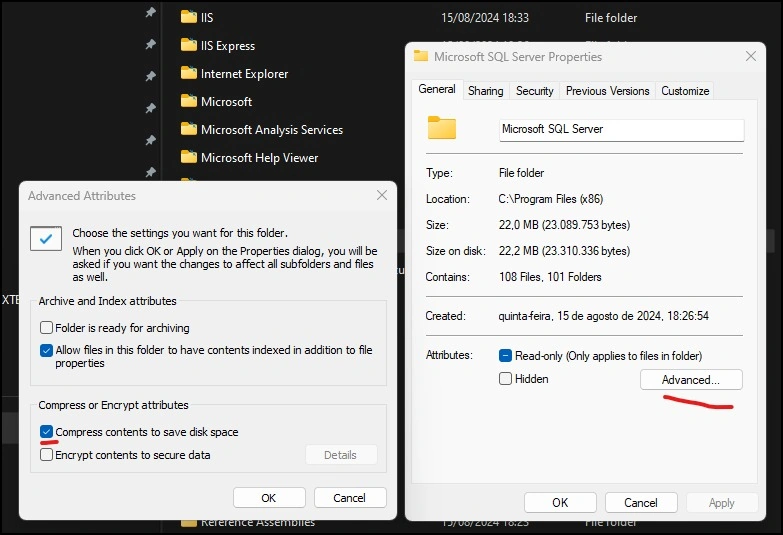
In my case, it was the compressed folder. If it's your error, too, just remove the status with File Explorer. Right-click on the specified directory, line 13 above in my case, choose Properties -> Advanced, and uncheck "Compress contents to save disk space."
This solution helped you?
Join the conversation! Your thoughts help the community grow.