

Introduction
Here we will see how to popup calendar toselect date using JQuery. When we click on the Image a popup calendar will beopen to select date from that calendar. we can also select date and month fromDropDownList.
Now we attach JQuery File under Scripts folder of thesolution explorer.
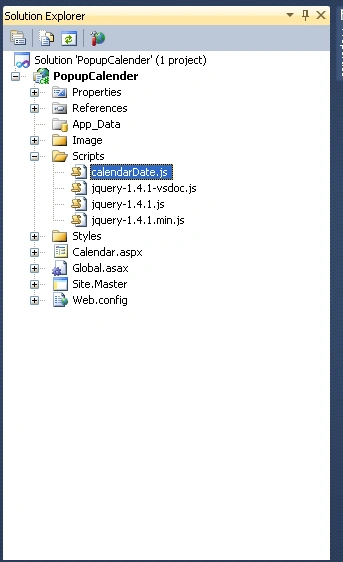
Figure 1
Add this script with the head section.
- <script type="text/javascript" src="Scripts/calendarDate.js">
- </script>
Calendardate is the js file. The abovereferences an external .js file.
Now We attach three Images in the solutionExplorer. These images are under the image folder of the solution explorer.Image folder looks like the below Figure2.
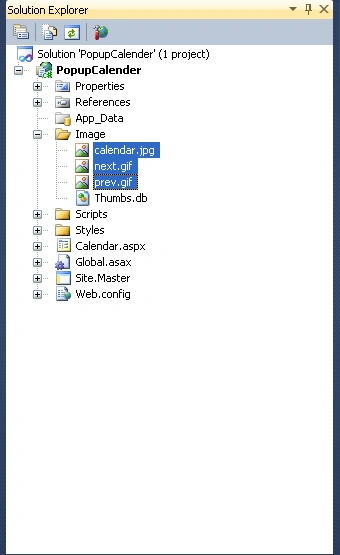
Figure 2
Now add a web form in the application.
ASPX code
- <%@ Page Language="C#" AutoEventWireup="true" CodeBehind="Calendar.aspx.cs" Inherits="PopupCalender.WebForm1" %><!DOCTYPE html PUBLIC "-//W3C//DTD XHTML 1.0 Transitional//EN" "http://www.w3.org/TR/xhtml1/DTD/xhtml1-transitional.dtd">
- <html xmlns="http://www.w3.org/1999/xhtml">
- <head runat="server">
- <title></title>
- <script type="text/javascript" src="Scripts/calendarDate.js"></script>
- </head>
- <body>
- <form id="form1" runat="server">
- <div>
- <script type="text/javascript">DateInput('orderdate', true, 'DD-MON-YYYY') </script>
- </div>
- </form>
- </body>
- </html>
Now run the application.
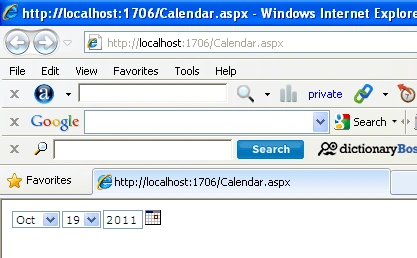
Figure 3
Now click on the calendar image to select the previous, next, and date.
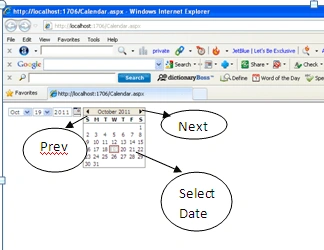
Figure 4
We can also select month and date using a drop-down list.
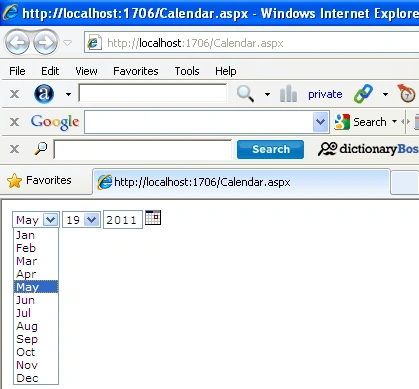
Figure 5
We can download Jquery File is attachedwith the download link and three images.
Jerald Jayaraj DPosted Jun 22, 2019, 5:08 AM
I choose the date form the calendarDate picker i can get the data from the txtbox and i will do the process
mohanaPosted Jan 30, 2014, 3:59 PM
how do you get back the dates from the page....
Ablafizi KibikiPosted Sep 28, 2013, 6:12 AM
i can not get get an idea how calender.js linkedto the text box
Ricardo LainesPosted Mar 5, 2013, 3:12 PM
y como jalo la fecha seleccionada?