

Q: What is Tooltip?
A: A Tooltip or infotip is a small message window that appears when a cursor hovers over an icon, image, hyperlink, text, or any other element rendered in our GUI.
For working code of tooltip: JSFIDDLE
Example 1 - Tooltip over a Button

For this we will set title property in our template:
- <button title="Tooltip content to be displayed">
- Hover Me
- </button>
Example 2
Displaying Tooltip when the cursor hovers over an item of a rendered list,
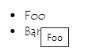
Here we will take help of v-bind (: - shorthand notation) for binding each element of list to title property by following the below simple steps:
Step 1
Inside script tag,
- var example1 = new Vue({
- el: '#example',
- data: {
- items: [
- { message: 'Foo' },
- { message: 'Bar' }
- ]
- }
- })
Step 2
Inside Template tag,
- <ul id="example">
- <li v-for="item in items" :title="item.message">
- {{ item.message }} <br>
- </li>
- </ul>
Conclusion
We learned how to display tooltip when our cursor hovers over any rendered GUI element.
Join the conversation! Your thoughts help the community grow.