What is SQL?
SQL stands for Structured Query Language, as it is the special purpose domain-specific language for querying data in Relational Database Management System (RDBMS).
Microsoft SQL Server, MySQL, Oracle, etc. use SQL for querying with slight syntax differences.
Types of SQL Statements
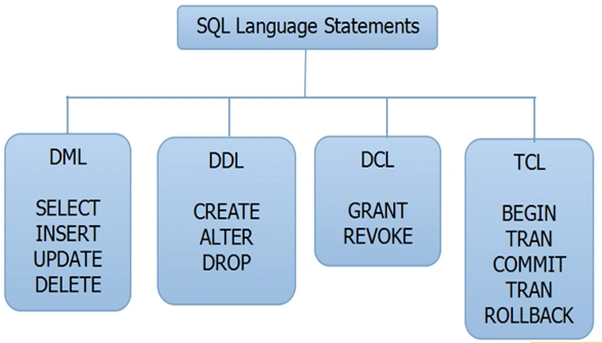
SQL statements are categorized into four different types of statements, which are
- DML (DATA MANIPULATION LANGUAGE)
- DDL (DATA DEFINITION LANGUAGE)
- DCL (DATA CONTROL LANGUAGE)
- TCL (TRANSACTION CONTROL LANGUAGE)
Let's see one by one.
DML
In Data Manipulation Language(DML), we have four different SQL statements, Select, Insert, Update, and Delete.
SELECT Statement
The SELECT statement is used to select records from the table, with or without a condition.
Example
- select * from student- Gets all records of student table.
-
Select * from student where rank>5- Gets records with the condition where students' rank is greater than 5.
INSERT
INSERT statement is used to insert a set of values into a database table. Insert statement it used with Values.
Example- Insert Into Student (Rank, StudentName, Mark) Values(1,’Kumar’,450)
UPDATE
The UPDATE statement is used to update existing values in a table, which is based on some condition.
Example
- update student set StudentName=’Manoj’ where StudentName=’Kumar’
The query given above will update the studentName from Manoj to Kumar where student Name Kumar.
Read more- Insert and Update in SQL Server
DELETE
Delete statement is used to delete the existing record in the table, which is based on some condition.
Example
- Delete from Student where StudentName=’Manoj’
The query given above will delete records which has StudentName as Manoj.
DDL
In Data Definition Language (DDL), we have three different SQL statements.
CREATE
CREATE statement is used to create a new table in an existing database. CREATE statement is also used to create other database object such as a stored procedure, function, etc.
Example
- Create Table Student (Rank Int,StudentName varchar(50),Mark Float)
ALTER
Alter statement can add a column, modify a column, drop a column, rename a column or rename a table.
Example
- Alter Table Student Add (StudentAddress varchar (100))
DROP
SQL DROP TABLE statement is used to remove a table definition and all the data, indexes, triggers, constraints and permission specifications for the table.
Example
TRUNCATE
TRUNCATE SQL query removes all rows from a table, without logging the individual row deletions.
Example
- Truncate Table Table_Name
Read more- Difference Between Truncate, Delete and Drop-in SQL Server
DCL
In Data Control Language(DCL), it defines the control over the data in the database. We have two different commands, which are
GRANT
Grant is allowed to do the specified user to the specified tasks.
Syntax
GRANT privilege_name
ON object_name
TO {user_name |PUBLIC |role_name}
[WITH GRANT OPTION];
REVOKE
It is used to cancel previously granted or denied permissions.
Syntax
REVOKE privilege_name
ON object_name
FROM {user_name |PUBLIC |role_name}
TCL
In Transaction Control Language (TCL), the commands are used to manage the transactions in the database. These are used to manage the changes made by DML statements. It also allows the statements to be grouped together into logical transactions.
COMMIT
Commit command is used to permanently save any transaction into the database.
Syntax
Commit;
Read more- Commit and Rollback Commands in SQL Server
ROLLBACK
Rollback command is used to restore the database for the last committed state. It’s also used with a save point to jump to the save point.
Syntax
Rollback to savepoint name
Read more- Commit and Rollback in SQL Server
SAVEPOINT
SAVEPOINT command is used to temporarily save a transaction so that you can roll back to that point whenever necessary.
Syntax
savepointsavepoint-name;
Read more- What is the usage of savepoints
These are the different types of statements in the SQL language. I hope, this will be helpful for the readers. Thanks for reading.



Joshua ByersPosted Jun 28, 2021, 10:09 AM
"update student set StudentName=’Manoj’ where StudentName=’Kumar’ ""The query given above will update the studentName from Manoj to Kumar where student Name Kumar.". This is wrong, the query updates the studentName from KUMAR to MANOJ where the student name is Kumar.
Sandip SinghaPosted Nov 22, 2018, 1:15 PM
Your explanation was all correct..but you have missed to explain some more SQL commands like use command is one of the four basic commands of ddl..you have explained only the three...again in dcl ,deny is also an important SQL command among the three..leaving these two commands your explanation was scrumptious and helpful too..
Vikrant MorePosted Oct 11, 2018, 1:41 PM
Truncate is missing in DDL
Kiran KhannaPosted Aug 18, 2018, 10:07 AM
WE SHOULD KNOW ALL SQL TO GET A JOB
Sandeep SharmaPosted May 14, 2018, 11:01 PM
sir, can you further explain DCL TCL through an example.
SubashPosted Mar 13, 2017, 8:34 PM
Very nice keep write more
NehaPosted Jan 5, 2017, 5:37 AM
Nice one.............................................
Manoj Kumar DuraisamyPosted Jan 5, 2017, 12:09 AM
Thank you so much Fabio Silva Lima......!!!!!!!!!!!!!
Fabio Silva LimaPosted Jan 4, 2017, 6:31 AM
Excelent! your explanation was perfect. Congratulations
Manoj Kumar DuraisamyPosted Jan 3, 2017, 2:10 AM
Thanks for your appreciation Jaco Zwarts
Jaco ZwartsPosted Jan 3, 2017, 2:00 AM
Thank you for sharing Manoj Kumar, Great summary wish I had this summary last year
Manoj Kumar DuraisamyPosted Jan 3, 2017, 12:17 AM
If anyone interested to explain in the detail can do