This issue is still unsolved for me
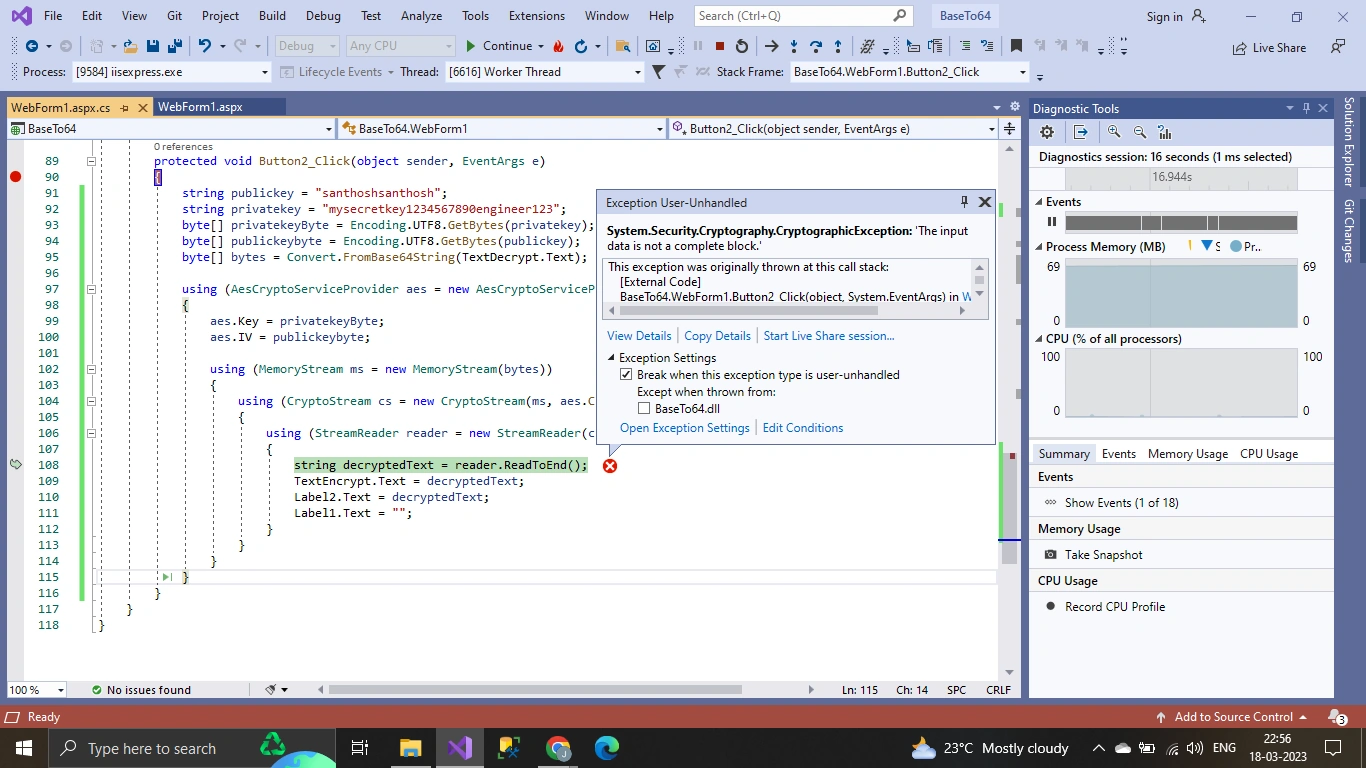
when decrypting the encrypted data i was trying different codes provided by our seniors but getting errors idk what to do
Few seniors helped me a lot but i am unable to solve it
Encrypted code
protected void Button1_Click(object sender, EventArgs e)
{
    var encrypted = Convert.ToString(TextEncrypt.Text);
    string jsonString = JsonConvert.SerializeObject(encrypted);
    //TextDecrypt.Text = "";
    string publickey = "santhosh";
    string secretkey = "engineer";
    byte[] secretkeyByte = { };
    secretkeyByte = Encoding.UTF8.GetBytes(secretkey);
    byte[] publickeybyte = { };
    publickeybyte = Encoding.UTF8.GetBytes(publickey);
    MemoryStream ms = null;
    CryptoStream cs = null;
    byte[] encryptedResult = Encoding.UTF8.GetBytes(encrypted);
    RijndaelManaged aes = new RijndaelManaged();
    aes.KeySize = 256;
    aes.BlockSize = 256;
    aes.Padding = PaddingMode.Zeros;
    aes.Mode = CipherMode.CBC;
    byte[] encodedTextBytes = Encoding.UTF8.GetBytes(TextEncrypt.Text);
    TextDecrypt.Text = Convert.ToBase64String(encodedTextBytes);

    //  Response.Write(TextDecrypt.Text);
    //  var toDecodeAsString = System.Convert.FromBase64String(encrypted);
    using (DESCryptoServiceProvider des = new DESCryptoServiceProvider())
    {
        RijndaelManaged AES = new RijndaelManaged();
        AES.KeySize = 256;
        AES.BlockSize = 128;
        ms = new MemoryStream();
        cs = new CryptoStream(ms, des.CreateEncryptor(publickeybyte, secretkeyByte), CryptoStreamMode.Write);
        cs.Write(encryptedResult, 0, encryptedResult.Length);
        cs.FlushFinalBlock();
        // Label1.Text = encryptedResult;
        TextDecrypt.Text = Convert.ToBase64String(encodedTextBytes);
        Label1.Text = Convert.ToBase64String(encodedTextBytes);

    }
}
Code for Deryption provided by seniors
protected void Button2_Click(object sender, EventArgs e)
{
    string publickey = "santhoshsanthosh";
    string privatekey = "mysecretkey1234567890engineer123";
    byte[] privatekeyByte = Encoding.UTF8.GetBytes(privatekey);
    byte[] publickeybyte = Encoding.UTF8.GetBytes(publickey);
    byte[] bytes = Convert.FromBase64String(TextDecrypt.Text);

    using (AesCryptoServiceProvider aes = new AesCryptoServiceProvider())
    {
        aes.Key = privatekeyByte;
        aes.IV = publickeybyte;

        using (MemoryStream ms = new MemoryStream(bytes))
        {
            using (CryptoStream cs = new CryptoStream(ms, aes.CreateDecryptor(), CryptoStreamMode.Read))
            {
                using (StreamReader reader = new StreamReader(cs))
                {
                    string decryptedText = reader.ReadToEnd();
                    TextEncrypt.Text = decryptedText;
                    Label2.Text = decryptedText;
                    Label1.Text = "";
                }
            }
        }
    }
}
Tuhin PaulPosted Mar 21, 2023, 9:44 AM
Try my version:
The IsValidJson method is added to validate that the input is a valid JSON string using the JToken.Parse method from the Newtonsoft.Json package. If the input is not valid JSON, the method returns false. In the Button1_Click and Button2_Click methods, the IsValidJson method is called to validate the input before encoding or decoding. If the input is not valid JSON, an error message is displayed instead of trying to encode or decode it. Exception handling is added to catch any exceptions that may occur during the encoding or decoding process. If an exception occurs, an error message is displayed with the exception message.
Tuhin PaulPosted Mar 21, 2023, 9:44 AM
This process is a valid way to encode and decode JSON strings using Base64. One thing to remeber that the code does not perform any validation or verification of the JSON string before encoding it, which could lead to encoding errors if the input is not a valid JSON string.
Jaya PrakashPosted Mar 20, 2023, 9:04 AM
@Naimish Makwana and @Tuhin Paul
this code is giving correct output for my requirement is this correct process or wrong pls can u check it sir
Naimish MakwanaPosted Mar 19, 2023, 7:50 AM
Hello Jayay,
It seems you key is not same in encryption and decryption. .
Button1_Click
Button2_Click
Make this same and test.
Thanks
Naimish Makwana
Jaya PrakashPosted Mar 19, 2023, 6:41 AM
the data is correctly encoded and stored but the decryption is not
Tuhin PaulPosted Mar 18, 2023, 6:24 PM
Before attempting to decrypt the data, check that it has been correctly encoded and stored. Ensure that the data has not been altered or corrupted during transmission. Also check that the keys used for encryption and decryption are correct and match. A mismatched key can cause the decryption process to fail.
Tuhin PaulPosted Mar 18, 2023, 6:23 PM
1. Check that the encrypted data is being correctly encoded and stored.
2. Check if the encryption and decryption algorithms are compatible