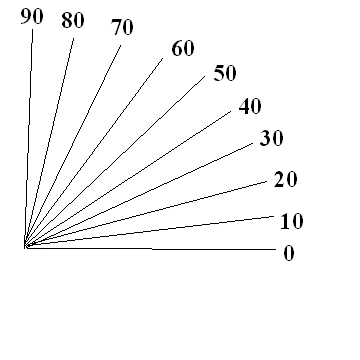
hello, I want to (in c#) draw lines with a positive rotation, like the title says.
I have the code below , but its not exactly what I want.
private void button1_Click(object sender, EventArgs e)
        {
            this.Invalidate(true);
            this.pictureBox1.Paint += new System.Windows.Forms.PaintEventHandler(this.FillRectangle1);
            this.pictureBox2.Paint += new System.Windows.Forms.PaintEventHandler(this.FillRectangle2);
        }

        private void FillRectangle1(object sender, PaintEventArgs e)
        {
            for (int i = 0; i<=90; i +=10)
            {
                Matrix matrix = new Matrix();
                matrix.Rotate(i);
                e.Graphics.Transform = matrix;
                e.Graphics.DrawLine(Pens.Black, 0, 0, 250, 0);
                e.Graphics.DrawString(i.ToString(), this.Font, Brushes.Black, new PointF(250, -5));
            }
        }
        private void FillRectangle2(object sender, PaintEventArgs e)
        {
            for (int i = 0; i<=90; i +=10)
            {
                Matrix matrix = new Matrix();
                matrix.RotateAt(i, new PointF(25, 25));
                e.Graphics.Transform = matrix;
                e.Graphics.DrawLine(Pens.Black, 25, 25, 245, 25);
                e.Graphics.DrawString(i.ToString(), this.Font, Brushes.Black, new PointF(245, 20));
            }
        }
Rather I want to program such a picture. Thank you for your help.
:
Ajay BansodePosted Jul 29, 2025, 7:31 PM
Use a
Literalcontrol in your.aspx:1. Web Forms Page
2.Code Behind (
.aspx.cs)protected void Page_Load(object sender, EventArgs e)
{
int centerX = 50;
int centerY = 250;
int radius = 150;
System.Text.StringBuilder sb = new System.Text.StringBuilder();
sb.Append("
for (int angle = 0; angle <= 90; angle += 10)
{
double radians = angle * Math.PI / 180;
double x = centerX + radius * Math.Cos(radians);
double y = centerY - radius * Math.Sin(radians);
double labelX = centerX + (radius + 20) * Math.Cos(radians);
double labelY = centerY - (radius + 20) * Math.Sin(radians);
sb.Append($"{angle} ");
sb.Append($"
}
sb.Append("");
litSvg.Text = sb.ToString();
}