i have data table Room{ "Id", "Status", "Sort", "CreatedDate", "CreatedAt", "CreatedBy", "UpdatedAt", "UpdatedBy", "CodeName", "Name",
"LocationId", "Volumn", "Items", "Images" }
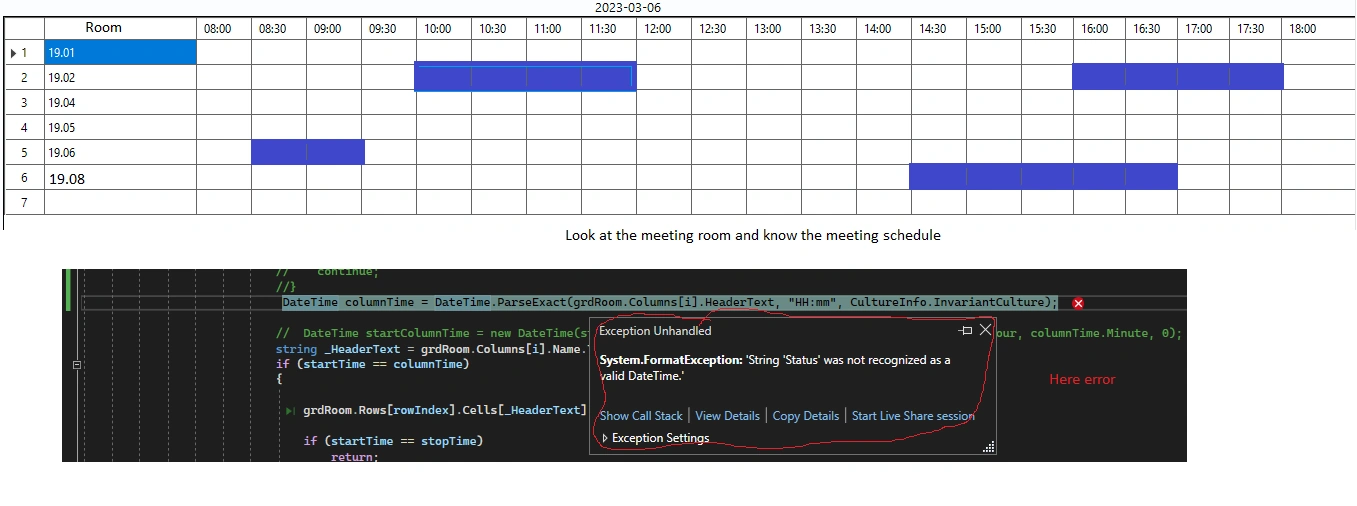
on datagridview get display column Room Name and add columns that are hours from 08:00 to 18:00. get the data in the Booking is
start time and end time to compare with the datagridview time columns from 08:00 to 18:00. Add new,data add nomal, but when loading
error data are columns like: Status", "Sort", "CreatedDate", "CreatedAt", "CreatedBy", "UpdatedAt", "UpdatedBy", "CodeName", "Name",
"LocationId", "Volumn", "Items", "Images" are letters that cannot be converted to hours to compare with the column headertext which
is the hours from 08:00 to 18:00.how when loading the data I only get and browse the columns as the new add column from 08:00 to 18:00,
not from the fields data in table Room
here error
Tuhin PaulPosted Mar 17, 2023, 1:18 AM
One solution to this issue is to use the DataGridView's "Columns" collection to remove the unwanted columns after loading the data from the Room table. check the code snippets:
Tuhin PaulPosted Mar 17, 2023, 1:17 AM
I think issue is loading data into a DataGridView with columns representing hours from 08:00 to 18:00, as well as some other columns that cannot be converted to hours. You would like to know how to only display and browse the columns representing hours in the DataGridView and not the other columns from the Room table.