- Condition One applies Blue color
- Condition two applies Pink color
- Condition three applies Green color
- Condition four applies Yellow color
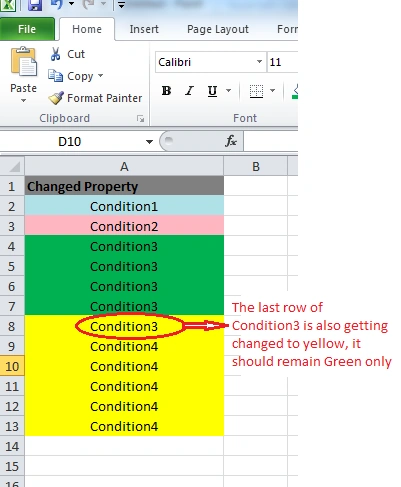
When the color in Condition 4 is applied, it changes the last row color of Condition 3. Kindly advise.
Note: I am using Excel Interop version- 1.7.0.0.
T KPosted Mar 17, 2015, 7:06 AM
Keyur PatelPosted Mar 17, 2015, 7:03 AM
https://www.snip2code.com/Snippet/613/How-to-set-a-conditional-formatting-in-a
http://stackoverflow.com/questions/15216047/programatically-adding-conditional-formatting-in-excel-2007
T KPosted Mar 17, 2015, 6:21 AM
Keyur PatelPosted Mar 17, 2015, 6:00 AM
We can use conditionalFormat in excel. You can check from following links.
https://support.office.com/en-au/article/Use-a-formula-to-apply-conditional-formatting-fed60dfa-1d3f-4e13-9ecb-f1951ff89d7f
http://www.wikihow.com/Apply-Conditional-Formatting-in-Excel
T KPosted Mar 17, 2015, 5:50 AM
Keyur PatelPosted Mar 17, 2015, 5:38 AM
Please try with following loop. Remove Count -1 from loop.
}
T KPosted Mar 17, 2015, 3:03 AM
Keyur PatelPosted Mar 17, 2015, 2:56 AM
I am not sure,whether it's correct or not but i think, something problem in your condition loop.
Excel cell start with row 1 , column 1. try to start with your loop row 1 instead of 0.
Please check in debug mode, cell address of last condition 3.
If you are still having an issue than please share your code.