I have created a webform that has several dropdownlist and textbox as well as a gridview linked to s sqltable. The Gridview has a column for select to send the data in the row to the selected dropdownlists and textbox so I can edit the data in the sqltable. When I click on the select button link only a couple of fields are being populated. I have tried changing the cell #'s in the script and no matter what cell number I select I still can't get some of the fields to populate.
Below are screen shots and the cs code.
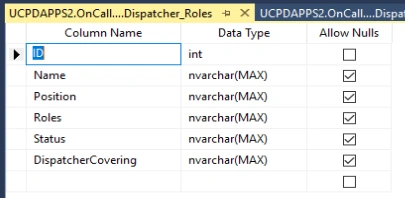
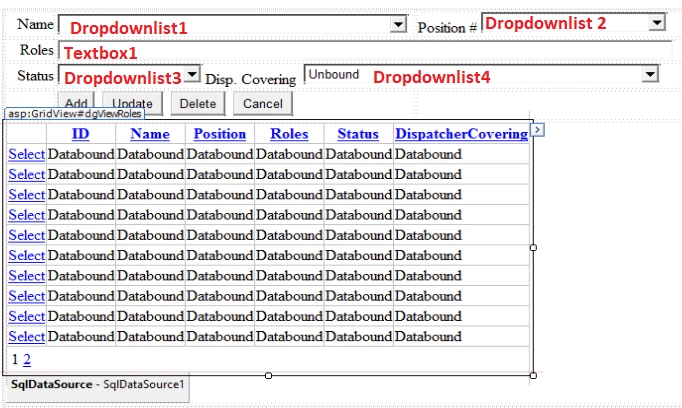
These are the fields not populating on select click.

using System;
using System.Collections.Generic;
using System.Linq;
using System.Web;
using System.Web.UI;
using System.Web.UI.WebControls;

namespace OnCallWeb.Dispatch_Policies
{
    public partial class Workstation_Roles : System.Web.UI.Page
    {
        protected void Page_Load(object sender, EventArgs e)
        {

        }

        protected void GridView1_SelectedIndexChanged(object sender, EventArgs e)
        {

            DropDownList1.Text = dgViewRoles.SelectedRow.Cells[2].Text;
            DropDownList2.Text = dgViewRoles.SelectedRow.Cells[3].Text;
            TextBox1.Text = dgViewRoles.SelectedRow.Cells[4].Text;
            DropDownList3.Text = dgViewRoles.SelectedRow.Cells[5].Text;
            DropDownList4.Text = dgViewRoles.SelectedRow.Cells[6].Text;
        }
    }
}
Walter GraulichPosted May 25, 2023, 11:58 AM
Sorry, I found the answer. For the dropdown list fields the items written in the sqltable have to match what is in the itm list for the dropdown. Since I was just manually typing in anything in those fields in the sqltable and they did not match what was listed in the dropdownlist menu, they do not populate the field when clicking the select hyperlink in the gridview.