hi,
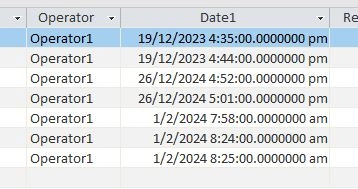
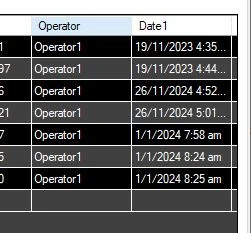
I was able to display the contents of a certain table with Date/Time Extended field. My problem is when viewing, the datagridview, the dates were late by exactly one month! Any help would be appreciated. thanks!
connection = new OleDbConnection("Provider=Microsoft.ACE.OLEDB.12.0;Data Source=" + strAccessPath + ";Persist Security Info=False;");
dataAdapter = new OleDbDataAdapter("SELECT * FROM BERData", connection);
dataTable = new System.Data.DataTable();
dataAdapter.Fill(dataTable);
dataGridView1.DataSource = dataTable;
access:
datagridview:
Tuhin PaulPosted Feb 2, 2024, 2:58 PM
Check the actual data in the database table. Check that the dates are entered correctly without any discrepancies. And also check the time zone or regional settings on the machine where the application is running and where the database is hosted. A difference in time zone settings can affect how dates are displayed.
Bob GaronPosted Feb 1, 2024, 8:23 AM
hi Sachin,
Thanks for your reply. Actually, the issue is when the Date is January which will yield 0, causing error. After adding the AddMonths(+1), I still get the error.
connection = new OleDbConnection("Provider=Microsoft.ACE.OLEDB.12.0;Data Source=" + strAccessPath + ";Persist Security Info=False;");
dataAdapter = new OleDbDataAdapter("SELECT * FROM BERData", connection);
dataTable = new System.Data.DataTable();
foreach (DataRow row in dataTable.Rows)
{
// Assuming the date is in a column named "Date1"
DateTime originalDate = (DateTime)row["Date1"];
DateTime adjustedDate = originalDate.AddMonths(+1);
row["Date1"] = adjustedDate;
}
dataAdapter.Fill(dataTable); //ERROR HERE
dataGridView1.DataSource = dataTable;
At this point, the datatable is still empty. the anomaly happened during the dataAdapter fill.
Sachin SinghPosted Feb 1, 2024, 7:31 AM
check the locale settings first, add these lines before filling the datagrid
if even after the changes it doesn't work then just do what is needed