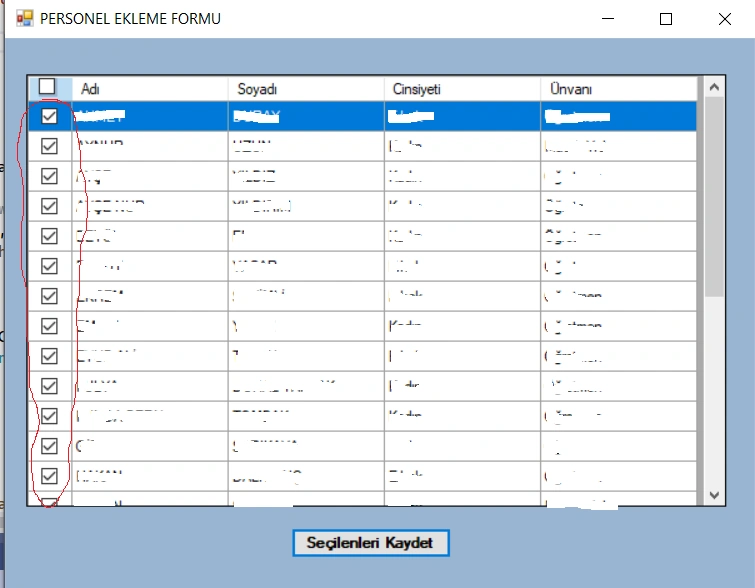
I want all checkboxes to appear as “false” initially. CBColumn.DataPropertyName = "id"; is causing all checkboxes to be checked. But when I remove the line CBColumn.DataPropertyName = "id"; then I can’t send the “id” value. I want to sendi d value. How can I succed this?
Abhishek YadavPosted Jun 10, 2023, 3:46 PM
DataGridViewTextBoxColumn idColumn = new DataGridViewTextBoxColumn();
idColumn.HeaderText = "ID";
idColumn.DataPropertyName = "id";
idColumn.Visible = false; // if you don't want to show the ID column
dataGridView1.Columns.Add(idColumn);
Mehmet FatihPosted Jun 9, 2023, 12:37 PM
I want my checkboxes to appear as false value. When I put the line Column.DataPropertyName = "id";, it is causing checkboxes to appear as true. When I remove the line idColumn.DataPropertyName = "id"; then it is saving all of the values not only checkedboxes. I want both the checkboxes comes as false initilaly and sending only checkedboxes.
Amit MohantyPosted Jun 9, 2023, 9:53 AM
Create a separate column for the "id" values in your data grid view. You can add a new column of type DataGridViewTextBoxColumn.