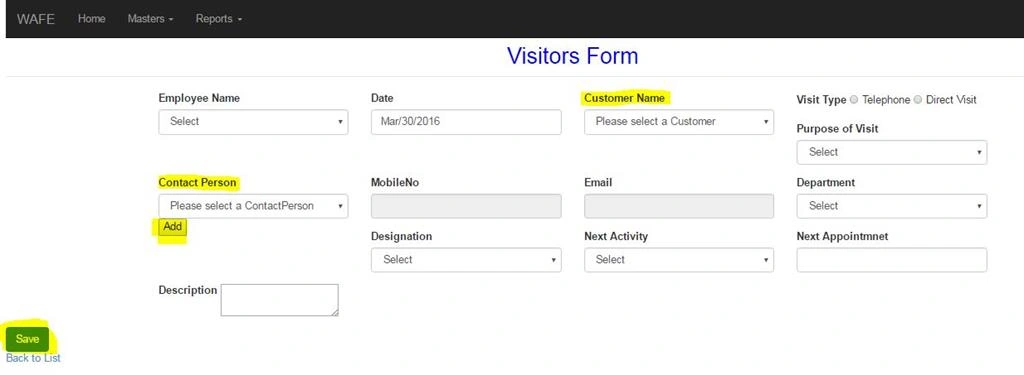
Hi in my view i have two buttons. One is near to Contact Person and another one is main Savebutton.If I select the Customer Name the customer name related Contact Person name will load automatically in contact person drop down.its like cascading drop down.
Suppose if i enter the Employee, Date,Customer Name ,Visit type , POVisit and select the Contact person(the Contact Person will load automatically based on the selection of customer name). Suppose the contact person is not in the list means i have to add that . so i click that add button near to contact person.it open Contact Person Partial View as popup window (and i enter the details and save the details and close the popup window.
Now all are working fine but now i got one new issue. if i enter the Employee, Date,Customer Name ,Visit type , POVisit and add the contact person( by clicking the add button), Department , Designation etc and click the Save button(Main Save Button which is in blue color), the data is not saving into the database.
But if i enter all the details and click the button which is near to the Contact Person the whole data is saving in the database . This is the issue if i enter all the details and click the main save buttons means its not saving the data in database but at the same time if i click the button which is near to contact person it saving the data in db. I tried to explain my issue as per my level best. please any one help to resolve the issue.
My View Model (Visitors View Model)
public class VisitorsViewModel
{
public Nullable Date { get; set; }
public System.Guid VisitingID { get; set; }
public Nullable EmployeeID { get; set; }
public string EmployeeName { get; set; }
public Nullable CustomerID { get; set; }
public string CustomerName { get; set; }
public bool VisitType { get; set; }
public System.Guid POVisitID { get; set; }
public string POVisit { get; set; }
public Nullable CustomerContactID { get; set; }
public Nullable ContactID { get; set; }
public string ContactPerson { get; set; }
public string Department { get; set; }
public Nullable DesignationID { get; set; }
public string Designation { get; set; }
public Nullable NextActivityID { get; set; }
public string NextActivity { get; set; }
public Nullable NextAppointmnet { get; set; }
public string Description { get; set; }
}
I created the properties of fields which is used in popup windows also created in the same view model.
My Parent view Visitors form i declare some fields here
@Html.Label("Employee Name", new { @class = "control-label" })
@Html.DropDownList("EmployeeID", null, "Select", new { @class = "form-control" })
@Html.Label("Customer Name", new { @class = "control-label" })
@Html.DropDownListFor(model => model.CustomerID, new SelectList(string.Empty, "Value", "Text"), "Please select a Customer", new { @class = "form-control required", type = "text" })
@Html.Label("Purpose of Visit", new { @class = "control-label", styles = "font-family: Arial;" })
@Html.DropDownList("POVisitID", null, "Select", new { @class = "form-control required" })
@Html.Label("Contact Person", new { @class = "control-label" })
@Html.DropDownListFor(model => model.CustomerContactID, new SelectList(string.Empty, "Value", "Text"), "Please select a ContactPerson", new { @class = "form-control", type = "text", id = "CustomerContactID" })
@Html.LabelFor(model => model.Description, new { @class = "control-label"})
@Html.TextAreaFor(model => model.Description, new { @class = "required" })
$.post("/VisitorsForm/ContactPersonCreate", CustomerContact, function (data) {
var option = new Option(ContactPerson, data);
$('#CustomerContactID').append($(option));
alert("sucess");
window.close();
});
}
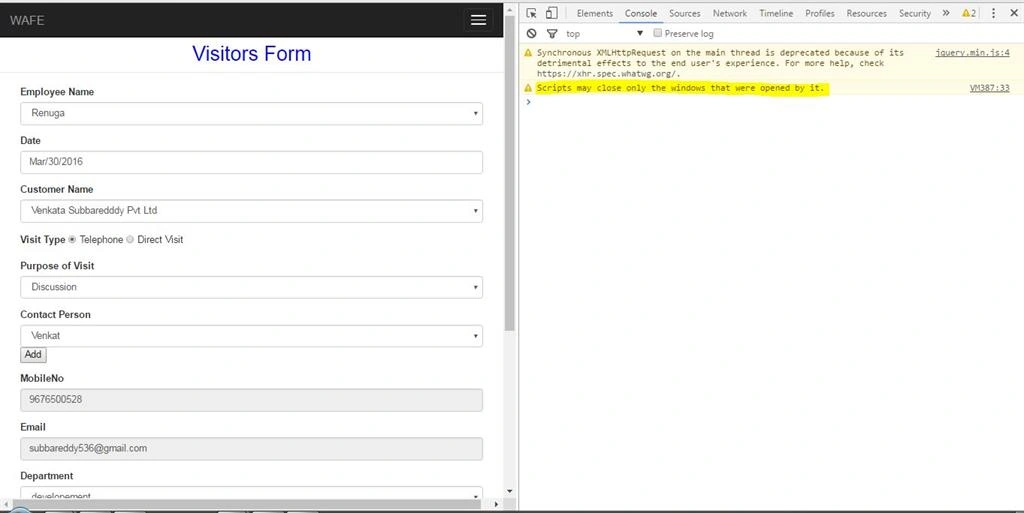
when i enter all the details and click the main save button it show error which is mentioned in the below image
My question is very long but please any one understand my issue and give me one solution and i request you to check my j query coding again. if anyone didn't understand my question ask with me immediately
Advance thanks.
4 Replies
Know the answer? Post it — somebody with the same question will find it here.
Sign in to answer this question
It is the same account you read, post and publish with — and you will come straight back to this page.
Manas all are working fine i keep one break point near to ContactPersonCreate and hit this action too. all are working correctly but i donno where the issue is but when i click the main save button it not saving the data it showing the same script error which is mentioned in the image while inspect element..
Put a breakpoint near ContactPersonCreate action in VisitorsForm controller and see if it hits the break-point. If it hits then check whether it executed successfully and also make sure that you have correct data.
Secondly press F12 to enable browser and see there should not be any error in console tab.
Sneha KPosted Apr 5, 2016, 3:04 AM
Manas MohapatraPosted Apr 5, 2016, 2:55 AM
Sneha KPosted Apr 5, 2016, 2:34 AM
Manas MohapatraPosted Apr 5, 2016, 2:23 AM