private void button2_Click(object sender, EventArgs e)
{
    SaveToFile(this.Controls);
}

private void button3_Click(object sender, EventArgs e)
{
    LoadFromFile(this.Controls);
}

private static byte[] key = Encoding.UTF8.GetBytes("MySecretKey1234").Concat(Encoding.UTF8.GetBytes(new string('0', 16))).Take(16).ToArray();
private static byte[] iv = new byte[16]; // 128 bit

public static void SaveToFile(Control.ControlCollection controls)
{
    string path = Path.Combine(AppDomain.CurrentDomain.BaseDirectory, "configuration");
    if (!Directory.Exists(path))
    {
        Directory.CreateDirectory(path);
    }

    // File path and name
    string fileName = Path.Combine(path, "config.txt");

    // Create an AES object and set the key and IV based on the specified values
    using (Aes aes = Aes.Create())
    {
        aes.Key = key;
        aes.IV = iv;

        // Write the values of checkboxes and textboxes to the file, encrypted with AES
        try
        {
            using (StreamWriter sw = new StreamWriter(fileName))
            using (CryptoStream cs = new CryptoStream(sw.BaseStream, aes.CreateEncryptor(), CryptoStreamMode.Write))
            {
                using (StreamWriter swCrypto = new StreamWriter(cs))
                {
                    foreach (Control c in controls)
                    {
                        if (c is CheckBox)
                        {
                            CheckBox cb = (CheckBox)c;
                            swCrypto.WriteLine(cb.Name + "=" + cb.Checked);
                        }
                        else if (c is TextBox)
                        {
                            TextBox tb = (TextBox)c;
                            swCrypto.WriteLine(tb.Name + "=" + tb.Text);
                        }
                    }
                }
            }
        }
        catch (Exception ex)
        {
            MessageBox.Show("An error occurred while saving configuration data: " + ex.Message);
        }
    }
}

public static void LoadFromFile(Control.ControlCollection controls)
{
    string fileName = Path.Combine(AppDomain.CurrentDomain.BaseDirectory, "configuration", "config.txt");

    // Create an AES object and set the key and IV based on the specified values
    using (Aes aes = Aes.Create())
    {
        aes.Key = key;
        aes.IV = iv;

        // Read the values of checkboxes and textboxes from the file, decrypted with AES
        try
        {
            using (StreamReader sr = new StreamReader(fileName))
            using (CryptoStream cs = new CryptoStream(sr.BaseStream, aes.CreateDecryptor(), CryptoStreamMode.Read))
            {
                using (StreamReader srCrypto = new StreamReader(cs))
                {
                    while (!srCrypto.EndOfStream)
                    {
                        string line = srCrypto.ReadLine();
                        string[] parts = line.Split(new char[] { '=' }, 2);
                        if (parts.Length == 2)
                        {
                            Control c = controls.Find(parts[0], true).FirstOrDefault();
                            if (c != null)
                            {
                                if (c is CheckBox)
                                {
                                    bool value = false;
                                    if (bool.TryParse(parts[1], out value))
                                    {
                                        ((CheckBox)c).Checked = value;
                                    }
                                }
                                else if (c is TextBox)
                                {
                                    ((TextBox)c).Text = parts[1];
                                }
                            }
                        }
                    }
                }
            }
        }
        catch (Exception ex)
        {
            MessageBox.Show("An error occurred while loading configuration");
        }
    }
}
Messagebox show
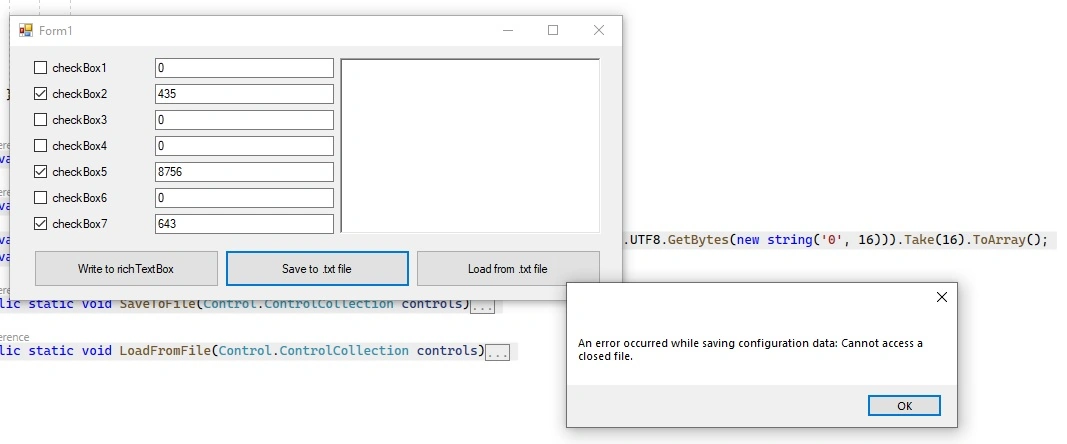
My fisrt question: Even if the error message appears, it writes and reads config.txt in the background. But why am I getting this error message? How do I update the codes? Where am I doing wrong?
My second question: SaveToFile is written in a single name here. What I want to do exactly is to create a new config file by randomly numbering the automatic config.txt in the specified file every time I save to file (For example: 123456789_config.txt, 123456788_config.txt). How can I fix for this?
My third question: While Open From File, it reads directly from the file itself. But I want to specify myself which file it should read through the File bower. How can I arrange?
Tuhin PaulPosted Mar 7, 2023, 1:27 AM
To diagnose the error message displayed during configuration data saving, you need to look at the exception message and stack trace.
Tuhin PaulPosted Mar 4, 2023, 9:43 PM
Regarding your first question, the error message is displayed when an exception occurs while trying to save the configuration data. The catch block in the SaveToFile method is catching the exception and showing the message box with the error message. To determine the cause of the exception, you need to look at the exception message and stack trace. You can also add some logging statements to help diagnose the issue.
For your second question, you can use the Path.GetRandomFileName method to generate a random file name and combine it with the directory path to create a new file name each time you save the configuration. For example, you can modify the fileName variable declaration in the SaveToFile method as follows:
This will create a new file name with a random string and the "_config.txt" suffix each time the method is called.
For your third question, you can use the OpenFileDialog class to allow the user to select the configuration file to load. You can add a button or menu item to your form that displays the file dialog when clicked. For example, you can modify the button3_Click method as follows:
This code displays a file dialog with a filter for txt files and sets the initial directory to the configuration directory. If the user selects a file and clicks the OK button, the LoadFromFile method is called with the selected file name and the form controls. You need to modify the LoadFromFile method to take a file name parameter and use it to open the file instead of using the hard-coded file name. For example, you can modify the method declaration as follows:
And modify the StreamReader declaration as follows: