
public Events()
{
InitializeComponent();
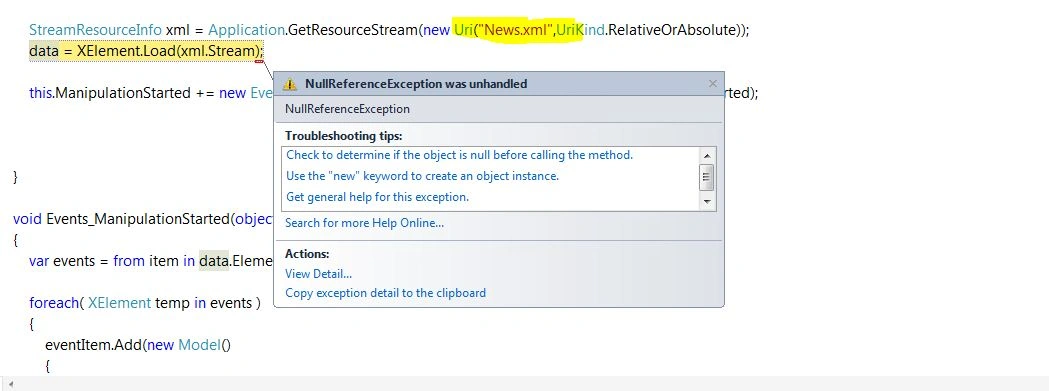
StreamResourceInfo xml = Application.GetResourceStream(new Uri("News.xml",UriKind.RelativeOrAbsolute));
data = XElement.Load(xml.Stream); // ERROR
this.ManipulationStarted += new EventHandler
}
void Events_ManipulationStarted(object sender, ManipulationStartedEventArgs e)
{
var events = from item in data.Elements("Event") select item;
foreach( XElement temp in events )
{
eventItem.Add(new Model()
{
name =temp.Element("Name").Value,
image = temp.Element("Image").Value,
date = temp.Element("Date").Value,
time = temp.Element("Time").Value
});
myList.ItemsSource = eventItem;
}
}
VulpesPosted Feb 15, 2014, 4:56 PM
If it's a Windows phone or Silverlight app, I'd check this blog which shows how to construct a valid Uri for accessing a static xml file:
http://blogs.msdn.com/b/silverlight_sdk/archive/2010/08/27/loading-a-static-xml-file-to-your-windows-phone-silverlight-app.aspx?Redirected=true
Abhishek Kumar RaviPosted Feb 16, 2014, 1:56 AM
I have tried it [ProjectName;compent/xmlFile.xml] but it didnt work i have given wrong project Name that time.
Then, you suggested me this LINK and i am 100% sure its the only solution.
Believe me, It is :) #TheOnlySolution