In this article
we will try to understand 4 important uses of template design patterns. Template
design pattern is one of those patterns which are used unknowingly or knowingly
in many places. This article will flesh out 4 places where this pattern is seen
evident.
Let's start
first with definition and then rest will follow.
Definition :- Template pattern is used in scenarios where we want to
create extendable behaviors in generalization and specialization relationship.
Template pattern
belongs to behavioral pattern category. Template pattern defines a main process
template and this main process template calls sub-processes in a sequential
manner. Later the sub processes of the main process can be altered to generate
a different behavior.
For example
below is a simple process to parse data and load the same in to oracle. The
overall general process has 3 fixed steps:-
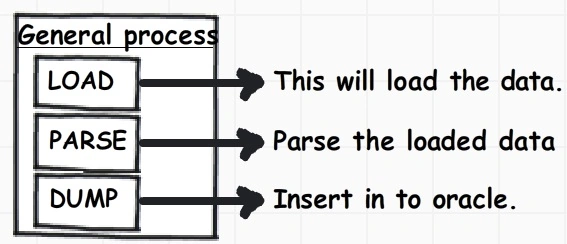
Figure: - General process
Now you can
alter "Load" and "Parse" implementation to create a CSV file load process. The
overall sequence of calling "Load", "Parse" and "Dump" will remain same but we
have the full liberty to change the implementation of "Load" , "Parse" and
"Dump" thus creating a new process.
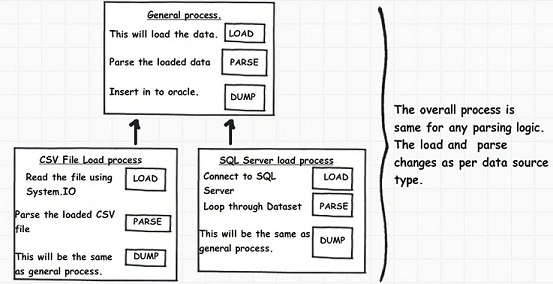
Figure: - Template thought process
You can see from
the above figure how we have altered 'Load' and 'Parse' sub process to generate
CSV file and SQL Server load process. The 'Dump' function and the sequence of
how the sub processes are called are not altered in the child processes.
In order to
implement template pattern we need to follow 4 important steps:
Create the template or the main process by creating a parent abstract class.
Create the sub processes by defining abstract methods and functions.
Create one method which defines the sequence of how the sub process methods will be called. This method should be defined as a normal method so that we child methods cannot override the same.
Finally create the child classes who can go and alter the abstract methods or sub process to define new implementation.
public
abstract class
GeneralParser
{
protected abstract
void Load();
protected abstract
void Parse();
protected virtual
void Dump()
{
Console.WriteLine("Dump
data in to oracle");
}
public void
Process()
{
Load();
Parse();
Dump();
}
}
The 'SqlServerParser'
inherits from 'GeneralParser' and overrides the 'Load' and 'Parse' with SQL
server implementation.
public
class
SqlServerParser : GeneralParser
{
protected override
void Load()
{
Console.WriteLine("Connect
to SQL Server");
}
protected override
void Parse()
{
Console.WriteLine("Loop
through the dataset");
}
}
The 'FileParser'
inherits from General parser and overrides the 'Load' and 'Parse' methods with
file specific implementation.
public
class FileParser
: GeneralParser
{
protected override
void Load()
{
Console.WriteLine("Load
the data from the file");
}
protected override
void Parse()
{
Console.WriteLine("Parse
the file data");
}
}
From the client
you can now call both the parsers.
FileParser ObjFileParser =
new FileParser();
ObjFileParser.Process();
Console.WriteLine("-----------------------");
SqlServerParser ObjSqlParser = new
SqlServerParser();
ObjSqlParser.Process();
Console.Read();
The outputs of
both the parsers are shown below.
Load the data from the file
Parse the file data
Dump data in to oracle
-----------------------
Connect to SQL Server
Loop through the dataset
Dump data in to oracle
Now let's walk
through some practical scenarios where "Template" pattern can be implemented.
Many times we
come across UI which have all the things almost same but with some small
difference in look and feel. For instance in the below screen the data is all
same but the one screen has the back ground color different than other.
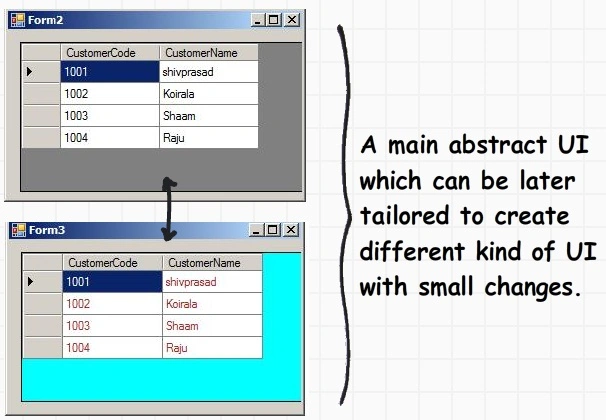
Figure:
In this scenario
in the form constructor will become the main process which will call three
processes / functions:-
InitializeComponent :- This will create the UI objects need for the form.
LoadCustomer :- This function will load data and bind to the grid.
LoadGrid :- This function will define the look and feel of the grid.
public
Form1()
{
InitializeComponent();
LoadCustomer();
LoadGrid();
}
Below is the full code of the base form. Please note the "LoadGrid" is an
abstract method. In other words we can create forms with different color
implementation without disturbing the rest of the part of the form.
public
abstract partial
class Form1 :
Form
{
protected Customers objCustomers =
new Customers();
protected List<Customer>
oCustomerList;
public Form1()
{
InitializeComponent();
LoadCustomer();
LoadGrid();
}
public void LoadCustomer()
{
oCustomerList = objCustomers.GetCustomers();
}
public abstract
void LoadGrid();
}
In other words if you want to create a new form with different color back ground
you can keep the other code as it is and just override the "LoadGrid"
functionality with a different color / look and feel , below is the sample code
for the same.
public
partial class
Form3 : Form1
{
....
....
....
....
public override
void LoadGrid()
{
dgGridCustomer.DataSource = oCustomerList;
dgGridCustomer.BackgroundColor = Color.Aqua;
dgGridCustomer.ForeColor = Color.Brown;
}
}
Scenario 2:- ASP.NET page life cycle
One very but
obvious scenario where we see template pattern very much visible is in ASP.NET
page life cycle. In ASP.NET page life cycle the page life cycle sequence is
fixed but it provides full authority to override implementation for the each of
those sequences.
For instance in
ASP.NET page life cycle we have various events with sequence like Init, Load ,
Validate , Prerender , render etc. Now the sequence is fixed we cannot change
them, but yes we can override the implementation for each of these events as per
our need.
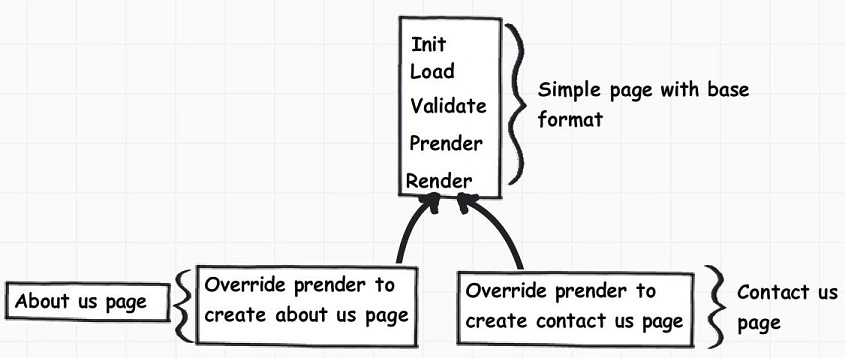
Figure:
The other
scenario which is applicable for template pattern is the XML parser. In XML we
normally parse the parent and the child elements. In many scenarios the parsing
is almost common with minor child element changes.
For instance in
the below code snippet we have Customer as the parent element and every customer
will have orders and orders will products.
Now the parsing of Customer and Order elements will be same but the products tag
can have size property depending on situation.
For instance in the below code snippet the product element has only name of the
product and amount.
<Customer Name="Shiv">
<Orders OrderNumber="1001">
<Product Name="Shirts" Amount="1000"/>
<Product Name="Socks" Amount="100"/>
</Orders>
</Customer>
There can be
situations where your product element can have other variations as shown in the
below XML snippet. In this case you can just override the parsing process of
product element and keep the overall XML parsing process sequence same.
<Customer Name="Shiv">
<Orders OrderNumber="1001">
<Product Name="Shirts" Amount="1000">
<LargeSize/>
</Product>
<Product Name="Socks" Amount="1000">
<SmallSize/>
</Product>
</Orders>
</Customer>
Business classes
have validation and we would like to create different versions of business
classes with different validation logic. You can see in the below code we have a
base supplier class. The set of the supplier code property is first calling "validatesuppcode"
function and then setting the value.
This "validatesuppcode"
function is defined as virtual and can be overridden by other classes to create
different validation logic.
public
class Supplier
{
private string
_SupplierCode;
public string SupplierCode
{
get
{
return _SupplierCode;
}
set
{
ValidateSuppCode(value);
_SupplierCode = value;
}
}
public virtual
void ValidateSuppCode(string SuppCode)
{
if (SuppCode.Length == 0)
{
throw new
Exception("Can
not be null");
}
}
}
We can now inherit the main
base supplier class and create a new supplier class called as "SupplierNew"
which checks for length greater than 10 also.
public
class SupplierNew
: Supplier
{
public override
void ValidateSuppCode(string
SuppCode)
{
base.ValidateSuppCode(SuppCode);
if (SuppCode.Length > 10)
{
throw new
Exception("can
not be more than 10");
}
}
}
Feel free to download these FAQ PDF's, articles of
design patterns from my site and also I have collected around 400 FAQ questions
and answers in
SilverLight, Azure, VSTS, WCF, WPF, WWF, SharePoint, design patterns, UML
etc.


jimmy martanPosted Mar 2, 2012, 1:52 AM
Thanks for such an informative article and the extensive explanation, it's been very useful. <a href="http://www.webdesignbizz.com/">Template Design</a>
Manish TewatiaPosted Dec 26, 2011, 1:49 AM
I worked through it now and all went well. Great job......
Sonakshi SinghPosted Dec 26, 2011, 1:35 AM
Very comprehensive approach
Manikavelu VelayuthamPosted Dec 23, 2011, 6:37 AM
Excellent Article
Alok PandeyPosted Dec 23, 2011, 2:00 AM
Very useful article.
Adora KrausePosted Dec 23, 2011, 1:54 AM
Nice presentation.
Arjun PanwarPosted Dec 23, 2011, 1:42 AM
Thanks for sharing