

As we know that performance is an important part for every application on production. If any website is facing issue of performance then the users do not prefer to use that website. There are many ways to improve the performance of a website in ASP.NET MVC. I am going to demonstrate one by one.
Step 1: Release Mode Build
You should always use the debug build on production. You should make sure that application is compiled in Release Mode rather than Debug Mode.
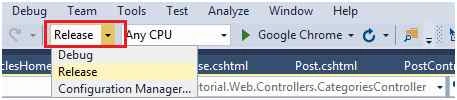
You need to make changes in Web.Config on Production, when going to deploy the ASP.NET MVC application. Make sure compilation debug mode should be false.

Step 2: Use Single View Engine
As you know in ASP.NET MVC, we can use multiple View Engines; it can be Web Forms [Aspx] orRazor [cshtml] or you can also create your own custom engine to process the ASP.NET MVC Views. We can also configure all engines in same application.
You need to care two things before setting up the engine for the MVC application. Firstly, Engines list should be clear before setting up new engine and only one engine should be setting up.
- protected override void OnApplicationStarted()
- {
- ViewEngines.Engines.Clear();
- ViewEngines.Engines.Add(new RazorViewEngine());
- base.OnApplicationStarted();
- AreaRegistration.RegisterAllAreas();
- RegisterGlobalFilters(GlobalFilters.Filters);
- RegisterRoutes(RouteTable.Routes);
- RegisterBundles(BundleTable.Bundles);
- Register(GlobalConfiguration.Configuration);
- RegisterAuth();
- System.Threading.LazyInitializer.EnsureInitialized(ref _initializer, ref _isInitialized, ref _initializerLock);
- }
We used to create client side application with attractive design. So, for this we always prefer to use Jquery/Javascript and CSS. But as we all know these files are downloaded when we are going to access the website. If you are using multiple CSS and Jquery file then it will take more time to load it and it makes your site very slow.
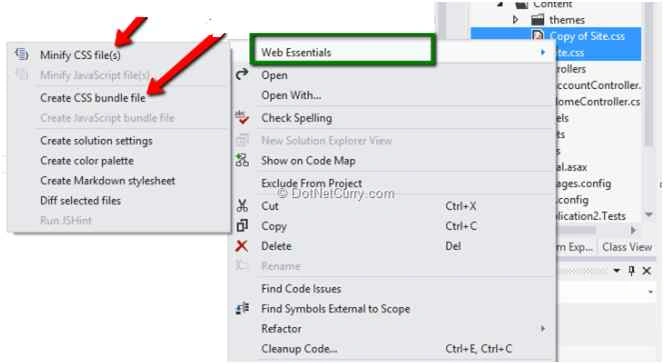
So, you should prefer to use small file which can be loaded faster or single file which load faster rather than multiple file. In MVC there are two concepts behind this Bundling and Minification. This will help your site to make it faster and decrease the load time.
- public static void RegisterBundles(BundleCollection bundles)
- {
- bundles.Add(new ScriptBundle("~/bundles/jquery").Include(
- "~/Content/Jquery/jquery-{version}.js"));
- bundles.Add(new ScriptBundle("~/bundles/jqueryval").Include(
- "~/Content/Jquery/jquery.unobtrusive*",
- "~/Content/Jquery/jquery.validate*"));
- bundles.Add(new ScriptBundle("~/bundles/JqueryHomePage").Include("~/Content/js/jquery-1.8.3.min.js", "~/Content/Jquery/bootstrap.min.js", "~/Content/Jquery/HomeJquery.js"));
- bundles.Add(new StyleBundle("~/Content/HomeMain").Include("~/Content/Css/style.css").Include("~/Content/Css/font-awesome/css/font-awesome.css", new CssRewriteUrlTransform()));
- }

rizwan alamPosted Oct 16, 2019, 5:48 AM
Nice article
sheshagiri pattarPosted Jun 22, 2018, 1:56 AM
Views running inside mvc application taking very much time what to do? and my dashboard containing very much db calls how to load my application dashboard faster in production?
sunil BhavsarPosted Sep 6, 2017, 2:36 AM
Vary Useful Article.........
Niladri SarkarPosted Jul 28, 2017, 2:38 AM
Damm Good article! Probably one the of best resources I have ever found.... Great work Mukesh :)
Jeevan WijerathnaPosted Oct 24, 2016, 8:16 AM
Useful article
Rajeev PunhaniPosted Feb 26, 2016, 7:01 AM
Nice article.
Pravin MarathePosted Feb 21, 2016, 11:56 AM
Really nice..
AbedElHamid AlWahidyPosted Jan 2, 2016, 5:02 AM
That is great article
Nitin PanditPosted Dec 27, 2015, 12:11 PM
Nice Article dear really Good :)
Padmavathi APosted Dec 23, 2015, 9:02 AM
Very useful article. Thank you for sharing.
Banketeshvar NarayanPosted Dec 22, 2015, 10:54 AM
NIce Share
Suman VermaPosted Dec 22, 2015, 8:20 AM
nice one
Suman VermaPosted Dec 22, 2015, 8:19 AM
Nice one
Aishwarya DPosted Dec 22, 2015, 1:50 AM
Nice one
Sibeesh VenuPosted Dec 22, 2015, 12:09 AM
Nice Share
Jaipal ReddyPosted Dec 21, 2015, 11:34 PM
Nice
Santhakumar MunuswamyPosted Dec 21, 2015, 11:26 PM
Can you upload source code it will be helpful for the beginner
Santhakumar MunuswamyPosted Dec 21, 2015, 11:26 PM
Thanks for sharing.
Ankur MistryPosted Dec 21, 2015, 3:16 PM
We can also implement gZip
Ankur MistryPosted Dec 21, 2015, 3:15 PM
useful information
Manas MohapatraPosted Dec 21, 2015, 11:50 AM
Very informative..
Mahesh ChandPosted Dec 21, 2015, 9:56 AM
This is great, Mukesh. I've found many cases where a website is slow because of database. Developers should go back and profile database including table indexing and run stored procedures to see how much time each of those SPs is taking and improve there. If there are too many joins, create Views. If database is large and very slow, create temp tables and views. Some applications may also need data catching. Web server can also catch pages as well. Cheers!
Ravi PatelPosted Dec 21, 2015, 9:55 AM
very helpful sir thanks
Raja TPosted Dec 21, 2015, 9:41 AM
Nice, Thanks for sharing