
Introduction
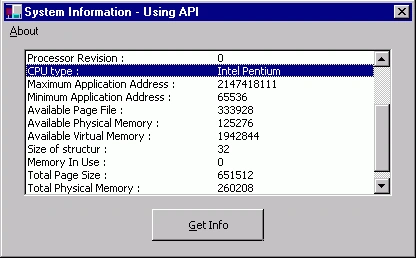
API (Application Programming Interface) is a set of commands, which interfaces the programs with the processors. The most commonly used set of external procedures are those that make up Microsoft Windows itself. The Windows API contains thousands of functions, structures, and constants that you can declare and use in your projects. Those functions are written in the C language, however, so they must be declared before you can use them. The declarations for DLL procedures can become fairly complex. Specifically to C# it is more complex than VB. You can use API viewer tool to get API function declaration but you have to keep in mind the type of parameter which is different in C#.
Most of the advanced languages support API programming. The Microsoft Foundation Class Library (MFC) framework encapsulates a large portion of the Win32 (API). ODBC API Functions are useful for performing fast operations on database. With API your application can request lower-level services to perform on computer's operating system. As API supports thousands of functionality from simple Message Box to Encryption or Remote computing, developers should know how to implement API in their program.
APIs has many types depending on OS, processor and functionality.
OS specific API:
Each operating system has common set of API's and some special e.g. Windows NT supports MS-DOS, Win16, Win32, POSIX (Portable Operating System Interface), OS/2 console API and Windows 95 supports MS-DOS, Win16 and Win32 APIs.
Win16 & Win32 API:
Win16 is an API created for 16-bit processor and relies on 16 bit values. It has platform independent nature e.g. you can tie Win16 programs to MS-DOS feature like TSR programs.
Win32 is an API created for 32-bit processor and relies on 32 bit values. It is portable to any operating system, wide range of processors and platform independent nature.
Win32 APIs has 32 prefix after the library name e.g. KERNEL32, USER32 etc
All APIs are implemented using 3 Libraries.
- Kernel
- User
- GDI
- KERNEL
It is the library named KERNEL32.DLL, which supports capabilities that are associated with OS such as
Context switching.
File I/O.
Memory management.
e.g. The GlobalMemoryStatus function obtains information about the system's current usage of both physical and virtual memory.
This is the library named "USER32.DLL" in Win32.
This allows managing the entire user interfaces such as
Windows
Menus
Dialog Boxes
Icons etc.,
e.g. The DrawIcon function draws an icon or cursor into the specified device context.
This is the library named "GDI32.dll" in Win32. It is Graphic output library. Using GDI Windows draws windows, menus and dialog boxes.
It can create Graphical Output.
It can also use for storing graphical images.
e.g. The CreateBitmap function creates a bitmap with the specified width, height, and color format (color planes and bits-per-pixel).
C# and API:
Implementing APIs in C# is tuff job for beginners. Before implementing API you should know how to implement structure in C#, type conversion, safe/unsafe code, managed/unmanaged code and lots more.
Before implementing complex APIs we will start with simple MessageBox API. To implement code for MessageBox API open new C# project and add one button. When button gets clicked the code will display Message Box.
Since we are using external library add namespace:
using System.Runtime.InteropServices;
James WhytePosted Oct 10, 2012, 5:19 AM
Try to ue api in C# with Ozeki Phone System XE. I have already tried it out to build applications. I came across their page which was about api and it was a great source to start programming. ozekiphone.com/what-is-capi-327.html
Sam HobbsPosted Jan 26, 2010, 12:48 AM
Actually an API interfaces programs to a specified system, where system might be Windows or it can be application software such as accounting software. An interface to the processor is more appropriately called a device driver. Most all of the Windows API functions exist in DLLs. The processor does nothing special when a Windows application calls a Windows API. Within API functions, Windows might do things that require the processor, but the interface from the application to Windows does not require that anything special is done by the processor.