

Object locking in C# is mainly employed to control access to a shared resource within a multithreaded setting, guaranteeing that only a single thread can interact with the resource at any given moment. This serves to avert race conditions, which arise when numerous threads try to alter a shared resource simultaneously, resulting in unforeseeable outcomes.
Advantages of Object Locking
- Maintaining Data Integrity: Guarantees that the data being accessed or altered by various threads stays reliable and accurate.
- Ensuring Thread Safety: Averts multiple threads from running critical code sections concurrently, thereby preventing potential concurrency problems.
- Preventing Deadlocks: Through the effective implementation of locking mechanisms, you can steer clear of scenarios where threads are stuck waiting endlessly for each other to release locks.
When to Acquire and Release an Object?
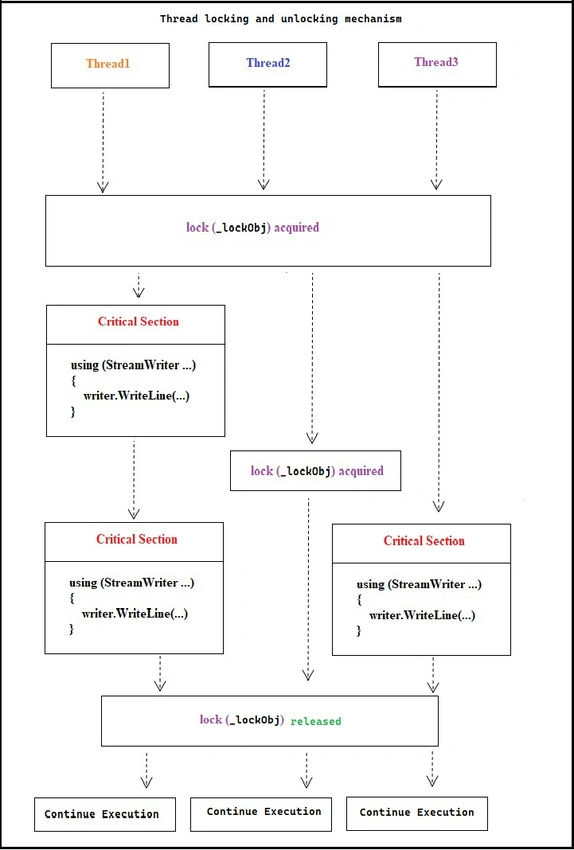
In C#, the lock statement is utilized to obtain the lock on an object and automatically release it upon exiting the code block.
(a) Acquiring an Object
- The lock statement is employed to obtain a lock on a specific object before entering a critical section.
- Only one thread can possess the lock at any given time, preventing other threads from accessing the locked code section until the lock is relinquished.
(b) Releasing an Object
- The lock is automatically released when the thread exits the code block associated with the lock statement. This guarantees that the lock is always released, even if an exception is thrown within the locked code block.
- Consider a practical real-life situation where numerous threads attempt to record messages to a file. It is crucial to prioritize thread safety in this scenario to prevent any mixing or corruption of log entries.
Real Scenario
- Imagine you have an application that processes various tasks in parallel, and each task needs to log its progress to a shared log file. To ensure that the log entries are written correctly without being interleaved, you need to use a locking mechanism.
- In this instance, we will establish a CustomLogger class that offers a method to log messages to a file in a thread-safe manner. The lock statement will be utilized to guarantee that only a single thread can write to the log file at any given time.
To lock and unlock an object, follow the steps below.
Step 1. Create a file by the name of “CustomLogger.cs” like below.
using System;
using System.CodeDom.Compiler;
using System.Collections.Generic;
using System.IO;
using System.Linq;
using System.Text;
using System.Threading;
using System.Threading.Tasks;
namespace LockUnlockExample
{
    internal class CustomLogger
    {
        private static readonly object _lockObj = new object();
        private readonly string _logFilePath;

        public CustomLogger(string logFilePath)
        {
            _logFilePath = logFilePath;
        }

        public void LogToFile(string message)
        {
            lock (_lockObj)
            {
                using (StreamWriter writer = new StreamWriter(_logFilePath, true))
                {
                    writer.WriteLine($"{DateTime.Now}: {message}");
                    System.Threading.Thread.Sleep(2000);
                }
            }
        }
        // Explanation of the above code:
        // 1. The lock statement ensures that the code block within its braces ({}) is executed by only one thread at a time.
        // 2. _lockObj is an object used for synchronization. It serves as a mutual exclusion lock (mutex).
        // 3. When a thread reaches this statement, it attempts to acquire the lock on _lockObj.
        // 4. If another thread has already acquired the lock, the current thread will wait (or block) until the lock is released.
    }
}
Join the conversation! Your thoughts help the community grow.