

Introduction

In this article, we will see how to use a CheckBox widget control and the CheckBox's CheckedChange event in Xamarin. For demonstration, I will create a simple application in which if the user accepts the terms and conditions (using the CheckBox) then the Submit button becomes enabled. If you are new to this Series on Xamarin then I suggest you read my previous articles of this series.
Let's Begin.
1. Create a new Android Application.
 2. Drop a CheckBox (with id="@+id/checkBox1") and Button (with id="@+id/btn_Submit") control onto the Layout, Main.axml.
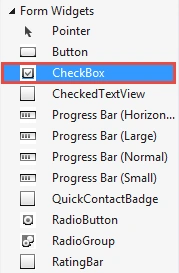
Set the text of the CheckBox as Accept Terms and Condition and the Button's text as Submit.
 Main.axml source code:
- <?xml version="1.0" encoding="utf-8"?>
- <LinearLayout xmlns:android="http://schemas.android.com/apk/res/android"
- android:orientation="vertical"
- android:layout_width="fill_parent"
- android:layout_height="fill_parent">
- <CheckBox
- android:text="Accept Terms and Conditions"
- android:layout_width="fill_parent"
- android:layout_height="wrap_content"
- android:id="@+id/checkBox1" />
- <Button
- android:text="Submit"
- android:layout_width="fill_parent"
- android:layout_height="wrap_content"
- android:id="@+id/btn_Submit"
- android:enabled="false" />
- </LinearLayout>
- using System;
- using Android.App;
- using Android.Content;
- using Android.Runtime;
- using Android.Views;
- using Android.Widget;
- using Android.OS;
- namespace CheckBoxDemo
- {
- [Activity(Label = "CheckBoxDemo", MainLauncher = true, Icon = "@drawable/icon")]
- public class Activity1 : Activity
- {
- //Create instance of Button
- Button btn_Submit;
- protected override void OnCreate(Bundle bundle)
- {
- base.OnCreate(bundle);
- //setting the view for the Activity
- SetContentView(Resource.Layout.Main);
- //Get btn_Submit Button and checkBox1 CheckBox control from the Main.xaml Layout.
- btn_Submit = FindViewById<Button>(Resource.Id.btn_Submit);
- CheckBox checkBox1 = FindViewById<CheckBox>(Resource.Id.checkBox1);
- //CheckBox CheckedChange Event
- checkBox1.CheckedChange += checkBox1_CheckedChange;
- //btn_Submit Click Event
- btn_Submit.Click += btn_Submit_Click;
- }
- void checkBox1_CheckedChange(object sender, CompoundButton.CheckedChangeEventArgs e)
- {
- //If CheckBox is Checked
- if(e.IsChecked==true)
- {
- btn_Submit.Enabled = true;
- }
- else
- {
- btn_Submit.Enabled = false;
- }
- }
- void btn_Submit_Click(object sender, EventArgs e)
- {
- Toast.MakeText(this,"Thanks for accepting Terms and Condition",ToastLength.Short).Show();
- }
- }
- }
Anoop Kumar SharmaPosted Dec 30, 2014, 10:15 PM
Thanks Vithal Wadje Sir! :)
Vithal WadjePosted Dec 30, 2014, 9:48 PM
nice to learn about Android ,thanks for sharing