Today, you will learn how to create a custom login and register without a plugin in WordPress. There are so many different ways of customizing the WordPress login page and register page process. There are two functions that are very important for logging in and registering. The first method is to check the username and the password. If your username and password are wrong, then this method will show an error in your Browser; and the second method is to create new user information and save it into your WordPess database.
WordPress Function
- wp_signon – It helps to authenticate a user with the option to remember the credentials.
- wp_create_user – This function allows you to insert a new user into the WordPress database.
- $login_data = array();
- $login_data['user_login'] = $username;
- $login_data['user_password'] = $password;
- $login_data['remember'] = $remember;
- $user_verify = wp_signon( $login_data, false );
- <?php
- // Check username is present and not already in use
- $username = $wpdb->escape($_REQUEST['username']);
- if (strpos($username, ' ') !== false)
- {
- $errors['username'] = "Sorry, no spaces allowed in usernames";
- }
- if (emptyempty($username))
- {
- $errors['username'] = "Please enter a username";
- }
- elseif (username_exists($username))
- {
- $errors['username'] = "Username already exists, please try another";
- }
- // Check email address is present and valid
- $email = $wpdb->escape($_REQUEST['email']);
- if (!is_email($email))
- {
- $errors['email'] = "Please enter a valid email";
- }
- elseif (email_exists($email))
- {
- $errors['email'] = "This email address is already in use";
- }
- // Check password is valid
- if (0 === preg_match("/.{6,}/", $_POST['password']))
- {
- $errors['password'] = "Password must be at least six characters";
- }
- // Check password confirmation_matches
- if (0 !== strcmp($_POST['password'], $_POST['password_confirmation']))
- {
- $errors['password_confirmation'] = "Passwords do not match";
- }
- // Check terms of service is agreed to
- if ($_POST['terms'] != "Yes")
- {
- $errors['terms'] = "You must agree to Terms of Service";
- }
- if (0 === count($errors))
- {
- $password = $_POST['password'];
- $new_user_id = wp_create_user($username, $password, $email);
- // You could do all manner of other things here like send an email to the user, etc. I leave that to you.
- $success = 1;
- header('Location:' . get_bloginfo('url') . '/login/?success=1&u=' . $username);
- }
Let's start with the following steps.
Step 1: To create a template in WordrPess, Create PHP file like new –login.php.
Go to your active theme.
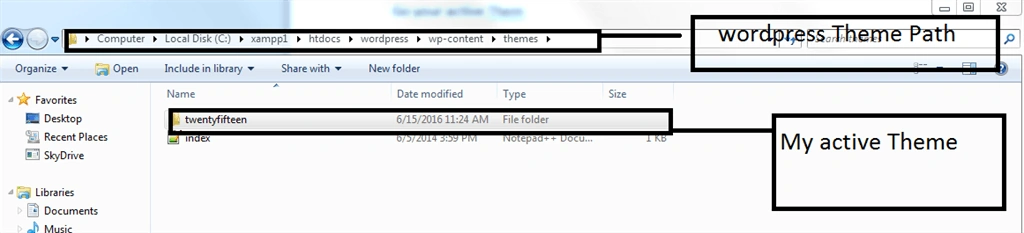
Open the active theme folder and save the PHP file which is created.
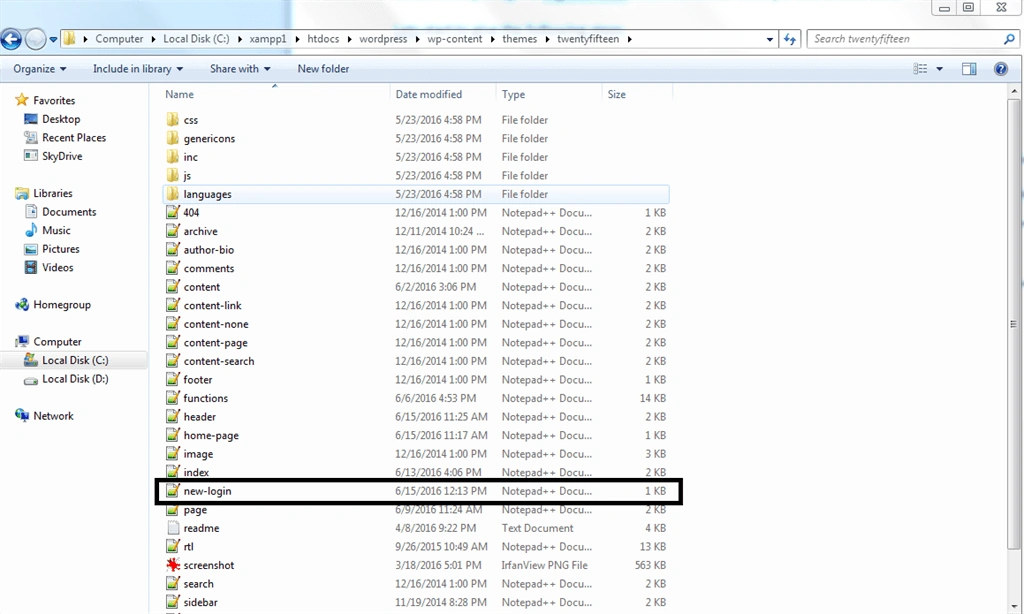
Open PHP file into PHP editor like Netbeans , Notepad++ etc.
Step 2: Open the file and write the template name, shown in the example, given below:

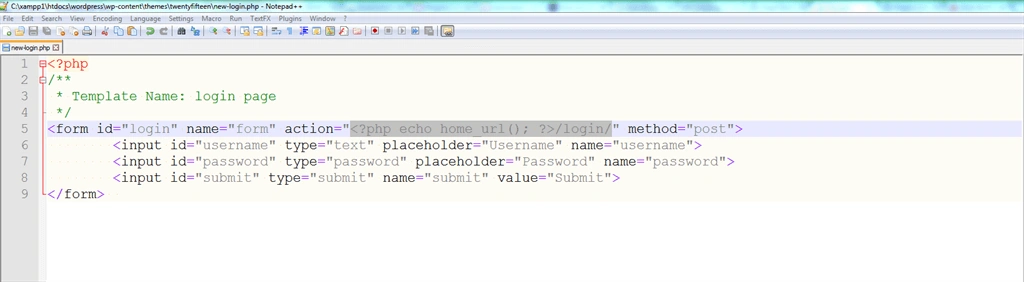
Save it.
Step 3: Go to WordPress admin panel and create WordPress pages.
Click Pages-> Add New.
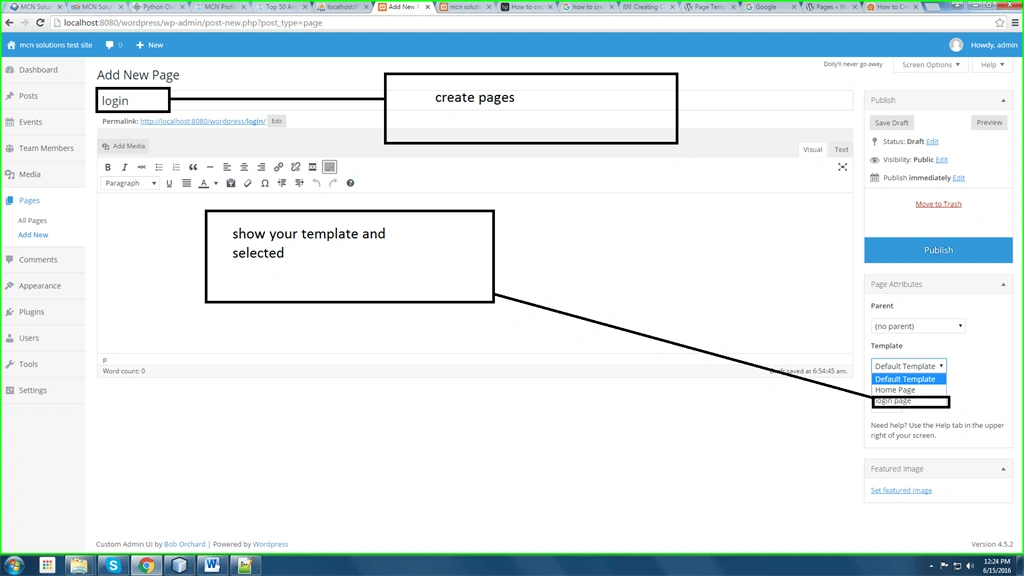
Click publish.
Step 4: Open your pages in the Browser. Show login HTML in your pages.

Step 5: If you enter the wrong information, then it will display the error as follows:

On entering the correct information, the following screenshot will emerge:

Login Code display
- <?php
- /**
- * Template Name: login page
- */
- get_header();
- if($_POST)
- {
- global $wpdb;
- //We shall SQL escape all inputs
- $username = $wpdb->escape($_REQUEST['username']);
- $password = $wpdb->escape($_REQUEST['password']);
- $remember = $wpdb->escape($_REQUEST['rememberme']);
- if($remember) $remember = "true";
- else $remember = "false";
- $login_data = array();
- $login_data['user_login'] = $username;
- $login_data['user_password'] = $password;
- $login_data['remember'] = $remember;
- $user_verify = wp_signon( $login_data, false );
- if ( is_wp_error($user_verify) )
- {
- echo "Invalid login details";
- // Note, I have created a page called "Error" that is a child of the login page to handle errors. This can be anything, but it seemed a good way to me to handle errors.
- } else
- {
- echo "<script type='text/javascript'>window.location.href='". home_url() ."'</script>";
- exit();
- }
- } else
- {
- // No login details entered - you should probably add some more user feedback here, but this does the bare minimum
- //echo "Invalid login details";
- }
- ?>
- <form id="login1" name="form" action="<?php echo home_url(); ?>/login/" method="post">
- <input id="username" type="text" placeholder="Username" name="username"><br>
- <input id="password" type="password" placeholder="Password" name="password">
- <input id="submit" type="submit" name="submit" value="Submit">
- </form>
- <?php get_footer(); ?>


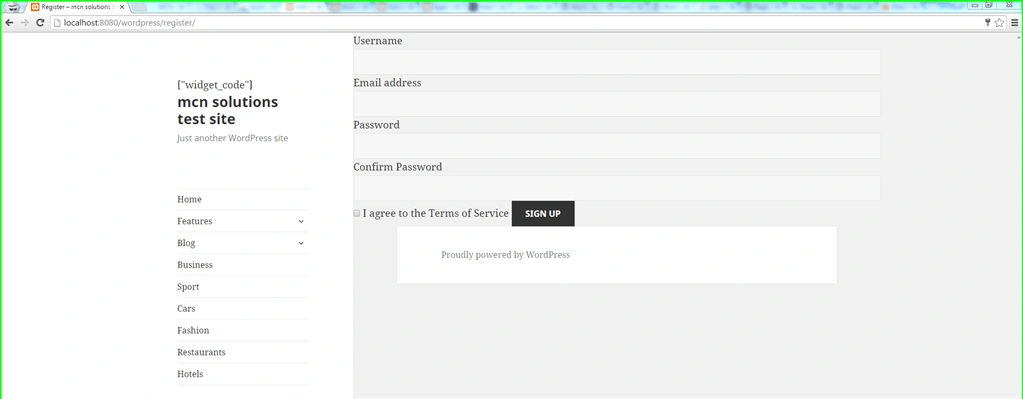
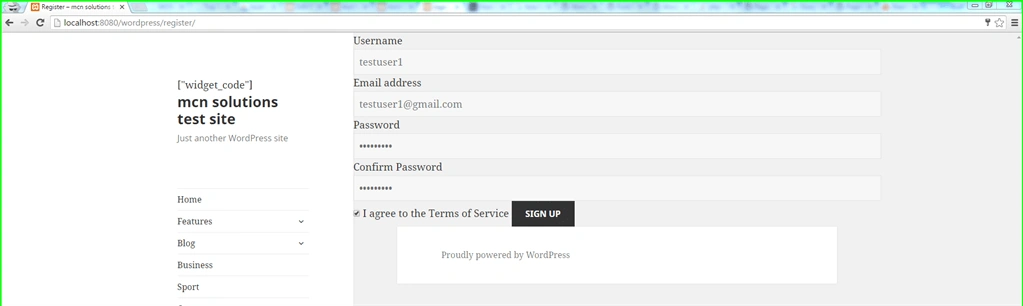
Fill in information

Click sign up button.
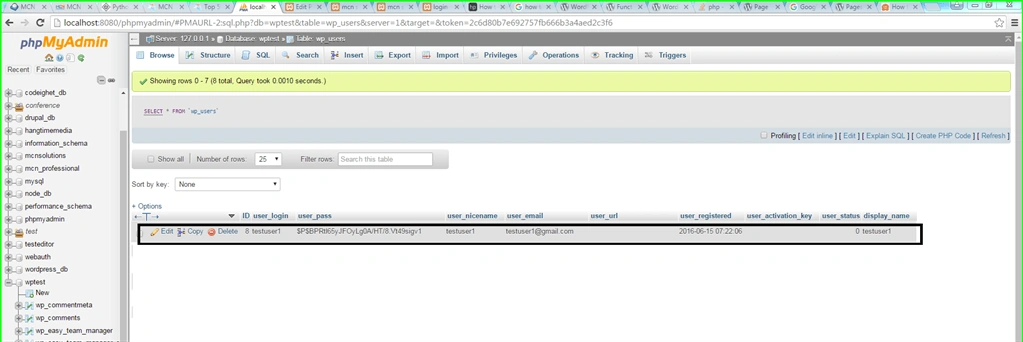
Go to the database and show the record.

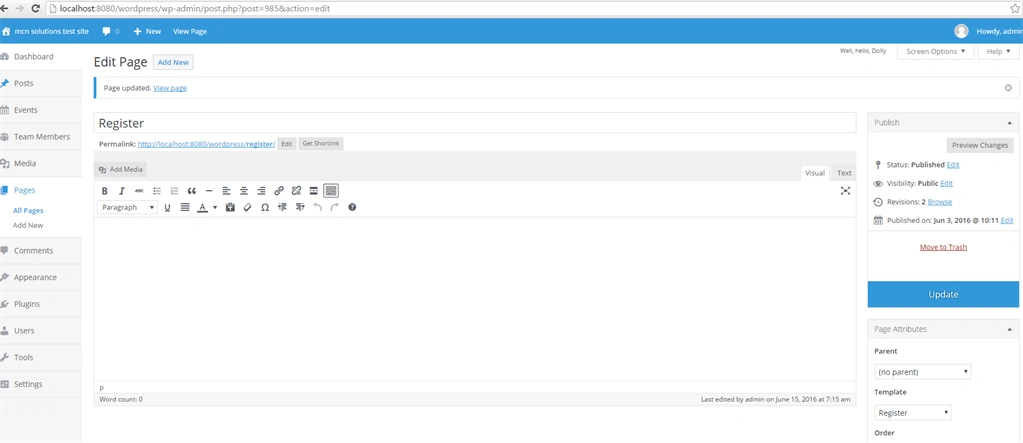
Register file code
- <?php
- /*
- Template Name: Register
- */
- get_header();
- global $wpdb, $user_ID;
- //Check whether the user is already logged in
- if ($user_ID)
- {
- // They're already logged in, so we bounce them back to the homepage.
- header( 'Location:' . home_url() );
- } else
- {
- $errors = array();
- if( $_SERVER['REQUEST_METHOD'] == 'POST' )
- {
- // Check username is present and not already in use
- $username = $wpdb->escape($_REQUEST['username']);
- if ( strpos($username, ' ') !== false )
- {
- $errors['username'] = "Sorry, no spaces allowed in usernames";
- }
- if(emptyempty($username))
- {
- $errors['username'] = "Please enter a username";
- } elseif( username_exists( $username ) )
- {
- $errors['username'] = "Username already exists, please try another";
- }
- // Check email address is present and valid
- $email = $wpdb->escape($_REQUEST['email']);
- if( !is_email( $email ) )
- {
- $errors['email'] = "Please enter a valid email";
- } elseif( email_exists( $email ) )
- {
- $errors['email'] = "This email address is already in use";
- }
- // Check password is valid
- if(0 === preg_match("/.{6,}/", $_POST['password']))
- {
- $errors['password'] = "Password must be at least six characters";
- }
- // Check password confirmation_matches
- if(0 !== strcmp($_POST['password'], $_POST['password_confirmation']))
- {
- $errors['password_confirmation'] = "Passwords do not match";
- }
- // Check terms of service is agreed to
- if($_POST['terms'] != "Yes")
- {
- $errors['terms'] = "You must agree to Terms of Service";
- }
- if(0 === count($errors))
- {
- $password = $_POST['password'];
- $new_user_id = wp_create_user( $username, $password, $email );
- // You could do all manner of other things here like send an email to the user, etc. I leave that to you.
- $success = 1;
- //header( 'Location:' . get_bloginfo('url') . '/login/?success=1&u=' . $username );
- }
- }
- }
- ?>
- <form id="wp_signup_form" action="<?php echo $_SERVER['REQUEST_URI']; ?>" method="post">
- <label for="username">Username</label>
- <input type="text" name="username" id="username">
- <label for="email">Email address</label>
- <input type="text" name="email" id="email">
- <label for="password">Password</label>
- <input type="password" name="password" id="password">
- <label for="password_confirmation">Confirm Password</label>
- <input type="password" name="password_confirmation" id="password_confirmation">
- <input name="terms" id="terms" type="checkbox" value="Yes">
- <label for="terms">I agree to the Terms of Service</label>
- <input type="submit" id="submitbtn" name="submit" value="Sign Up" />
- </form>
- <?php get_footer(); ?>

Roshan RathodPosted Jul 30, 2020, 12:05 AM
Good one...
Rafael ChicaPosted Oct 4, 2018, 5:31 PM
Nice, but how make page profile no plugin. Thanks.
Santhakumar MunuswamyPosted Jun 25, 2016, 2:54 AM
Nice share
Vignesh ManiPosted Jun 17, 2016, 5:36 AM
Nice
Thiruppathi RPosted Jun 16, 2016, 1:00 AM
Nice one..
Bhushan SinghPosted Jun 16, 2016, 12:19 AM
thnks
RajaPosted Jun 16, 2016, 12:01 AM
Nice...