

Introduction
Here's part-2 of the series and it shows CRUD operations using Ajax or without loading the page and binding the data in HTML Table using Ajax with edit and delete operations.
Description
Before moving to the article I will suggest you to visit my first article to save data in the database and bind in HTML table using Ajax. Here's the link:
After the first article we completed till the following:
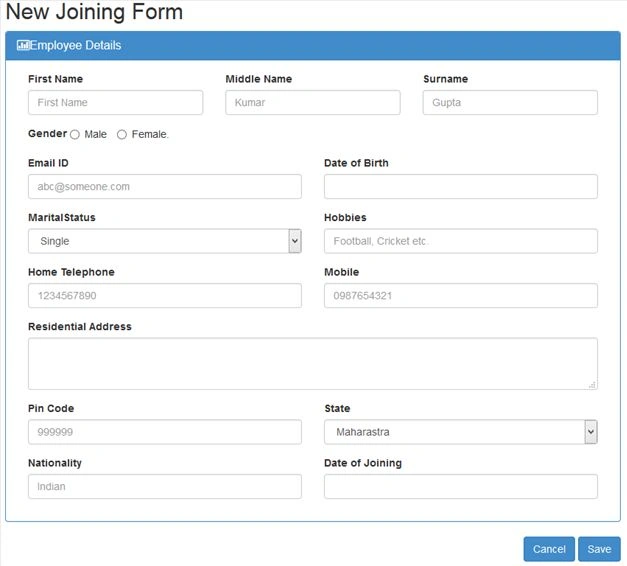
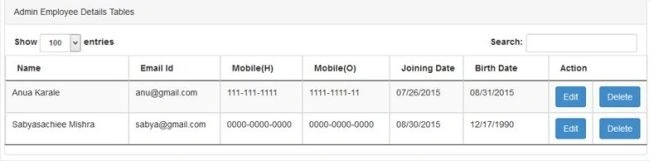
Step 1: (For Edit Option).
The Edit button has the following code:
<input type="button" class="btn btn-primary editButton" data-id="<%=TableData.Rows[data]["EmpId"] %>" data-toggle="modal" data-target="#myModal" name="submitButton" id="btnEdit" value="Edit" /></td>
data-id is bind with EmpId so that on clicking that particular row button, respective data from the database of EmpID will be the Popup.
Here I have used PopUp edit of BootStrap for displaying it in a better way.
HTML Code for PopUp Edit is as in the following code snippet:
<div class="modal fade bs-example-modal-lg" tabindex="-1" role="dialog" aria-labelledby="myLargeModalLabel" id="myModal">
        <div class="modal-dialog" role="document">
            <div class="modal-content">
                <div class="modal-header">
                    <button type="button" class="close" data-dismiss="modal" aria-label="Close"><span aria-hidden="true">×</span></button>
                    <h2 class="modal-title" id="myModalLabel">Modal title</h2>
                </div>
                <div class="modal-body">
                    <div class="panel-body">
                        <div class="form-group col-lg-4">
                            <label>First Name</label>
                            <input type="text" name="FirstName" id="FirstName1" class="form-control" placeholder="Ajay" required="" />
                        </div>

                        <div class="form-group col-lg-4">
                            <label>Middle Name</label>
                            <input type="text" name="MiddleName" id="MiddleName1" class="form-control" placeholder="Kumar" required="" />
                        </div>
                        <div class="form-group col-lg-4 ">
                            <label>Surname</label>
                            <input type="text" name="Surname" id="Surname1" class="form-control" placeholder="Gupta" required="" />
                        </div>

                        <div class="form-group col-lg-4">
                            <label>Gender</label>
                            <label class="radio-inline">
                                <input type="radio" checked="" value="Male" id="Male1" name="Gender" />
                                Male

                            </label>
                            <label class="radio-inline">
                                <input type="radio" value="Female" id="Female1" name="Gender" />
                                Female.
                            </label>
                        </div>
                        <div class="clearfix"></div>
                        <div class="form-group col-lg-6">
                            <label>Email ID</label>
                            <input type="email" readonly="readonly" name="EmailId" id="EmailId1" class="form-control" placeholder="[email protected]" required="" />
                        </div>
                        <div class="form-group col-lg-6">
                            <label>Date of Birth </label>
                            <input type="date" name="Dob" id="Dob1" min="1920-01-02" class="form-control datepicker" required="" />
                        </div>
                        <div class="form-group col-lg-6">
                            <label>MaritalStatus</label>
                            <select name="MaritalStatus" id="MaritalStatus1" class="form-control" required="">
                                <option value="" disabled="disabled">-- Select -- </option>
                                <option value="Single">Single</option>
                                <option value="Married">Married</option>
                            </select>
                        </div>
                        <div class="form-group col-lg-6">
                            <label>Hobbies</label>
                            <input type="text" name="Hobbies" id="Hobbies1" class="form-control" placeholder="Football, Cricket etc." />
                        </div>
                        <div class="form-group col-lg-6">
                            <label>Home Telephone</label>
                            <input type="text" name="TelephoneNo" id="TelephoneNo1" class="form-control" placeholder="1234567890" />
                        </div>
                        <div class="form-group col-lg-6">
                            <label>Mobile</label>
                            <input type="tel" name="MobileNo" id="MobileNo1" class="form-control" required="" placeholder="0987654321" />
                        </div>
                        <div class="form-group col-lg-12">
                            <label>Residential Address</label>
                            <textarea rows="2" name="ResidentialAddress" id="ResidentialAddress1" class="form-control" required=""></textarea>
                        </div>
                        <div class="form-group col-lg-6 ">
                            <label>Pin Code</label>
                            <input type="text" name="PinCode" id="PinCode1" class="form-control" placeholder="999999" />
                        </div>
                        <div class="form-group col-lg-6">
                            <label>State</label>
                            <select name="State" id="State1" class="form-control" required="">
                                <option value="" disabled="disabled">-- Select -- </option>
                                <option value="Maharashtra">Maharastra</option>
                                <option value="Bihar">Bihar</option>
                                <option value="Delhi">UP</option>
                                <option value="Odisha">Odisha</option>
                                <option value="Odisha">AP</option>
                            </select>
                        </div>
                        <div class="form-group col-lg-6">
                            <label>Nationality</label>
                            <input type="text" name="title" id="Nationality1" class="form-control" placeholder="Indian" required="" />
                        </div>
                        <div class="form-group col-lg-6">
                            <label>Date of Joining</label>
                            <input type="date" name="Doj" id="Doj1" class="form-control datepicker" required="" />
                        </div>
                    </div>
                </div>
                <div class="modal-footer">
                    <button type="button" class="btn btn-default" data-dismiss="modal">Close</button>
                    <button type="button" id="btnUpdate" class="btn btn-primary" edit-id="" data-dismiss="modal">Save changes</button>
                </div>
            </div>
        </div>
    </div>
</div>
MImran KhanPosted Sep 4, 2019, 3:38 AM
Cannot implicitly convert type 'string' to 'system.datetime' in asp.net in this code details.AddRange(from DataRow dtrow in TableData.Rows select new Employee { EmpId = Convert.ToInt32(dtrow["EmpId"]), FName = dtrow["Fname"].ToString(), Email = dtrow["EMail"].ToString(), HomeMobile = dtrow["Telephone"].ToString(), OfficeMobile = dtrow["Mobile"].ToString(), Doj = dtrow["DOJ"], Dob = dtrow["DOB"] });
Love HammadPosted Jun 3, 2017, 7:08 AM
Really very nice article. Please suggest me way to insert multiple value from gridview or any other data control to database using ajax. Thank you.
Manav PandyaPosted Jan 20, 2017, 12:29 AM
Nice article share sir ....
CHETAN SARODEPosted Aug 20, 2016, 3:56 AM
I am using same process but my EmpID is string when the EmpID is like 123,12345 then it works fine but when it like A0001,A0002,AB123 then it shows error how to solve
SubashPosted Aug 1, 2016, 5:42 AM
Nice
Pops FalePosted Mar 29, 2016, 5:08 AM
nice
ROHAN THAKURPosted Nov 7, 2015, 4:14 AM
nice article, but searching and paging is not working...
Serkan CamurPosted Oct 8, 2015, 10:08 AM
thanks.. http://www.serkancamur.com
Rakesh SadhulaPosted Oct 1, 2015, 2:19 PM
Great !!! My KT did not gone in vain
Jaipal ReddyPosted Sep 30, 2015, 3:59 AM
Nice article sir.
Vidhyadhar GalandePosted Sep 28, 2015, 8:41 AM
Nice Article
Sujeet SumanPosted Sep 28, 2015, 1:16 AM
Nice Article................
Muhammad Aqib ShehzadPosted Sep 26, 2015, 8:25 AM
Good one....
Vipul MalhotraPosted Sep 23, 2015, 4:01 AM
nice article
Ajeet MishraPosted Sep 23, 2015, 2:26 AM
nice
Afzaal Ahmad ZeeshanPosted Sep 18, 2015, 6:51 AM
Interesting topic! Good...
tarun sainPosted Sep 16, 2015, 8:08 AM
Sir, so when you post new article on search with custom pagination using ajax....
Dheeraj KumarPosted Sep 16, 2015, 5:06 AM
This is great article, Really very Help Full Thanks...
venkat raoPosted Sep 16, 2015, 1:44 AM
TableData.Clear(); sda.Fill(TableData); jsondata = JsonConvert.SerializeObject(TableData); showing error: TableData doest not exist in the current context
Mohammed IbrahimPosted Sep 14, 2015, 8:27 PM
nice
ROHAN THAKURPosted Sep 14, 2015, 7:02 AM
Thnx sir...
ROHAN THAKURPosted Sep 14, 2015, 6:03 AM
paging and searching not working sir.
Rajeesh MenothPosted Sep 10, 2015, 2:49 PM
Good One, Thanks for sharing..
Harshad PansuriyaPosted Sep 10, 2015, 8:43 AM
Nice share
Sibeesh VenuPosted Sep 10, 2015, 8:08 AM
Nice Share
tarun sainPosted Sep 10, 2015, 7:41 AM
excellent article sir ji, but searching and pagination not working in this article..
VINAY KUMAR GUPTAPosted Sep 10, 2015, 6:26 AM
nICE aRTICLE sIR jI
ROHAN THAKURPosted Sep 10, 2015, 4:25 AM
It's working now. Thanks for your immediate response sir...
ROHAN THAKURPosted Sep 10, 2015, 2:41 AM
sir please share the updated file.
ROHAN THAKURPosted Sep 10, 2015, 2:03 AM
after loading page only one record we can delete, if we want to delete second record it's not deleting no exception or error occur... so please help in regarding this
RakeshPosted Sep 9, 2015, 5:47 AM
Good one
ROHAN THAKURPosted Sep 9, 2015, 3:25 AM
Thanks for sharing sir, but delete not working properly
Santhakumar MunuswamyPosted Sep 8, 2015, 3:16 PM
Thanks for nice share
Mohammed IbrahimPosted Sep 8, 2015, 3:09 PM
nice share
Ilker EPosted Sep 8, 2015, 8:47 AM
Helpfull.. thanks
Pankaj Kumar ChoudharyPosted Sep 8, 2015, 8:45 AM
Nice Explain Sir.........
Karthikeyan KPosted Sep 8, 2015, 6:13 AM
Good one sir...Thanks for sharing us...