

A quick search on the Internet for "CSS menus" reveals hundreds of websites providing free CSS based menus: horizontal menus, vertical menus, menus with tabs, menus with dropdowns, etc. Almost all of these menus operate on the same basic principle: they take an HTML unordered list and they apply CSS styles. That is, the HTML looks something like this:
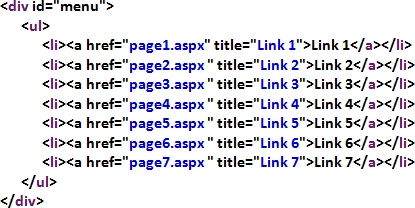
The CSS makes this look like a menu or set of tabs:

The CSS has one style for the active tab (Link 3) and another style for all the
other tabs. The HTML indicates which tab is active by assigning it a special CSS
class:
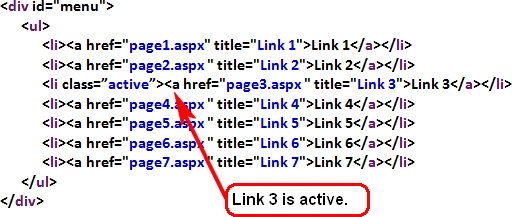
This is where the difficulty arises when you're using a Master Page. How do you
set the class for the active tab?
You can put the basic HTML list in the Master Page, but you will have to write
code to set the class for the active tab. There are many ways to do this. I do
it with JavaScript.
The first step is to give each list item an ID.
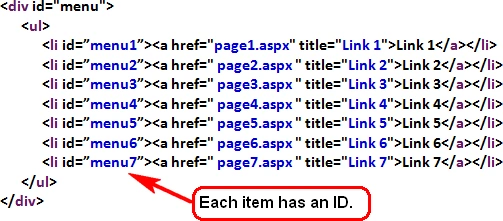
Add the following to the master page:

Each of the content pages (page1.aspx, page2.aspx, etc.) should implement the
Master Page and include the following. On each page, this hidden span indicates
which menu tab should be active.

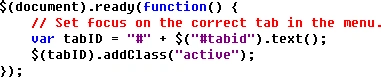
Now we'll add some Javascript to the Master Page. Each time the Master Page
loads, the Javascript code will find the span called tabid. The text of this
span provides the ID of the menu tab which should be active. The Javascript code
will find the menu tab and give it the "active" class.
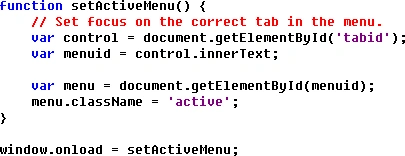
In jQuery, the Javascript looks like this:
The downloadable code sample uses a CSS menu from Dynamic Drive CSS Library (http://www.dynamicdrive.com/style/).
Dynamic Drive CSS Library has many different CSS menus which you can download
and use. In my example, I used the DD Color Tabs CSS(http://www.dynamicdrive.com/style/csslibrary/item/dd-color-tabs/P10/).
Andrew MoskalPosted Oct 18, 2012, 1:38 PM
I have got this to work perfectly without using the jquery. My question now is I have to add a nested Master and I cannot get it work with the nested (or the pages within the nested). Any clues?
ketan shahaPosted Jun 22, 2012, 1:56 AM
c
ketan shahaPosted Jun 22, 2012, 1:56 AM
c
sathesh RPosted May 30, 2011, 6:36 AM
the above code is not working in fire fox
vaibhav fegadePosted Mar 23, 2011, 9:08 AM
when I click on CssMenu.zip it gives following error XML Parsing Error: no element found Location: http://www.c-sharpcorner.com/uploadfile/afenster/3737/Default.aspx Line Number 1, Column 1: Please help me....
Allison SzaszeditedPosted Feb 18, 2011, 3:41 PMEdited Feb 18, 2011, 3:43 PM
I am also not getting this to work. I ended up downloading the sample file and commented out the j-query so I could see how the javascript was working, only it didn't work at all with the sample file. The tabs didn't show a current state. I think there must be a discrepancy somewhere...
Andrew FenstereditedPosted Jan 5, 2011, 10:03 AMEdited Jan 5, 2011, 10:06 AM
I'm sorry you're having trouble. One thing I notice in your comment is that the div ID is "menu." The CSS in the sample project is looking for a div ID of "ddcolortabs." So you need to either modify the CSS or change the ID of the div. You should download and look at the sample project, which contains a working example. The JavaScript gets linked in on the master page like this: <head id="Head1" runat="server"> <title>CSS Menu Example</title> <meta http-equiv="content-type" content="text/html;charset=utf-8" /> <script src="<%# Page.ResolveUrl("~/Scripts/menu.js")%>" type="text/javascript"></script> </head> You also need to make sure your content pages are set up right. So your Contact.aspx page should have this: <asp:Content ID="Content1" ContentPlaceHolderID="ContentPlaceHolder_Menu" runat="server"> <span id="tabid" style="display: none">Contact</span> </asp:Content> This is used to specify which tab (which list item) gets set active. In this case, it's the Contact tab.
Ben JohnsoneditedPosted Jan 5, 2011, 8:37 AMEdited Jan 5, 2011, 8:39 AM
I have followed each of your steps but have no luck getting it no work. Nothing seems to happen. My list is as follows <div id="menu"> <ul> <li id="Home"><a href="index.aspx"><span>Home</span></a></li> <li id="Quotes"><a href="Quotes.aspx"><span>Quotes</span></a></li> <li id="Contact"><a href="<%= Page.ResolveUrl("~/Contact.aspx")%>"><span>Contact</span></a></li> </ul> </div> And Javascript <script type="text/javascript" language="javascript"> function setActiveMenu() { var control = document.getElementById('tabid'); var menuid = control.innerText; var menu = document.getElementById(menuid); menu.classname = 'active'; } window.onlaod = setActiveMenu; </script> Where do you place your java script in the masterpage? Hope you can help, thanks