

I am here to discuss one of the popular behavioral design patterns called Observer. Before talking about its implementation, let’s begin with defining it.
As per the GOF guys, Observer pattern is defined as the following:
“Define a one-to-many dependency between objects, so that when one object changes state, all its dependents are notified and updated automatically.”
Well! Let’s understand what they mean and where this pattern can fit. Observer pattern is used in cases when any signal/event needs to be notified to multiple observers or clients. The condition of sending signals can be customized based on the business need.
Observer pattern in .NET Framework
Delegate, in .NET, by default supports the observer pattern, especially multicast delegate, that can be attached to any event or user action to call registered event handlers.
Generic interfaces IObserver and IObservable can also be used to implement the observer pattern as they provide required methods, by default. If you are interested in knowing how to work with them, you may refer to this link.
In WPF and Windows Forms, you might have implemented INotifyPropertyChanged that also supports Observer pattern. OK! So, we discussed about out of the box features that directly or indirectly support observer pattern. Now, let’s talk about the custom implementation of the pattern. Let’s have a look at the code map diagram from the example we will be going through in the rest of the article.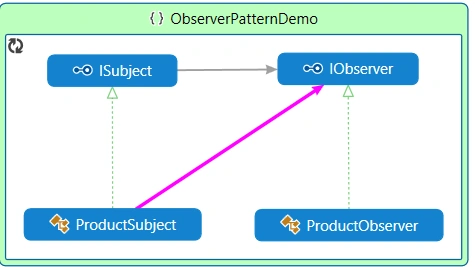
Observer pattern has some key components, as following.
- Subject -> Provides interface to attach/detach observer objects. In the diagram above, ISubject does this job.
- ConcreteSubject -> Provides the implementation of subject interface and handles notification logic. Here, ProductSubject has been used for this.
- Observer -> Defines the method to handle notification. In our example, IObserver is designed for this.
- ConcreateObserver -> Provides implementation to the notification method. We have ProductObserver doing this job.
How Observer pattern works
Let’s understand this by a simple example.
We will first create Subject interface as following.
- interface ISubject
- {
- void Register(IObserver observer);
- void Unregister(IObserver observer);
- void Notify();
- }
- public interface IObserver
- {
- void NotifyProductArrival();
- }


Prakash TripathiPosted Sep 5, 2016, 11:23 AM
Thnx Prasanna for reading.
Prasanna MuraliPosted Sep 5, 2016, 11:13 AM
Nice post......
Prakash TripathiPosted Jul 19, 2016, 8:38 AM
Thnx Vignesh.
Prakash TripathiPosted Jul 19, 2016, 8:38 AM
Thnx Farooq.
Vignesh ManiPosted Jul 19, 2016, 8:28 AM
Nice
farooq smdPosted Jul 19, 2016, 7:49 AM
Nice one
Prakash TripathiPosted Jul 19, 2016, 6:17 AM
Thnx Asad.
Asad AliPosted Jul 19, 2016, 4:08 AM
Good one
Prakash TripathiPosted Jul 19, 2016, 3:09 AM
Thnx Shobana for reading.
Shobana JPosted Jul 19, 2016, 2:32 AM
Nice one
Prakash TripathiPosted Jul 19, 2016, 2:19 AM
Thnx Kalu singh.
kalu singh raoPosted Jul 19, 2016, 1:25 AM
Nice...