

I am here to continue the discussion around Design Patterns. Today, we will go through one of the structural design patterns called Composite.
Also in case you have not had a look at our previous articles, go through the following link:
- Design Patterns Simplified: Part 1
- Design Patterns Simplified - Part 2 (Singleton)
- Design Patterns Simplified - Part 3 (Simple Factory)
- Design Patterns Simplified - Part 4 (Abstract Factory)
- Design Patterns Simplified - Part 5 (Factory Method)
- Design Patterns Simplified - Part 6 (Prototype)
- Design Patterns Simplified - Part 7 (Builder)
- Design Patterns Simplified - Part 8 (Facade)
- Design Patterns Simplified - Part 9 (Adapter)
- Design Patterns Simplified - Part 10 (Decorator)
- Design Patterns Simplified - Part 11 (Bridge)
As per GOF guys, Composite pattern is defined as in the following.
“Compose objects into tree structures to represent part-whole hierarchies. Composite lets clients treat individual objects and compositions of objects uniformly.”
Well! Let’s understand what they mean and where this pattern can be fit into.
In cases when data is available in hierarchical format and both individual (leaf) and composite (non-leaf) objects are treated in the same way, composite pattern turns out to be the perfect fit.
For example, employee structure in an organization where leadership or CEO stands in the top followed by bunch of directors and managers and then the junior employees.
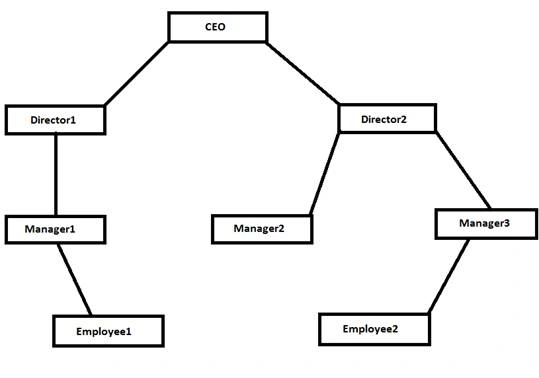
In this case CEO, Directors, and Managers are composite objects as they manage their subordinates, however, Employees or Junior Employees are the individual objects that appear in the leaf of the structure.
Another example could be file system structure in a computer where hierarchy can be formed right from root folder until the last file available.
Child controls in the Windows or Web forms can also be handled by Composite pattern as they also follow the below given hierarchy.
- Form -> Panel ->TextBox
- Form -> Panel ->Table ->TextBox
- Form -> Table-> Label
Below is the UML of Composite pattern.
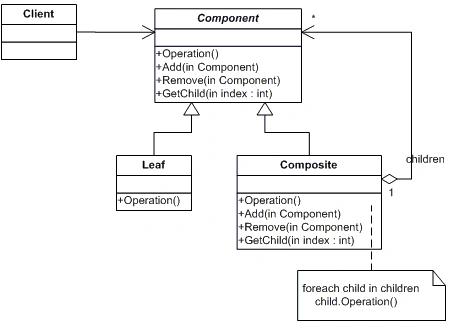
Composite pattern has three key elements as following.
- Component: This is the abstract class or interface containing methods that will be implemented by all the objects in the hierarchy.
- Composite: This class keeps all the methods required to manage its child objects i.e. Add/Remove/Get and common method defined in Component.
- Leaf: This class has only the common method defined in Component.
How Composite pattern works?
We will understand this by simple example.
Let’s start with creating Component which is the base for all the objects
- ///<summary>
- /// The Component
- ///</summary>
- public interface IEmployee
- {
- void ShowYearsOfExperiance();
- }
Prakash TripathiPosted Apr 19, 2016, 1:03 AM
Thnx Humayun.
Humayun Kabir MamunPosted Apr 19, 2016, 12:41 AM
Nice...
Prakash TripathiPosted Apr 18, 2016, 2:02 PM
Thnx Debasis.
Prakash TripathiPosted Apr 18, 2016, 2:02 PM
Thnx Rahul.
Debasis SahaPosted Apr 18, 2016, 1:48 PM
Good One..
Rahul Kumar SaxenaPosted Apr 18, 2016, 1:48 PM
Good Series..
Prakash TripathiPosted Apr 18, 2016, 1:23 PM
Thnx Gowtham.
Gowtham KPosted Apr 18, 2016, 1:08 PM
Good One, Thanks for sharing:)
Prakash TripathiPosted Apr 18, 2016, 12:59 PM
Thnx Kuppurasu
Kuppurasu NagarajPosted Apr 18, 2016, 12:57 PM
Nice Sharing...