

Introduction
This is used for configuring the module behavior on different pages in the same project or in different projects. The settings may be some redirected URL or some procedure name etc.
Before starting with Part Three, let's go through the previous two parts,
- DNN (Formerly DotNetNuke) Tutorial - Part 1
- DNN (Formerly DotNetNuke) Tutorial - Part 2 (Adding Modules)
Create a Custom Edit Page
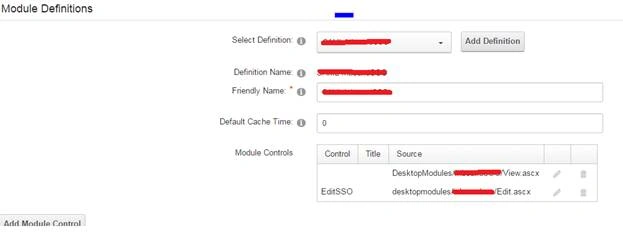
Create a new module folder in the DesktopModules and add two user controls.
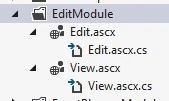
For Example
Here, I have added two user controls View.ascx and Edit.ascx in the EditModule folder. (You can give custom names for the user controls, for easy understanding I've just given View and Edit as names. )
Here is the View.ascx page will be visible to the end-users and the Edit.ascx only be for the Admin users
- As you know all the modules should be inherited from the class “PortalModuleBase”.
- Also, we need to include some reference to the View page to call the action page “Edit.ascx”.
using DotNetNuke.Entities.Modules.Actions;
using DotNetNuke.Security;
A module action is used to define a specific function for a given module. Each module can define one or more actions that the portal will present to the user. These actions may be presented as a menu, a dropdown list, or even a group of link buttons.
Using the property ModuleActionCollection property we can add new module action to the View Page.
public ModuleAction CollectionModuleActions
{
    get
    {
        ModuleActionCollection Actions = new ModuleActionCollection();
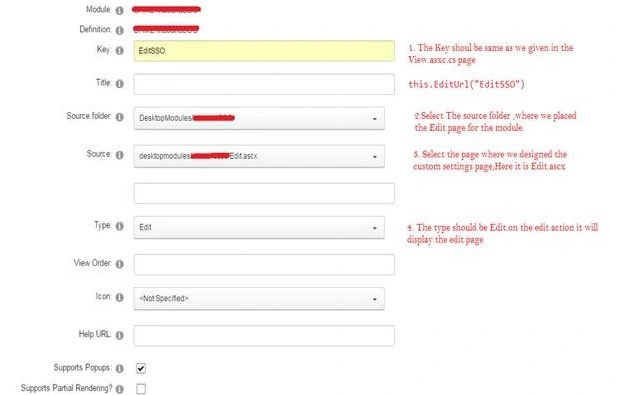
        Actions.Add(this.GetNextActionID(), "Edit", ModuleActionType.ContentOptions, "", "", this.EditUrl("EditSSO"), true, SecurityAccessLevel.Edit, true, false);
        return Actions;
    }
}
this.GetNextActionID()
It returns an integer value, the Next Action ID.
“Edit”
It will be the title of the Page.
ModuleActionType.ContentOptions
Common action types can be specified in the CommandName attribute of the ModuleAction class.
SecurityAccessLevel
The SecurityAccessLevelenum is used to determine which level of access rights to assign to a specific module or module action.
In the Edit.ascx page you can apply the custom configuration and settings values for the module.
There are two different tables for the modules.
- TabModuleSettings
- ModuleSettings
Gowtham RajamanickamPosted Apr 26, 2016, 3:09 AM
good article
Debasis SahaPosted Apr 18, 2016, 12:58 AM
Good One..
Kuppurasu NagarajPosted Apr 17, 2016, 4:12 AM
Nice Sharing..
Vignesh ManiPosted Apr 17, 2016, 3:22 AM
Nice