Introduction
This article explains the following:
- How to upload files using file upload control.
- How to save a file in a folder and path to a database.
- Displaying the list of files in a GridView that are already uploaded.
- Downloading the files by clicking on the LinkButton.
Database
Use the following table and Stored Procedure to demonstrate this concept.

Use the following script to create the preceding table.
- CREATE table FileDetails
- (
- FileId int Primary Key Identity(1,1),
- FileName varchar(100),
- FileSize varchar(30),
- FileType varchar(30),
- FilePath varchar(200),
- CreatedOn Datetime
- )
-
- Use the following script to Create the Stored procedures
-
- CREATE procedure USP_Select_FileDetails
- AS
- Begin
- Select * from FileDetails
- END
-
-
- CREATE procedure USP_Insert_FileDetails
- @FileName varchar(100),
- @FileSize varchar(30),
- @FileType varchar(30),
- @FilePath varchar(200),
- @CreatedOn Datetime = Null
- AS
- Begin
- Insert FileDetails(FileName,FileSize,FileType,FilePath,CreatedOn)
- Values(@FileName,@FileSize,@FileType,@FilePath,GetDate())
- END
Creating the project
Now create the project using the following.
Go to Start, then All Programs and click Microsoft Visual Studio 2010
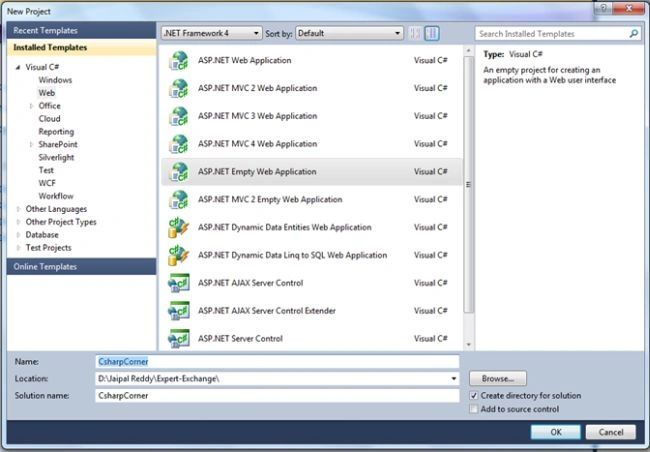
Go to File, then click New, Project..., Visual C# , Web. Then select ASP.NET Empty Web Application.
Provide the project a name and specify the location.
Web.ConfigCreate the connection string in the Web.Config file as in the following code snippet:
- <connectionStrings>
- <add name="conStr"
- connectionString="Password= 1234; User ID=sa; Database=DB_Jai; Data Source=."
- providerName="System.Data.SqlClient"/>
- </connectionStrings>
Next: Right-click on Solution Explorer and add a web form to your project.
Webform Design
Design you Webform (.aspx page) as in the following:
- <div align="center" style="width: 100%;">
- <fieldset style="width: 30%;">
- <legend>Download Files From GridView</legend>
- <table width="100%">
- <tr>
- <td align="left">
- <asp:FileUpload ID="FileUpload1" runat="server" />
- </td>
- <td align="left">
- <asp:Button ID="btnUpload" runat="server" Text="Upload" OnClick="btnUpload_Click" />
- </td>
- </tr>
- <tr>
- <td colspan="2" align="center">
- <br />
- <asp:Label ID="lblMsg" runat="server" ></asp:Label>
- </td>
- <tr>
- <td colspan="2" align="center">
- <br />
- <asp:GridView ID="gvFiles" runat="server" AutoGenerateColumns="False" Width="100%"
- OnRowCommand="gvFiles_RowCommand">
- <Columns>
- <asp:TemplateField HeaderText="Download Here">
- <ItemTemplate>
- <asp:LinkButton ID="lnkDownload" runat="server" CausesValidation="False" CommandArgument='<%# Eval("FileName") %>'
- CommandName="Download" Text='<%# Eval("FileName") %>' />
- </ItemTemplate>
- </asp:TemplateField>
- <asp:BoundField DataField="FileSize" HeaderText="File Size" />
- <asp:BoundField DataField="FileType" HeaderText="File Type" />
- </Columns>
- </asp:GridView>
- </td>
- </tr>
- </table>
- </fieldset>
- </div>
CodeBehindAdd the following namespaces:
- using System.Data;
- using System.IO;
- using System.Data.SqlClient;
- using System.Configuration;
- using System.Drawing;
Invoke the ConnectionString from Web.Config as in the following:
- SqlConnection con = new SqlConnection(ConfigurationManager.ConnectionStrings["ConStr"].ConnectionString);
User Defined Functions#region User Defined Methods
-
- private string GetFileExtension(string fileExtension)
- {
- switch (fileExtension.ToLower())
- {
- case ".docx":
- case ".doc":
- return "Microsoft Word Document";
- case ".xlsx":
- case ".xls":
- return "Microsoft Excel Document";
- case ".txt":
- return "Text Document";
- case ".jpg":
- case ".png":
- return "Image";
- default:
- return "Unknown";
- }
- }
-
-
- private void UploadFile()
- {
- string FileName = string.Empty;
- string FileSize = string.Empty;
- string extension = string.Empty;
- string FilePath = string.Empty;
-
- if (FileUpload1.HasFile)
- {
- extension = Path.GetExtension(FileUpload1.FileName);
- FileName = FileUpload1.PostedFile.FileName;
- FileSize = FileName.Length.ToString() + " Bytes";
-
- FileUpload1.PostedFile.SaveAs(Server.MapPath(@"~/Application/FileUploads/" + FileName.Trim()));
- FilePath = @"~/Application/FileUploads/" + FileName.Trim().ToString();
- }
- else
- {
- lblMsg.Text = "Plase upload the file";
- lblMsg.ForeColor = Color.Red;
- return;
- }
-
- SqlCommand cmd = new SqlCommand("USP_Insert_FileDetails", con);
- cmd.CommandType = System.Data.CommandType.StoredProcedure;
- cmd.Parameters.AddWithValue("@FileName", FileName);
- cmd.Parameters.AddWithValue("@FileSize", FileSize);
- cmd.Parameters.AddWithValue("@FileType", GetFileExtension(extension));
- cmd.Parameters.AddWithValue("@FilePath", FilePath);
- con.Open();
- int result = cmd.ExecuteNonQuery();
- if (result > 0)
- {
- lblMsg.Text = "File Uploaded Successfully ";
- lblMsg.ForeColor = Color.Green;
- BindGridView();
- }
- }
-
-
- private void BindGridView()
- {
- SqlDataAdapter adp = new SqlDataAdapter("USP_Select_FileDetails", con);
- adp.SelectCommand.CommandType = System.Data.CommandType.StoredProcedure;
- if (con.State != ConnectionState.Open)
- {
- con.Open();
- }
- DataSet ds = new DataSet();
- adp.Fill(ds);
- gvFiles.DataSource = ds;
- gvFiles.DataBind();
- }
Page Event Handlers#region Page Event Handlers.
- protected void Page_Load(object sender, EventArgs e)
- {
- lblMsg.Text = string.Empty;
- if (!Page.IsPostBack)
- {
- BindGridView();
- }
- }
-
- protected void btnUpload_Click(object sender, EventArgs e)
- {
- UploadFile();
- }
-
- protected void gvFiles_RowCommand(object sender, GridViewCommandEventArgs e)
- {
- Response.Clear();
- Response.ContentType = "application/octet-stream";
- Response.AppendHeader("Content-Disposition", "filename=" + e.CommandArgument);
- Response.TransmitFile(Server.MapPath("~/Application/FileUploads/") + e.CommandArgument);
- Response.End();
- }
#endregion
Output
Upload the file using file upload control and click on the Upload button. The uploaded file is displayed in the GridView. Next click on the link button to download the files.

I hope you enjoyed this article. Please provide your valuable suggestions and feedback.


Reshwanth SPosted Dec 26, 2017, 11:24 AM
Thanks for sharing your resource
Nithish ReddyPosted Oct 9, 2017, 2:31 AM
Thanks jaipal , Your code helps me !
vikashPosted Apr 10, 2017, 7:37 AM
Hi sir vikash here whenever i will download Attachment from Gridview then file are not download kindly check it my code mention below protected void GridView1_RowCommand(object sender, GridViewCommandEventArgs e) { Response.Clear(); Response.ContentType = "application/octet-stream"; Response.AppendHeader("Content-Disposition", "Mail=" +e.CommandArgument); Response.TransmitFile(Server.MapPath("~/") + e.CommandArgument); Response.End(); }
sandeep rauloPosted Mar 9, 2017, 1:53 AM
Very well done...was searching for something like this from past few weeks and finally got it
Subham KhaitanPosted Jan 4, 2017, 2:07 AM
I have used the same code but when i m clicking on the link button my file is not downloaded infact the weBform is downloaded PLZZ HELP ME WITH THE SOLUTION
Jaipal ReddyPosted Mar 19, 2016, 1:07 AM
Thank you Sonu Chaudhary.
Sonu ChaudharyPosted Mar 18, 2016, 3:16 PM
thanks
Jaipal ReddyPosted Mar 14, 2016, 5:12 AM
Thank you Bilal Ansari. .
Bilal AnsariPosted Mar 5, 2016, 1:06 AM
THank you but how can i download from another webpage.?
AbedElHamid AlWahidyPosted Nov 16, 2015, 7:41 AM
good example and good explain
Saineshwar BageriPosted Sep 20, 2015, 12:59 AM
nice one
Jaipal ReddyPosted Sep 19, 2015, 4:21 AM
Thank you Varaprasad.
varaprasad atmakuriPosted Sep 18, 2015, 11:52 AM
Great One.
Munesh SharmaPosted Sep 18, 2015, 5:33 AM
nice explanation
Sibeesh VenuPosted Sep 17, 2015, 6:23 AM
Nice Share
Ankit BansalPosted Sep 17, 2015, 4:33 AM
thanks for share..
Karthikeyan KPosted Sep 16, 2015, 11:11 PM
Thanks fo sharing
Karthikeyan KPosted Sep 16, 2015, 11:11 PM
Good one bro
Pankaj Kumar ChoudharyPosted Sep 16, 2015, 8:24 PM
Nice Explain Jaipal...........
Mohammed IbrahimPosted Sep 16, 2015, 2:30 PM
nice
Ankit BansalPosted Aug 7, 2015, 2:11 AM
nice...thanks for share..
Raj KumarPosted Aug 7, 2015, 12:55 AM
Good One Jaipal Reddy
Debasis SahaPosted Aug 7, 2015, 12:55 AM
Nice one...
Abhishek YadavPosted Aug 6, 2015, 2:29 PM
That's very nice Jaipal Reddy!!!
Gopi ChandPosted Aug 6, 2015, 12:36 PM
Nice share
RakeshPosted Aug 6, 2015, 10:26 AM
Good one
Gowtham RajamanickamPosted Aug 6, 2015, 9:43 AM
good one..
Sibeesh VenuPosted Aug 6, 2015, 8:33 AM
Nice Share
Rahul PrajapatPosted Aug 6, 2015, 7:57 AM
NIce explanations sir, thanks
Nilesh JadavPosted Aug 6, 2015, 7:52 AM
Nice sir ! That was great article
Pankaj Kumar ChoudharyPosted Aug 6, 2015, 5:09 AM
Nice way of explanation...........
Rajeesh MenothPosted Aug 6, 2015, 4:58 AM
Upload your file here,it will help for every one..Good One