

Introduction
Start your Dynamics CRM operations from your ASP.NET application. In this article we will learn and look how to connect Dynamics CRM.
We need to download CRM SDK to connect CRM.
For more information you can refer to this link.
About SDK and Useful Libraries information
- using microsoft.crm.sdk.proxy.dll;
- using microsoft.xrm.sdk.dll;
- using microsoft.xrm.client.dll;
Conceptual Information
CRM SDK provides required essentials to make proper connection,
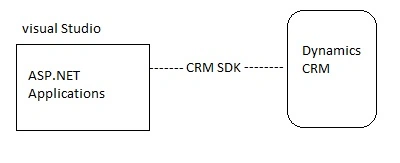
Define Data Connection
In this section, learn how to define Dynamics CRM Connection,
- OrganizationService service = new OrganizationService("YourCRMConnectionString");
Organization service is the data connection class,
- String YourCRMConnectionString = @"Url=http://Servername/yourworkCatalog; Domain=mydomain; Username=*******; Password=*****;"
- service.Server = "Servername";
- service.user = "username";
- service.organization = "*****";
Simple format otherwise,
- <connectionStrings>
- <add name="Server=servername, organization=YourCatalogworks, user=****" connectionString="Url=http://myserver/AdventureWorksCycle; Domain=SalesLabs; Username=maruthi; Password=********;" />
- </ connectionStrings>
Get Sample Record

Bhuvanesh MohankumarPosted Apr 30, 2016, 3:13 PM
Good one...
bharatwaj vanamamalaiPosted Apr 22, 2016, 9:02 AM
Nice article... thanks for sharing
Sr KarthigaPosted Feb 17, 2016, 8:23 AM
Good one
Sr KarthigaPosted Feb 17, 2016, 8:22 AM
Nice explanation
Shubham KumarPosted Feb 1, 2016, 1:57 AM
nice
Sibeesh VenuPosted Feb 1, 2016, 1:13 AM
Nice Share
Ankit BansalPosted Feb 1, 2016, 12:40 AM
nice one..