

Exception handling is required in any application. It is a very interesing issue where different apps have their own various way(s) to handle that. I plan to write a series of articles to discuss this issue
- Exception Handling (1), in ASP.NET MVC
- Exception Handling (2), in ASP.NET Web API
- Exception Handling (3), in ASP.NET Core MVC --- this article
- Exception Handling (4), in ASP.NET Core Web API
- Exception Handling (5), in ASP.NET Summary
- Exception Handling (6), HttpStatusCode
- Exception Handling (7), C# Exception Handling Statements
In this article, we will be discussing various ways of handling an exception in ASP.NET Core MVC.
Introduction
In Part I of this article seriers, we discussed Exception handling for ASP.NET MVC, where we may have three ways to handle exceptions,

For ASP.NET Core MVC, we have similar situation or discussion, but, with major differences:
- We will not discuss the Try-Catch-Finally approach, because it is language related issue;
- Due to Exception Filter, the approach is just secondary importance in ASP.NET Core app, we will just make brief discussion at the end.
This will be the order inwhich we will discuss the topic today:
- A: Exception Handling in Development Environment for ASP.NET Core MVC
- UseDeveloperExceptionPage
- B: Exception Handling in Production Environment for ASP.NET Core MVC
- Approach 1: UseExceptionHandler
- 1: Exception Handler Page
- 2: Exception Handler Lambda
- Approach 2: UseStatusCodePages
- 1: UseStatusCodePages, and with format string, and with Lambda
- 2: UseStatusCodePagesWithRedirects
- 3: UseStatusCodePagesWithReExecute
- Approach 3: Exception Filter
- Local
- Global
- Approach 1: UseExceptionHandler
A: Exception Handling in Developer Environment
The ASP.NET Core starup templates generate the following code,
public void Configure(IApplicationBuilder app, IWebHostEnvironment env)
 {
     if (env.IsDevelopment())
     {
         app.UseDeveloperExceptionPage();
     }
     else
     ......
 }
The UseDeveloperExceptionPage extension method adds middleware into the request pipeline. The Developer Exception Page displays developer friendly detailed information about request exceptions. This helps developers in tracing errors that occur during development phase.
As this middleware displays sensitive information, it is advisable to add it only in development environment. The developer environment is a new feature in .NET Core. We will demostrate this below.
Step 1 - Create an ASP.NET Core MVC application
We use the current version of Visual Studio 2019 16.8 and .NET 5.0 SDK to build the app.
- Start Visual Studio and select Create a new project.
- In the Create a new project dialog, select ASP.NET Core Web Application > Next.
- In the Configure your new project dialog, enter
ErrorHandlingSamplefor Project name. - Select Create.
- In the Create a new ASP.NET Core web application dialog, select,
- .NET Core and ASP.NET Core 5.0 in the dropdowns.
- ASP.NET Core Web App (Model-View-Controller).
- Create

Step 2 - Change code in Home Controller
Replace the Index method in the HomeController with the code below:
public IActionResult Index(int? id = null)
{
    if (id.HasValue)
    {
        if (id == 1)
        {
            throw new FileNotFoundException("File not found exception thrown in index.chtml");
        }
        else if (id == 2)
        {
            return StatusCode(500);
        }
    }
    return View();
}
Step 3 - Change code in Index view
Add the code in the bottom of Home/Index view, i.e., the file Index.cshtml in Views/home directory,
<br />

<div class="text-left">
    <p>
        <a href="/NoSuchPage">
            Request an endpoint that doesn't exist. Trigger a 404
        </a>.
    </p>
    <p><a href="/home/index/1">Trigger an exceptionn</a>.</p>
    <p><a href="/home/index/2">Return a 500 error.</a>.</p>
</div>
Step 4 - Run app and Test
Run the app,
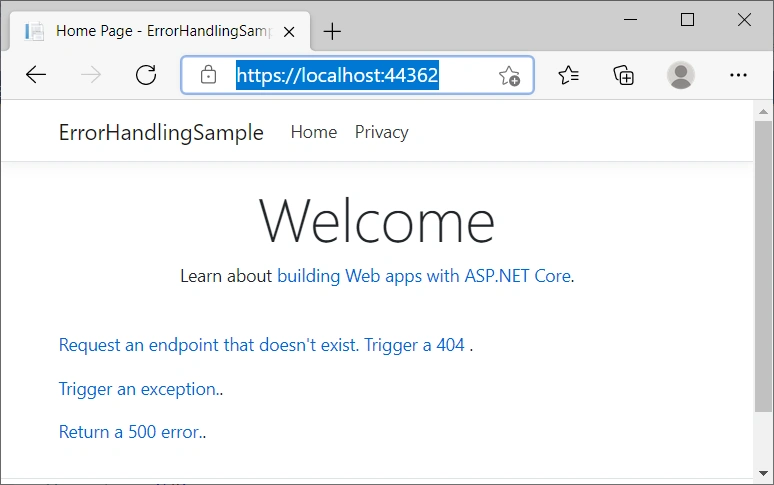
Click "Trigger an exception." you will get,

This is the Developer Exception Page that includes the following information about the exception and the request,
- Stack trace
- Query string parameters if any
- Cookies if any
- Headers
- Routing
For examples: Headers, and Routing


B: Exception Handling in Production Environment
ASP.NET Core configures app behavior based on the runtime environment that is determined in launchSettings.json file:
- Development : The launchSettings.json file sets
ASPNETCORE_ENVIRONMENTtoDevelopmenton the local machine. - Staging
- Production : The default if
DOTNET_ENVIRONMENTandASPNETCORE_ENVIRONMENThave not been set.
Note
The launchSettings.json file:
- Is only used on the local development machine.
- Is not deployed.
- contains profile settings.
Now, we switch environment from Development to Production,
{
  "iisSettings": {
    "windowsAuthentication": false,
    "anonymousAuthentication": true,
    "iisExpress": {
      "applicationUrl": "http://localhost:50957",
      "sslPort": 44362
    }
  },
  "profiles": {
    "IIS Express": {
      "commandName": "IISExpress",
      "launchBrowser": true,
      "environmentVariables": {
        //"ASPNETCORE_ENVIRONMENT": "Development",
        "ASPNETCORE_ENVIRONMENT": "Production"
      }
    },
    "ErrorHandlingSample": {
      "commandName": "Project",
      "dotnetRunMessages": "true",
      "launchBrowser": true,
      "applicationUrl": "https://localhost:5001;http://localhost:5000",
      "environmentVariables": {
        //"ASPNETCORE_ENVIRONMENT": "Development",
        "ASPNETCORE_ENVIRONMENT": "Production"
      }
    }
  }
}
Approach 1: UseExceptionHandler
1: Exception Handler Page
For Production environment, startup file Configure method tells us: ASP.NET Core handles exception by calling UseExceptionHandler,
public void Configure(IApplicationBuilder app, IWebHostEnvironment env)
{
    if (env.IsDevelopment())
    {
        app.UseDeveloperExceptionPage();
    }
    else
    {
        app.UseExceptionHandler("/Home/Error");
    }
    ......
}
Run the app, and Click Trigger an exception link in the home page, we got the Exception Handler Page, and by default Home/Error.cshtml.cs generated by the ASP.NET Core templates,

This exception handling middleware,
- Catches and logs exceptions.
- Re-executes the request in an alternate pipeline using the path indicated. The request isn't re-executed if the response has started. The template generated code re-executes the request using the
/Home/Errorpath.
2: Exception Handler Lambda
An alternative to a custom exception handler page is to provide a lambda to UseExceptionHandler. Using a lambda allows access to the error before returning the response.
The following code uses a lambda for exception handling (startup file):
public void Configure(IApplicationBuilder app, IWebHostEnvironment env)
{
    if (env.IsDevelopment())
    {
        app.UseDeveloperExceptionPage();
    }
    else
    {
        app.UseExceptionHandler(errorApp =>
        {
            errorApp.Run(async context =>
            {
                context.Response.StatusCode = 500;
                context.Response.ContentType = "text/html";

                await context.Response.WriteAsync("<html lang=\"en\"><body>\r\n");
                await context.Response.WriteAsync("ERROR!<br><br>\r\n");

                var exceptionHandlerPathFeature =
                    context.Features.Get<IExceptionHandlerPathFeature>();

                if (exceptionHandlerPathFeature?.Error is FileNotFoundException)
                {
                    await context.Response.WriteAsync(
                                              "File error thrown!<br><br>\r\n");
                }

                await context.Response.WriteAsync(
                                              "<a href=\"/\">Home</a><br>\r\n");
                await context.Response.WriteAsync("</body></html>\r\n");
                await context.Response.WriteAsync(new string(' ', 512));
            });
        });
        app.UseHsts();
    }

    app.UseHttpsRedirection();
    app.UseStaticFiles();

    app.UseRouting();

    app.UseAuthorization();

    app.UseEndpoints(endpoints =>
    {
        endpoints.MapRazorPages();
    });
}
We got the result,

Note
For convenience, we keep the original startup file as startup.cs file, and make a new startup file with a class name and file name as startupLambda, the highlighted one in the graph below,
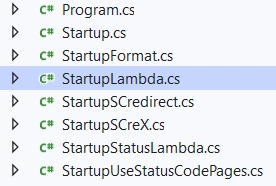
and in Program.cs, comment out Startup class, replace it by startupLambda class, like this,
public class Program
{
    public static void Main(string[] args)
    {
        CreateHostBuilder(args).Build().Run();
    }

    public static IHostBuilder CreateHostBuilder(string[] args) =>
        Host.CreateDefaultBuilder(args)
            .ConfigureWebHostDefaults(webBuilder =>
            {
                //webBuilder.UseStartup<Startup>();
                webBuilder.UseStartup<StartupLambda>();
                //webBuilder.UseStartup<StartupUseStatusCodePages>();
                //webBuilder.UseStartup<StartupStatusLambda>();
                //webBuilder.UseStartup<StartupFormat>();
                //webBuilder.UseStartup<StartupSCredirect>();
                //webBuilder.UseStartup<StartupSCreX>();
            });
}
With similarity, we create several new startup classes as in the above graph, we will define them and use them in later discussions.
Approach 2: UseStatusCodePages
The two techniques discussed so far deal with the unhandled exceptions arising from code. However, that's not the only source of errors. Many times errors are generated due to internal server errors, non existent pages, web server authorization issues and so on. These errors are reflected by the HTTP status codes such as 500, 404 and 401.
By default, an ASP.NET Core app doesn't provide a status code page for HTTP error status codes, such as 404 - Not Found. When the app encounters an HTTP 400-599 error status code that doesn't have a body, it returns the status code and an empty response body.
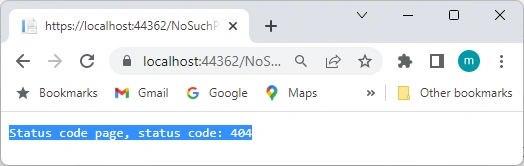
Click the link: Request an endpoint that doesn't exist. Trigger a 404 below,
We will get,

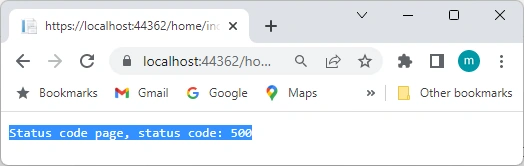
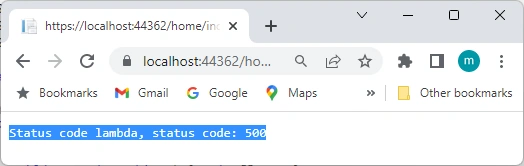
Whie clicking Run a 500 error,







Du Anh QuyPosted May 2, 2024, 2:31 PM
Can you provide further instructions in case the admin page is located in another AREA of the same project? Thanks a lot
MarcPosted Feb 19, 2023, 4:36 PM
Hi George. I was testing your examples and works fine. I tested a SqlException by modifying my conn string appsettings. app.UseStatusCodePagesWithRedirects was njot bale to catch. Any idea why?
pradip thakrePosted Dec 22, 2021, 11:07 AM
Please provide the project
farukh shaikhPosted Oct 28, 2021, 2:30 PM
Thanxx Sir !!!