

Introduction
This article will teach us how to redux with react js application.
Redux is a popular Javascript library used to manage state in web applications.
We will also learn some of its core building blocks, such as a store, actions, and reducers, and how to make Redux the global state management library.
Prerequisites
- JavaScript
- Basic knowledge of Next.js
- Node.js
- V.S. Code, Visual Studio
We cover the below things,
- Create Next.js application
- How to use redux
Step 1. Run the below code to create the Next.js application.
npx create-next-app primeflexappnextredux
cd primeflexappnextredux
npm run dev
Step 2. Run the below command to install Redux and Redux Persist.
npm i @reduxjs/toolkit
npm i redux-thunk
npm i redux-persist
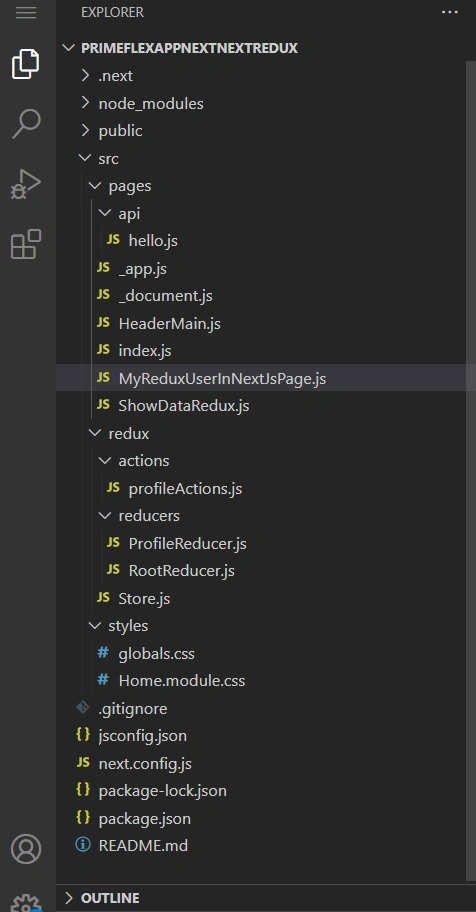
Create the files according to the below image.
Step 3. Add the below code in the app.js.
import { store } from '../redux/Store';
import '@/styles/globals.css';
import { Provider } from "react-redux";
import HeaderMain from './HeaderMain';

export default function App({ Component, pageProps }) {
  return (
    <Provider store={store}>
      <HeaderMain />
      <Component {...pageProps} />
    </Provider>
  )
}
Step 4. Add the below code in the index.js.
import Head from 'next/head'
import Image from 'next/image'
import { Inter } from 'next/font/google'
import styles from '@/styles/Home.module.css'
import MyReduxUseInNextPage from './MyReduxUserInNextJsPage'

const inter = Inter({ subsets: ['latin'] })

export default function Home() {
  return (
    <>
      <Head>
        <title>Create Next App</title>
        <meta name="description" content="Generated by create next app" />
        <meta name="viewport" content="width=device-width, initial-scale=1" />
        <link rel="icon" href="/favicon.ico" />

        <link rel="stylesheet" href="https://unpkg.com/primeflex@^3/primeflex.css" />

        <link rel="stylesheet" href="https://unpkg.com/primeflex/themes/saga-blue.css" />
        <link rel="stylesheet" href="https://unpkg.com/primeflex/themes/arya-blue.css" />
        <link rel="stylesheet" href="https://unpkg.com/primeflex/themes/vela-blue.css" />

        <link
          rel="stylesheet"
          href="https://cdn.jsdelivr.net/npm/[email protected]/dist/css/bootstrap.min.css"
          integrity="sha384-rbsA2VBKQhggwzxH7pPCaAqO46MgnOM80zW1RWuH61DGLwZJEdK2Kadq2F9CUG65"
          crossorigin="anonymous"
        />

        <script src="https://cdn.jsdelivr.net/npm/react/umd/react.production.min.js" crossorigin></script>

        <script
          src="https://cdn.jsdelivr.net/npm/react-dom/umd/react-dom.production.min.js"
          crossorigin></script>

        <script
          src="https://cdn.jsdelivr.net/npm/react-bootstrap@next/dist/react-bootstrap.min.js"
          crossorigin></script>
      </Head>
      <main className={styles.main}>
        <div className={styles.grid}>
          <MyReduxUseInNextPage />
        </div>
      </main>
    </>
  )
}
Step 5. Add the below code in the Home.module.css
.main {
  display: flex;
  flex-direction: column;
  justify-content: space-between;
  align-items: center;
  padding: 6rem;
  min-height: 100vh;
}

.description {
  display: inherit;
  justify-content: inherit;
  align-items: inherit;
  font-size: 0.85rem;
  max-width: var(--max-width);
  width: 100%;
  z-index: 2;
  font-family: var(--font-mono);
}

.description a {
  display: flex;
  justify-content: center;
  align-items: center;
  gap: 0.5rem;
}

.description p {
  position: relative;
  margin: 0;
  padding: 1rem;
  background-color: rgba(var(--callout-rgb), 0.5);
  border: 1px solid rgba(var(--callout-border-rgb), 0.3);
  border-radius: var(--border-radius);
}

.code {
  font-weight: 700;
  font-family: var(--font-mono);
}

.grid {
  display: grid;
  grid-template-columns: repeat(1, minmax(100%, auto));
  width: var(--max-width);
  max-width: 100%;
}

.card {
  padding: 1rem 1.2rem;
  border-radius: var(--border-radius);
  background: rgba(var(--card-rgb), 0);
  border: 1px solid rgba(var(--card-border-rgb), 0);
  transition: background 200ms, border 200ms;
}

.card span {
  display: inline-block;
  transition: transform 200ms;
}

.card h2 {
  font-weight: 600;
  margin-bottom: 0.7rem;
}

.card p {
  margin: 0;
  opacity: 0.6;
  font-size: 0.9rem;
  line-height: 1.5;
  max-width: 30ch;
}

.center {
  display: flex;
  justify-content: center;
  align-items: center;
  position: relative;
  padding: 4rem 0;
}

.center::before {
  background: var(--secondary-glow);
  border-radius: 50%;
  width: 480px;
  height: 360px;
  margin-left: -400px;
}

.center::after {
  background: var(--primary-glow);
  width: 240px;
  height: 180px;
  z-index: -1;
}

.center::before,
.center::after {
  content: '';
  left: 50%;
  position: absolute;
  filter: blur(45px);
  transform: translateZ(0);
}

.logo,
.thirteen {
  position: relative;
}

.thirteen {
  display: flex;
  justify-content: center;
  align-items: center;
  width: 75px;
  height: 75px;
  padding: 25px 10px;
  margin-left: 16px;
  transform: translateZ(0);
  border-radius: var(--border-radius);
  overflow: hidden;
  box-shadow: 0px 2px 8px -1px #0000001a;
}

.thirteen::before,
.thirteen::after {
  content: '';
  position: absolute;
  z-index: -1;
}

/* Conic Gradient Animation */
.thirteen::before {
  animation: 6s rotate linear infinite;
  width: 200%;
  height: 200%;
  background: var(--tile-border);
}

/* Inner Square */
.thirteen::after {
  inset: 0;
  padding: 1px;
  border-radius: var(--border-radius);
  background: linear-gradient(
    to bottom right,
    rgba(var(--tile-start-rgb), 1),
    rgba(var(--tile-end-rgb), 1)
  );
  background-clip: content-box;
}

/* Enable hover only on non-touch devices */
@media (hover: hover) and (pointer: fine) {
  .card:hover {
    background: rgba(var(--card-rgb), 0.1);
    border: 1px solid rgba(var(--card-border-rgb), 0.15);
  }

  .card:hover span {
    transform: translateX(4px);
  }
}

@media (prefers-reduced-motion) {
  .thirteen::before {
    animation: none;
  }

  .card:hover span {
    transform: none;
  }
}

/* Mobile */
@media (max-width: 700px) {
  .content {
    padding: 4rem;
  }

  .grid {
    grid-template-columns: 1fr;
    margin-bottom: 120px;
    max-width: 320px;
    text-align: center;
  }

  .card {
    padding: 1rem 2.5rem;
  }

  .card h2 {
    margin-bottom: 0.5rem;
  }

  .center {
    padding: 8rem 0 6rem;
  }

  .center::before {
    transform: none;
    height: 300px;
  }

  .description {
    font-size: 0.8rem;
  }

  .description a {
    padding: 1rem;
  }

  .description p,
  .description div {
    display: flex;
    justify-content: center;
    position: fixed;
    width: 100%;
  }

  .description p {
    align-items: center;
    inset: 0 0 auto;
    padding: 2rem 1rem 1.4rem;
    border-radius: 0;
    border: none;
    border-bottom: 1px solid rgba(var(--callout-border-rgb), 0.25);
    background: linear-gradient(
      to bottom,
      rgba(var(--background-start-rgb), 1),
      rgba(var(--callout-rgb), 0.5)
    );
    background-clip: padding-box;
    backdrop-filter: blur(24px);
  }

  .description div {
    align-items: flex-end;
    pointer-events: none;
    inset: auto 0 0;
    padding: 2rem;
    height: 200px;
    background: linear-gradient(
      to bottom,
      transparent 0%,
      rgb(var(--background-end-rgb)) 40%
    );
    z-index: 1;
  }
}

/* Tablet and Smaller Desktop */
@media (min-width: 701px) and (max-width: 1120px) {
  .grid {
    grid-template-columns: repeat(2, 50%);
  }
}

@media (prefers-color-scheme: dark) {
  .vercelLogo {
    filter: invert(1);
  }

  .logo,
  .thirteen img {
    filter: invert(1) drop-shadow(0 0 0.3rem #ffffff70);
  }
}

@keyframes rotate {
  from {
    transform: rotate(360deg);
  }
  to {
    transform: rotate(0deg);
  }
}
Step 6. Add the below code in the globals.css.
Join the conversation! Your thoughts help the community grow.