

Introduction
I have been practicing and reading a lot about RESTful services for the past few days. To my surprise, I could not find a complete series of practical implementations of ASP.Net Web APIs on the web. My effort in this series will be to focus on how to develop basic enterprise-level application architecture with Web APIs.
We'll be discussing less theory and doing more practice to understand how RESTful services can be created using an ORM. We choose Entity Framework here. My first article in the series is to set up a basic architecture of a REST service-based application. Later on in my future articles, I'll explain how to follow the best standards to achieve enterprise-level architecture.
Roadmap

My road map for the series is as follows.
- RESTful Day #1: Enterprise-level application architecture with Web APIs using Entity Framework, Generic Repository pattern, and Unit of Work.
- RESTful Day #2: Inversion of control using dependency injection in Web APIs using Unity Container and Bootstrapper.
- RESTful Day #3: Resolve dependency of dependencies using Inversion of Control and dependency injection in ASP.Net Web APIs with Unity Container and Managed Extensibility Framework (MEF).
- RESTful Day #4: Custom URL Re-Writing/Routing using Attribute Routes in MVC 4 Web APIs.
- RESTful Day #5: Basic Authentication and Token-based Custom Authorization in Web APIs using Action Filters.
- RESTful Day #6: Request logging and Exception handing/logging in Web APIs using Action Filters, Exception Filters, and NLog.
- RESTful Day #7: Unit Testing and Integration Testing in WebAPI using NUnit and Moq framework (Part 1).
- RESTful Day #8: Unit Testing and Integration Testing in WebAPI using NUnit and Moq framework (Part 2).
- RESTful Day #9: Extending OData support in ASP.NET Web APIs.
I'll purposely use Visual Studio 2010 and .NET Framework 4.0 because there are a few implementations that are very hard to find in .NET Framework 4.0, but I'll make it easy by showing how to do it.
REST
Here is an excerpt from Wikipedia.
“Unlike SOAP-based web services, there is no "official" standard for RESTful web APIs. This is because REST is an architectural style, whereas SOAP is a protocol. Even though REST is not a standard per se, most RESTful implementations make use of standards such as HTTP, URI, JSON, and XML.”
I agree with it. Let's do some coding.
Setup database
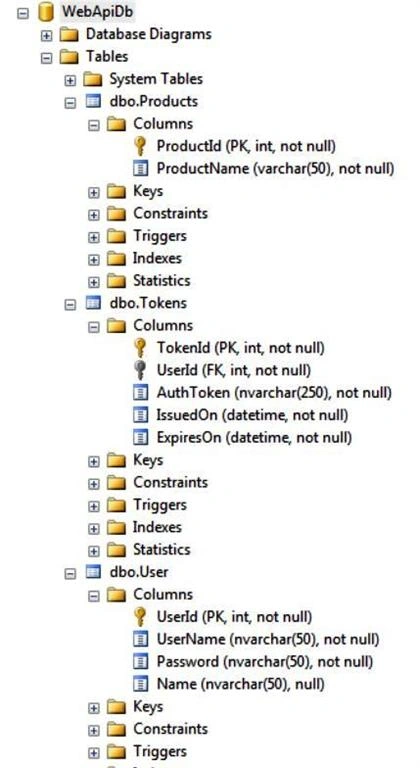
I am using SQL Server 2008 as a database server. I have provided the SQL scripts to create the database in SQL Server, you can use it to create one. I have given WebApiDb as my database name. My database contains three tables for now; they are Products, Tokens, and Users. In this tutorial, we'll only be dealing with a product table to do CRUD operations using Web API and Entity Framework. We'll use Tokens and Users in my future article. For those who fail to create a database using scripts, here is the structure you can use:
Web API project
Open your Visual Studio. I am using Visual Studio 2010, you can use Visual Studio version 2010 or above.
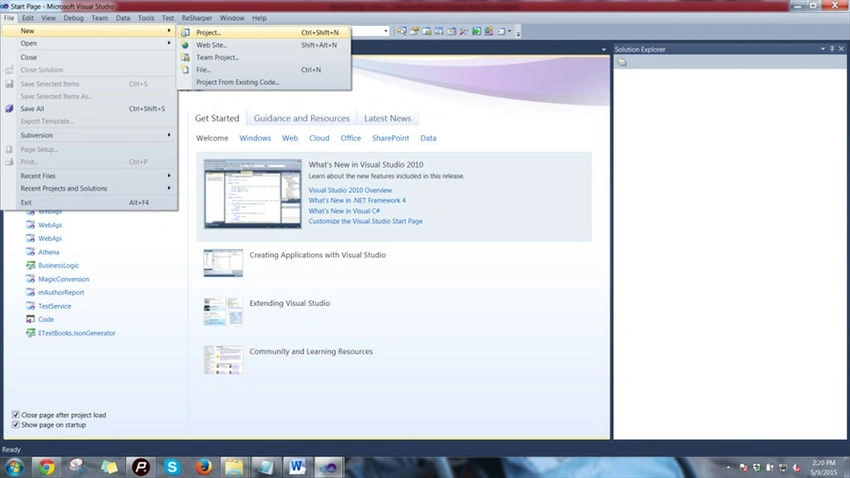
Step 1. Create a new Project in your Visual Studio as in the following.
Step 2. Thereafter, choose to create an ASP.Net MVC 4 Web Application and provide it the name of your choice, I used WebAPI.
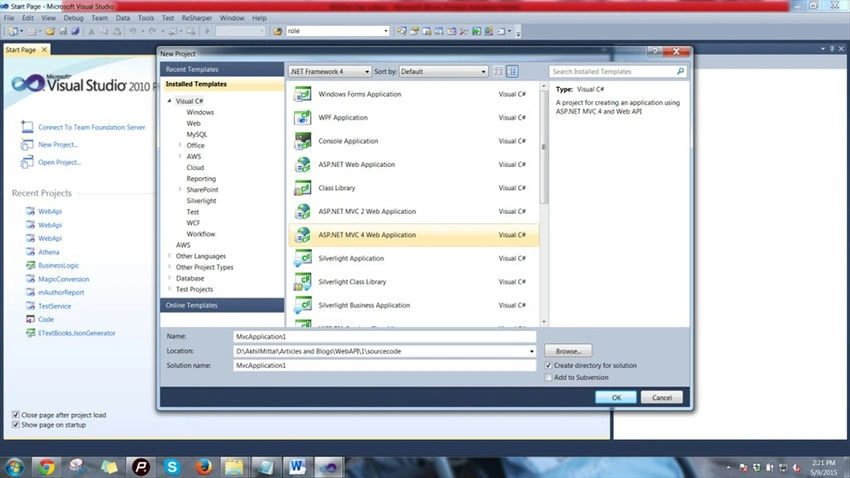
Step 3. Out of the various types of project templates shown to you, choose the Web API project as in the following.
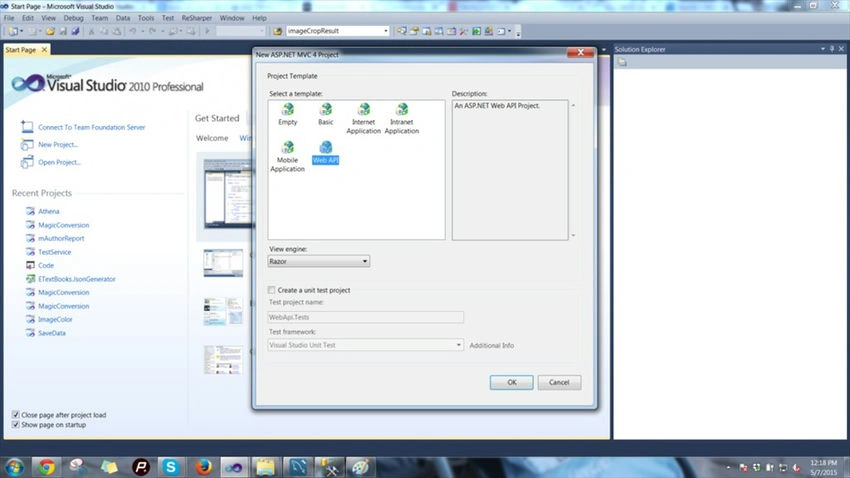
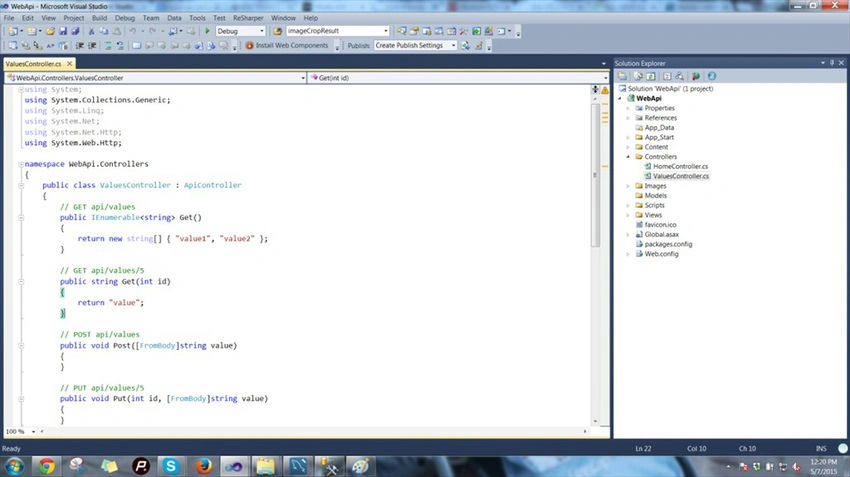
Once done, you'll get a project structure like the one shown below, with a default Home and Values controller.
You can choose to delete this ValuesController since we'll be using our own controller to learn.
Setup Data Access Layer
Let's set up the data access layer first. We'll be using Entity Framework 5.0 to talk to the database. We'll use the Generic Repository Pattern and Unit of Work pattern to standardize our layer.
Let's have a look at the standard definition of Entity Framework given by Microsoft:
“The Microsoft ADO.NET Entity Framework is an Object/Relational Mapping (ORM) framework that enables developers to work with relational data as domain-specific objects, eliminating the need for most of the data access plumbing code that developers usually need to write. Using the Entity Framework, developers issue queries using LINQ, then retrieve and manipulate data as strongly typed objects. The Entity Framework's ORM implementation provides services like change tracking, identity resolution, lazy loading, and query translation so that developers can focus on their application-specific business logic rather than the data access fundamentals.”
In simple language, an Entity Framework is an Object/Relational Mapping (ORM) framework. It is an enhancement to ADO.NET, an upper layer to ADO.NET that gives developers an automated mechanism for accessing and storing the data in the database.
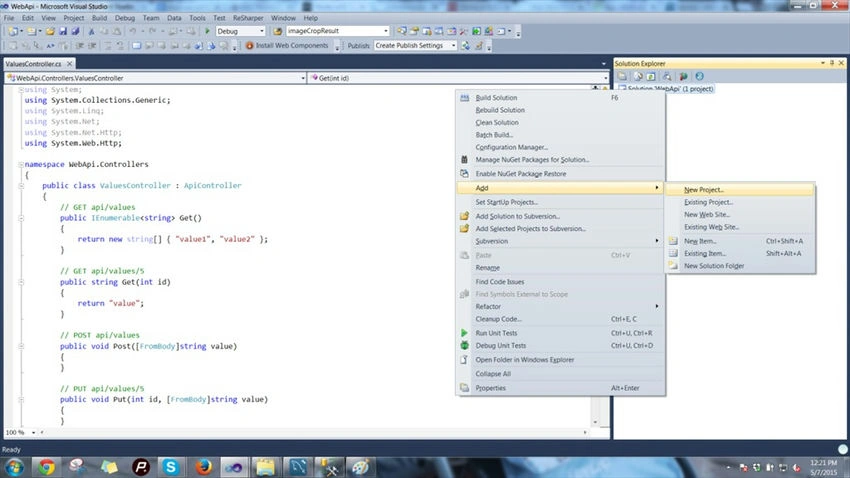
Step 1. Create a new class library in your Visual Studio and name it DataModel as shown below.
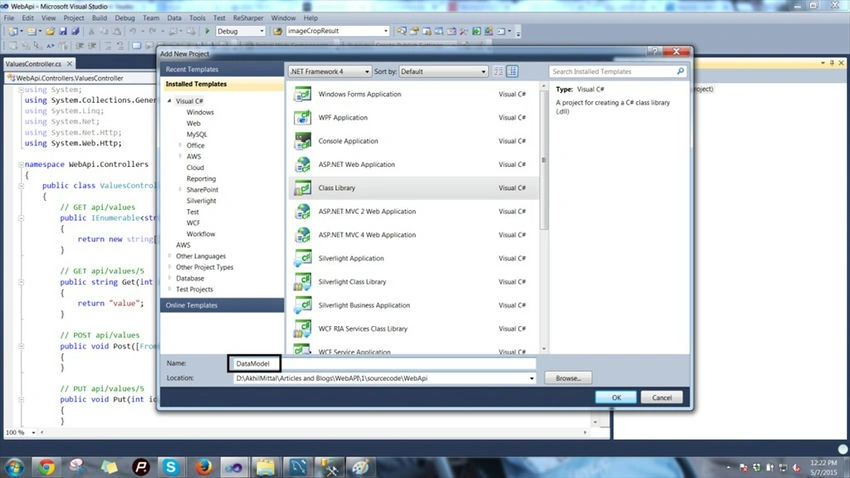
Step 2. In the same way, create one more project, again a class library, and call it BusinessEntities as in the following.
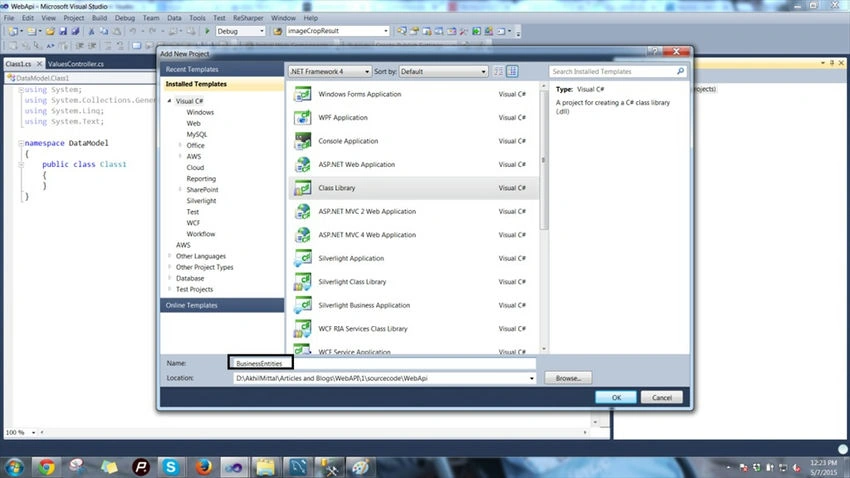
I'll explain the use of this class library soon.
Step 3. Move on to your DataModel project. Right-click on it and add a new item to the list shown, choose ADO.Net Data Model, and name it WebApiDataModel.edmx.
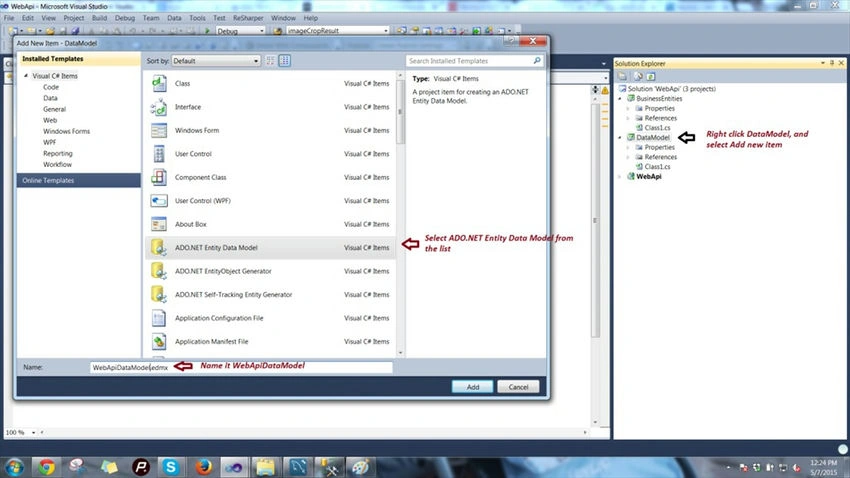
The file .edmx will contain the data information of our database that we created earlier, let's set this up.
You'll be presented with a wizard as follows.
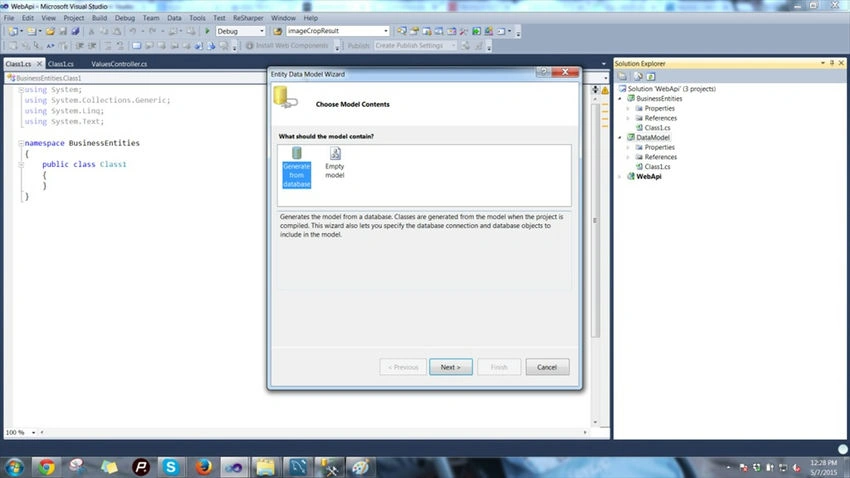
Choose to generate from the database. Choose Microsoft SQL Server as shown in the following image.
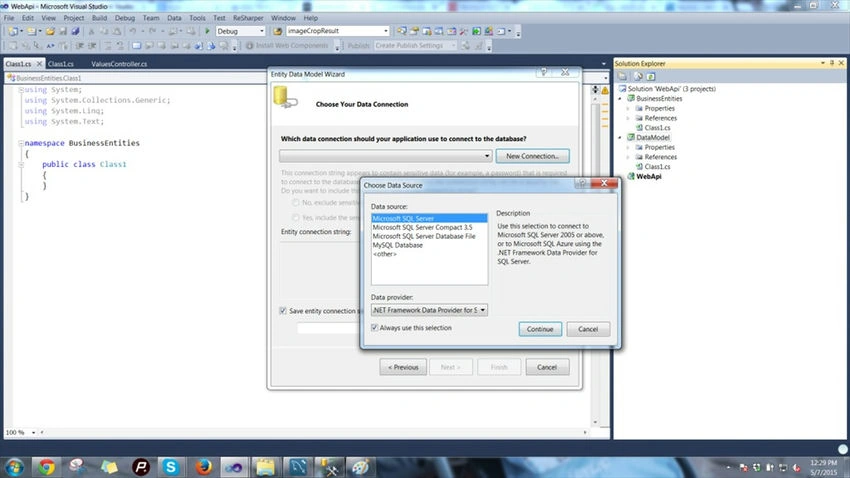
Click Continue, then provide the credentials for your database, in other words, WebAPIdb, and connect to it as in the following.
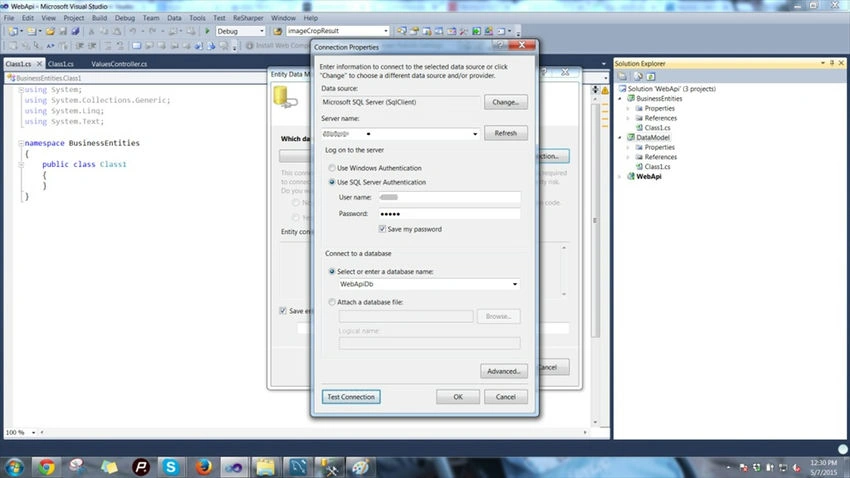
You'll get a screen showing the connection string of the database we chose as in the following.
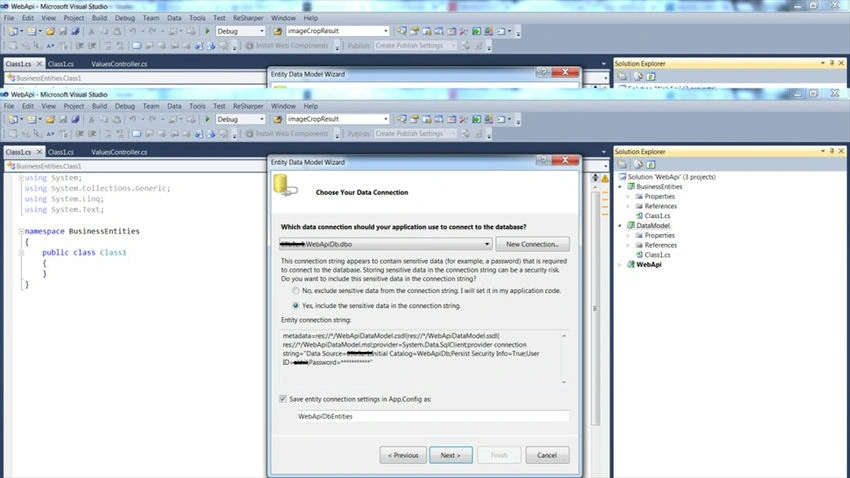
Provide the name of the connection string as WebApiDbEntities and click Next.
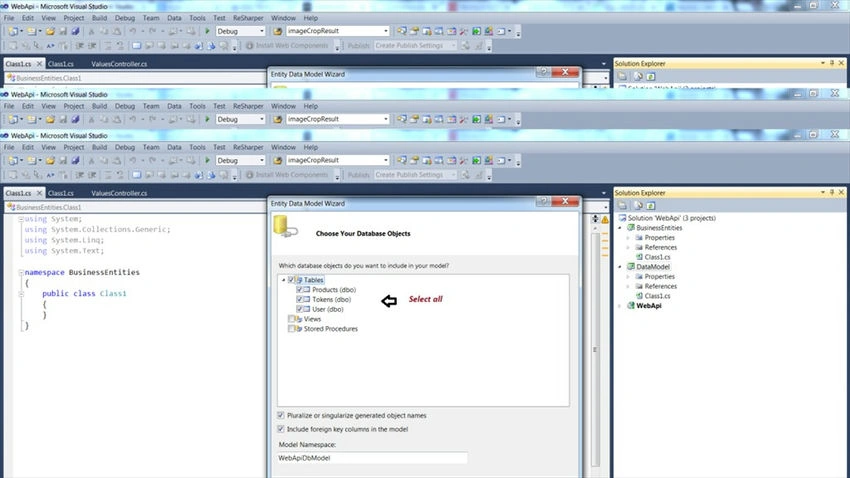
Choose all the database objects, check all the checkboxes, and provide a name for the model. I gave it the name WebApiDbModel.
Once you finish this wizard, you'll get the schema ready in your data model project as follows.
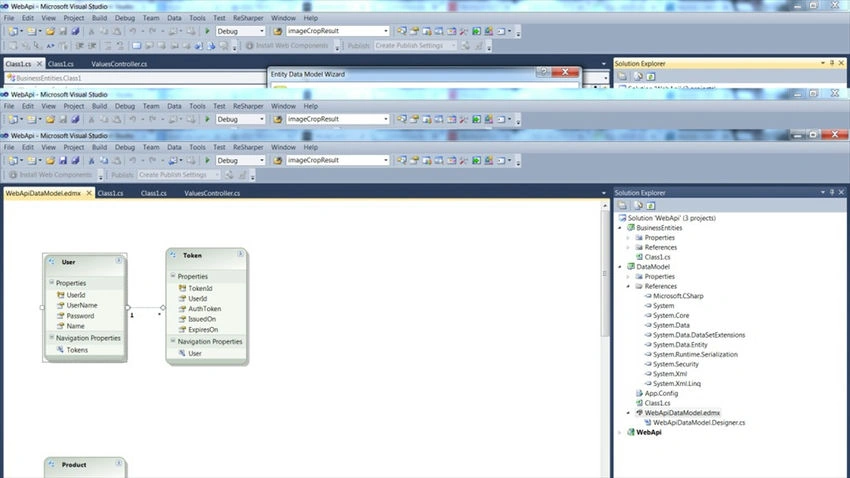
We've got our schema in place using Entity Framework. But a bit of work remains. We need our data context class and entities through which we'll communicate with the database.
So, moving on to the next step.
Step 4. Click on Tools in Visual Studio and open the Extension Manager. We need to get a db context generator for our data model. We can also do it using the default code generation item by right-clicking in the edmx view and adding a code generation item, but that will generate an object context class that is heavier than the DB context. I want a lightweight db context class to be created, so we'll use the Extension Manager to add a package and then create a db context class.
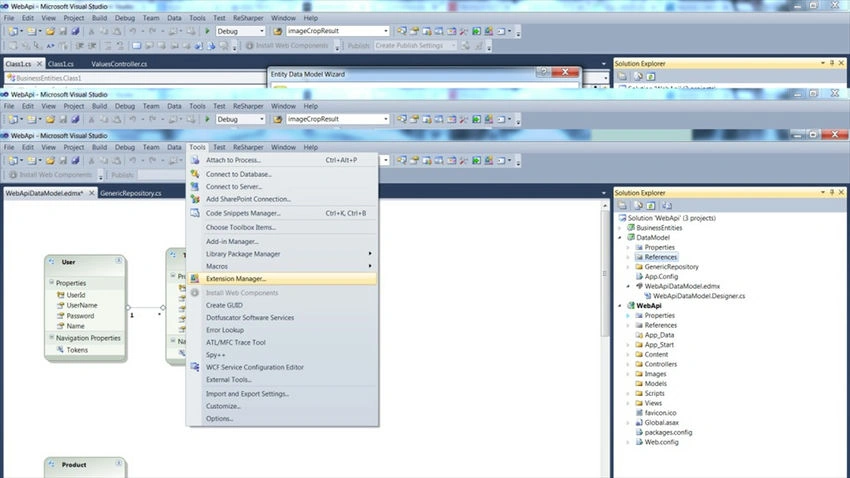
Search for Entity Framework Db context generator in the online gallery and select the one for EF 5. x as in the following.
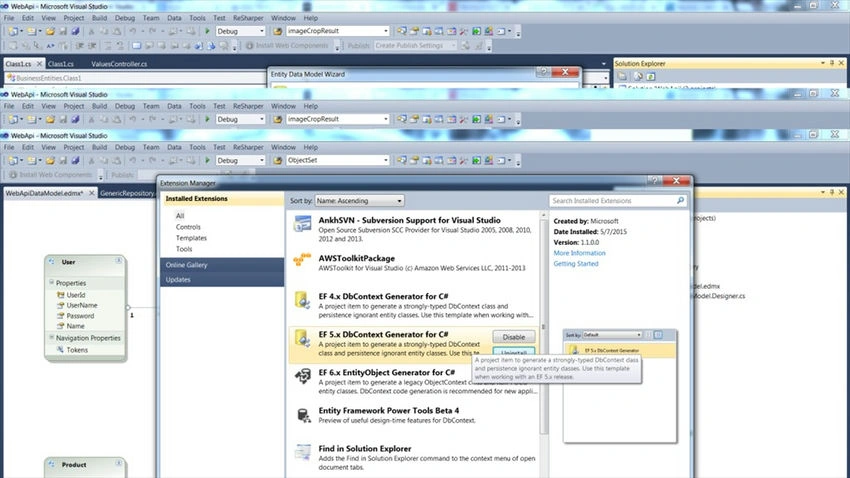
I guess you need to restart Visual Studio to get that into your templates.
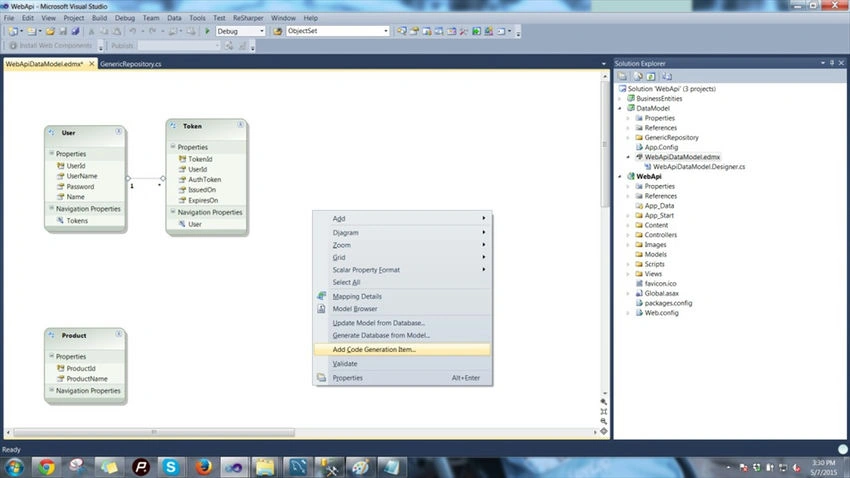
Step 5. Now right-click in the .edmx file schema designer and choose “Add Code Generation Item”.
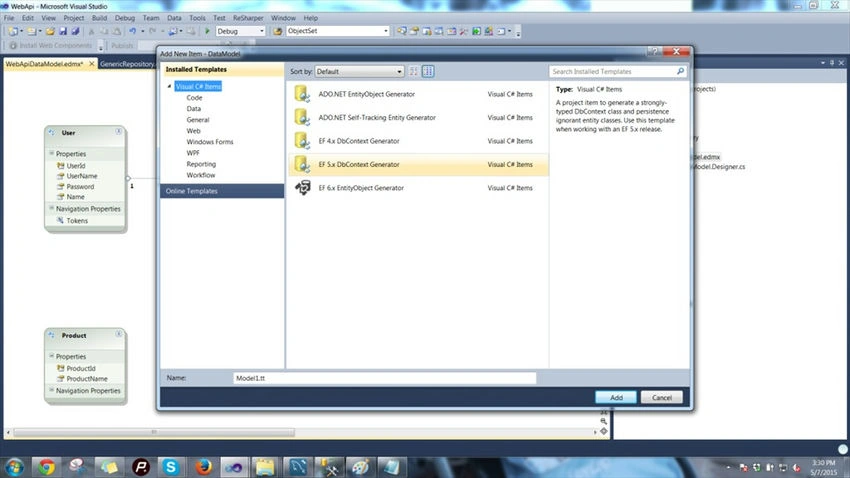
Step 6. Now you'll see that we have the template for the extension that we added, select EF 5. x DbContext Generator and click Add.
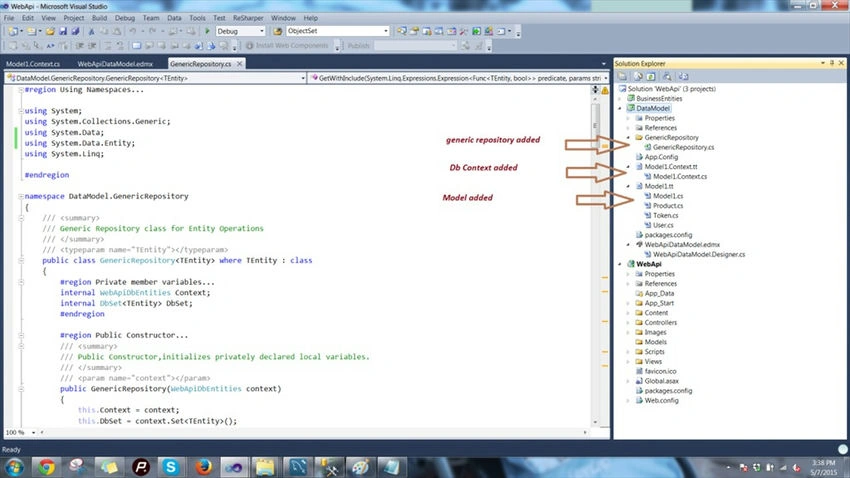
After adding this we'll get the db context class and its properties. This class is responsible for all database transactions that we need to do, so our structure looks as shown below.
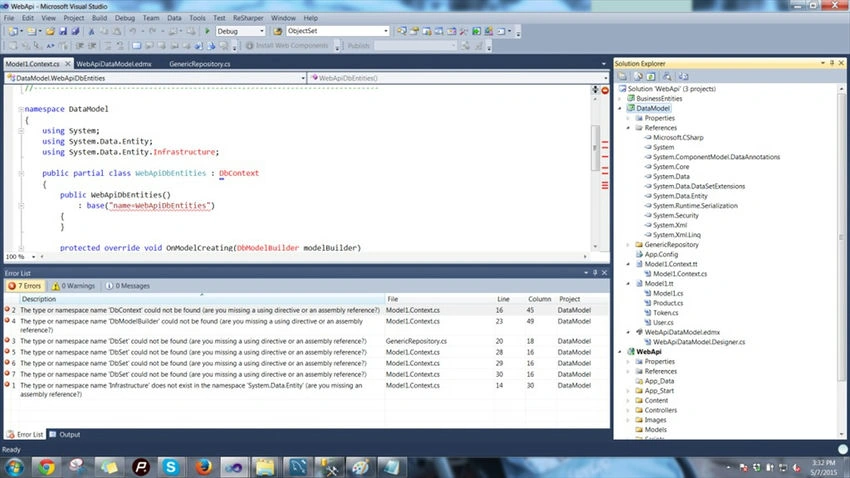
Wow, we ended up with errors. But we got our db context class and our entity models. You can see them in our DataModel project. Errors? Nothing to worry about, it's just we did not reference Entity Framework in our project. We'll do it right away.
Step 7. Go to Tools -> Library Packet Manager -> Packet Manager Console.
You'll get the console in the bottom-left of Visual Studio.
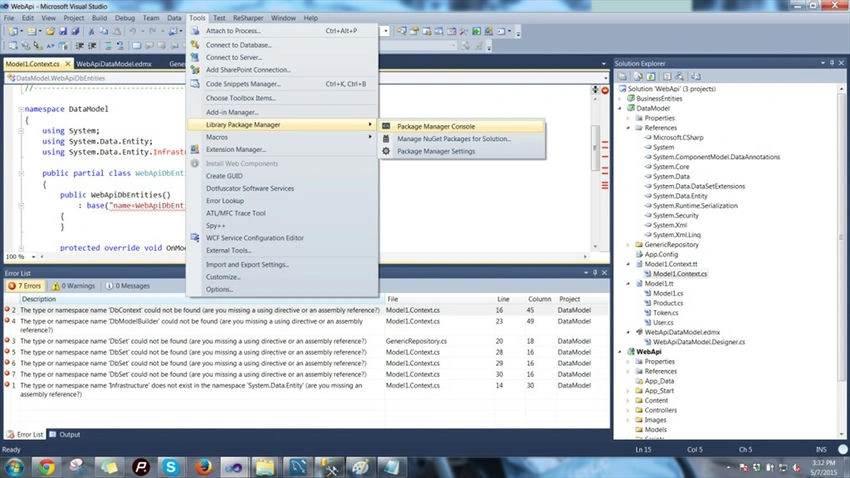
Select the dataModel project and provide the command “Install-Package EntityFramework –Version 5.0.0” to install Entity Framework 5 in our DataModel project.
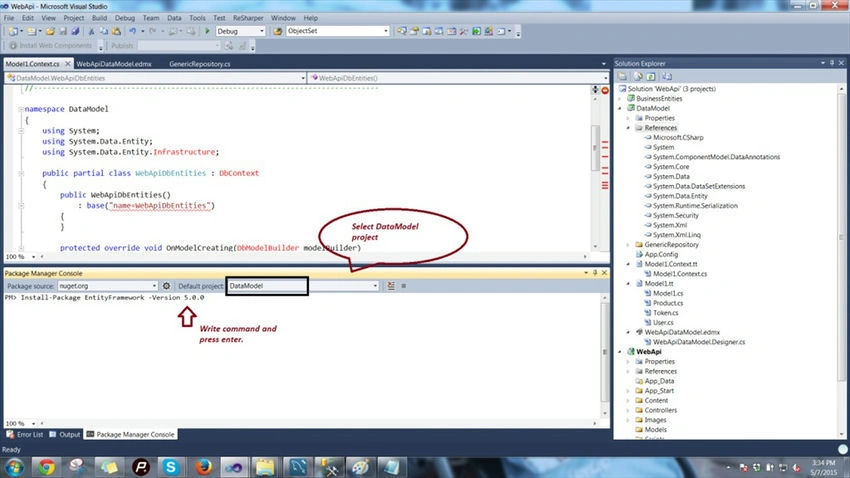
Press Enter. And all the errors become resolved.
Generic Repository and Unit of Work
You can read about the Repository Pattern and creating a repository in detail from my article,
Repository Pattern in MVC3 Application With Entity Framework: Part 5
Just to list the benefits of the Repository Pattern.
- It centralizes the data logic or Web service access logic.
- It provides a substitution point for the unit tests.
- It provides a flexible architecture that can be adapted as the overall design of the application evolves.
We'll create a generic repository that works for all our entities. Creating repositories for each and every entity may result in lots of duplicate code in large projects. For creating a Generic Repository you can follow the,
Generic Repository Pattern in MVC3 Application With Entity Framework: Part 6
Step 1. Add a folder named GenericRepository to the DataModel project and to that folder add a class named Generic Repository. Add the following code to that class that serves as a template-based generic code for all the entities that will interact with the database as in the following.
#region Using Namespaces...

using System;
using System.Collections.Generic;
using System.Data;
using System.Data.Entity;
using System.Linq;

#endregion

namespace DataModel.GenericRepository
{
    /// <summary>
    /// Generic Repository class for Entity Operations
    /// </summary>
    /// <typeparam name="TEntity"></typeparam>
    public class GenericRepository<TEntity> where TEntity : class
    {
        #region Private member variables...

        internal WebApiDbEntities Context;
        internal DbSet<TEntity> DbSet;

        #endregion

        #region Public Constructor...

        /// <summary>
        /// Public Constructor,initializes privately declared local variables.
        /// </summary>
        /// <param name="context"></param>
        public GenericRepository(WebApiDbEntities context)
        {
            this.Context = context;
            this.DbSet = context.Set<TEntity>();
        }

        #endregion

        #region Public member methods...

        /// <summary>
        /// generic Get method for Entities
        /// </summary>
        /// <returns></returns>
        public virtual IEnumerable<TEntity> Get()
        {
            IQueryable<TEntity> query = DbSet;
            return query.ToList();
        }

        /// <summary>
        /// Generic get method on the basis of id for Entities.
        /// </summary>
        /// <param name="id"></param>
        /// <returns></returns>
        public virtual TEntity GetByID(object id)
        {
            return DbSet.Find(id);
        }

        /// <summary>
        /// generic Insert method for the entities
        /// </summary>
        /// <param name="entity"></param>
        public virtual void Insert(TEntity entity)
        {
            DbSet.Add(entity);
        }

        /// <summary>
        /// Generic Delete method for the entities
        /// </summary>
        /// <param name="id"></param>
        public virtual void Delete(object id)
        {
            TEntity entityToDelete = DbSet.Find(id);
            Delete(entityToDelete);
        }

        /// <summary>
        /// Generic Delete method for the entities
        /// </summary>
        /// <param name="entityToDelete"></param>
        public virtual void Delete(TEntity entityToDelete)
        {
            if (Context.Entry(entityToDelete).State == EntityState.Detached)
            {
                DbSet.Attach(entityToDelete);
            }
            DbSet.Remove(entityToDelete);
        }

        /// <summary>
        /// Generic update method for the entities
        /// </summary>
        /// <param name="entityToUpdate"></param>
        public virtual void Update(TEntity entityToUpdate)
        {
            DbSet.Attach(entityToUpdate);
            Context.Entry(entityToUpdate).State = EntityState.Modified;
        }

        /// <summary>
        /// generic method to get many record on the basis of a condition.
        /// </summary>
        /// <param name="where"></param>
        /// <returns></returns>
        public virtual IEnumerable<TEntity> GetMany(Func<TEntity, bool> where)
        {
            return DbSet.Where(where).ToList();
        }

        /// <summary>
        /// generic method to get many record on the basis of a condition but queryable.
        /// </summary>
        /// <param name="where"></param>
        /// <returns></returns>
        public virtual IQueryable<TEntity> GetManyQueryable(Func<TEntity, bool> where)
        {
            return DbSet.Where(where).AsQueryable();
        }

        /// <summary>
        /// generic get method , fetches data for the entities on the basis of condition.
        /// </summary>
        /// <param name="where"></param>
        /// <returns></returns>
        public TEntity Get(Func<TEntity, Boolean> where)
        {
            return DbSet.Where(where).FirstOrDefault<TEntity>();
        }

        /// <summary>
        /// generic delete method , deletes data for the entities on the basis of condition.
        /// </summary>
        /// <param name="where"></param>
        /// <returns></returns>
        public void Delete(Func<TEntity, Boolean> where)
        {
            IQueryable<TEntity> objects = DbSet.Where<TEntity>(where).AsQueryable();
            foreach (TEntity obj in objects)
                DbSet.Remove(obj);
        }

        /// <summary>
        /// generic method to fetch all the records from db
        /// </summary>
        /// <returns></returns>
        public virtual IEnumerable<TEntity> GetAll()
        {
            return DbSet.ToList();
        }

        /// <summary>
        /// Inclue multiple
        /// </summary>
        /// <param name="predicate"></param>
        /// <param name="include"></param>
        /// <returns></returns>
        public IQueryable<TEntity> GetWithInclude(System.Linq.Expressions.Expression<Func<TEntity, bool>> predicate, params string[] include)
        {
            IQueryable<TEntity> query = this.DbSet;
            query = include.Aggregate(query, (current, inc) => current.Include(inc));
            return query.Where(predicate);
        }

        /// <summary>
        /// Generic method to check if entity exists
        /// </summary>
        /// <param name="primaryKey"></param>
        /// <returns></returns>
        public bool Exists(object primaryKey)
        {
            return DbSet.Find(primaryKey) != null;
        }

        /// <summary>
        /// Gets a single record by the specified criteria (usually the unique identifier)
        /// </summary>
        /// <param name="predicate">Criteria to match on</param>
        /// <returns>A single record that matches the specified criteria</returns>
        public TEntity GetSingle(Func<TEntity, bool> predicate)
        {
            return DbSet.Single<TEntity>(predicate);
        }

        /// <summary>
        /// The first record matching the specified criteria
        /// </summary>
        /// <param name="predicate">Criteria to match on</param>
        /// <returns>A single record containing the first record matching the specified criteria</returns>
        public TEntity GetFirst(Func<TEntity, bool> predicate)
        {
            return DbSet.First<TEntity>(predicate);
        }

        #endregion
    }
}
Unit of Work
Again, I'll not explain in detail what Unit of Work is. You can Google the theory or follow my existing article on MVC with the Unit of Work.
To give a heads up, again from my existing article, the important responsibilities of a Unit of Work are the following.
- To manage transactions.
- To order the database inserts, deletes, and updates.
- To prevent duplicate updates. Inside a single usage of a Unit of Work object, various parts of the code may mark the same Invoice object as changed, but the Unit of Work class will only issue a single UPDATE command to the database.
The value of using a Unit of Work pattern is to free the rest of our code from these concerns so that you can otherwise concentrate on the business logic.
Step 1. Create a folder named UnitOfWork and add a class to that folder named UnitOfWork.cs.
Add GenericRepository properties for all three entities that we got. The class also implements an IDisposable interface and its method Dispose to free up connections and objects. The class will be as follows.

Hamid KhanPosted Nov 6, 2018, 12:49 AM
Very helpful Thanks Sir
Rashid HannanPosted Oct 18, 2018, 9:08 AM
I have tried to impliment day1 using EF6, and public TEntity Get(Func<TEntity, Boolean> where) { return DbSet.Where(where).FirstOrDefault<TEntity>(); } in GenericRepository code didn't work :(, have you got any updated code please?
Hadshana KamalanathanPosted Jul 22, 2018, 1:35 AM
Nice article...
rahul rathorePosted Apr 23, 2016, 3:20 PM
Gr8 article akhil. I am done with your article restful-day-1 and now moving to day 2.It's really g8 and thanks for writing this much of deeper concept.
Debasis SahaPosted Mar 31, 2016, 1:07 AM
Good One..
Saillesh PawarPosted Mar 15, 2016, 10:05 AM
Sir can you just give us sample Get method where we have multiple search criteria. eg user details based on name or address or id. How to implement this GET using Generics
Saillesh PawarPosted Mar 15, 2016, 2:39 AM
Completed Day 1 and looking forward to Day 2.
Asfend YarPosted Mar 12, 2016, 2:56 PM
good
Jaipal ReddyPosted Mar 1, 2016, 3:37 AM
Thank you Sir. .
Humayun Kabir MamunPosted Mar 1, 2016, 1:53 AM
Nice...
rakesh patelPosted Aug 31, 2015, 8:04 AM
Where is RESTful Day #6 ?
Nilesh JadavPosted Jun 6, 2015, 1:00 AM
Nice one sir !
Sachin KaliaPosted Jun 2, 2015, 1:29 AM
Akhil MittalAkhil its always remarkable points whenever you share an article..learn good things with high volume.Great .But here i have question which always puzzle me "REST is an architectural style".Could you please elaborate this world in Simple Layman..this sentence always gives me point of wondering..
Dinesh BeniwalPosted Jun 1, 2015, 5:31 AM
Congrats Akhil Mittal for article of the day ;)
Akhil MittalPosted Jun 1, 2015, 1:40 AM
Article of the day at http://www.asp.net/community/articles
Santhakumar MunuswamyPosted May 30, 2015, 1:02 PM
Thanks for good work.. keep it up
Manoj KulkarniPosted May 18, 2015, 1:33 AM
Nice article. Thank you for sharing.
Gowtham RajamanickamPosted May 12, 2015, 1:16 PM
good
NitinPosted May 12, 2015, 12:52 PM
good one
rahul rathorePosted May 12, 2015, 5:43 AM
i have'nt read it but will surely go through it .Because i have this confidence that if u are writing sth then it must be awesome the same way your OOP series was .
Sibeesh VenuPosted May 11, 2015, 3:02 AM
Good One :)
Parveen AroraPosted May 11, 2015, 2:08 AM
Awesome Work!! Thanks for providing your valuable experience through these articles. Reading my first tutorial on C-SharpCorner after a long time.
Muddana MallikarjunPosted May 11, 2015, 12:53 AM
Great Article .. waiting for remaining days .. Thank you :) ..
Santhakumar MunuswamyPosted May 10, 2015, 11:59 PM
Thanks for good work
junaid mPosted May 10, 2015, 11:13 PM
very good
ad codersPosted May 10, 2015, 12:30 PM
Great read, awesome as ever.Just had a look, will follow in detail.
Dinesh BeniwalPosted May 10, 2015, 12:27 PM
Great hope meet you soon in delhi chapter ;)
Dinesh BeniwalPosted May 10, 2015, 12:15 PM
Welcome back Akhil, great article