

Introduction
In this article we will learn routing in Reactjs from the beginning. Routing is a mechanism to redirect the users from one page to another page, and provides the navigation from one page to another page.
Prerequisites
- We should have a basic knowledge of ReactJS
- Visual Studio Code should be installed
- Node and NPM installed
React router
React router is a routing library built on top of the react which is used to create the routing in React apps.
Create React.js Project
- npx create-react-app routingdemo
Install react router
Install React router by using the following command.
- npm install react-router-dom --save
Install bootstrap in this project by using the following command.
- npm install --save bootstrap
Now, open the index.js file and add Bootstrap reference.
- import 'bootstrap/dist/css/bootstrap.min.css';
Project structure
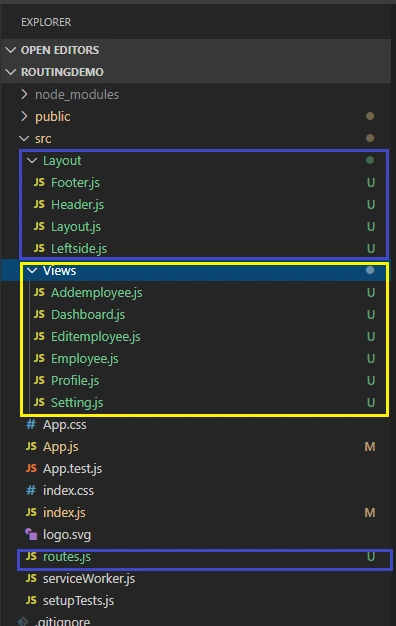
I have created two folders, layout and Views. Inside these folders I have created the following components.
Layout Folder components
- Footer.js
- Header.js
- Leftside.js
- Layout.js
Views folder conponents
- Addemployee.js
- Dashboard.js
- Editemployee.js
- Employee.js
- Profile.js
- Setting.js
Now let's create one more file named 'route.js', in this file we defined routing. Open route.js file and add the following code
- import React from 'react';
- const Dashboard=React.lazy(()=>import('./Views/Dashboard'));
- const setting=React.lazy(()=>import('./Views/Setting'))
- const employee=React.lazy(()=>import('./Views/Employee'))
- const addemployee=React.lazy(()=>import('./Views/Addemployee'))
- const editemployee=React.lazy(()=>import('./Views/Editemployee'))
- const profile=React.lazy(()=>import('./Views/Profile'))
- const notfound=React.lazy(()=>import('./PageNotFound'))
- const routes = [
- { path: '/Dashboard', component: Dashboard },
- { path: '/setting', component: setting },
- { path: '/employee', component: employee },
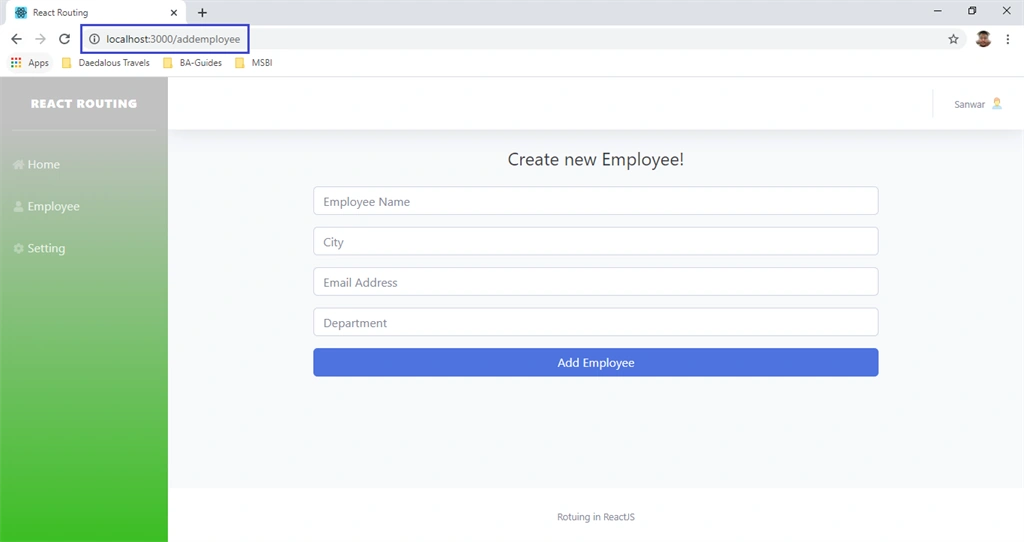
- { path: '/addemployee', component: addemployee },
- { path: '/profile', component: profile },
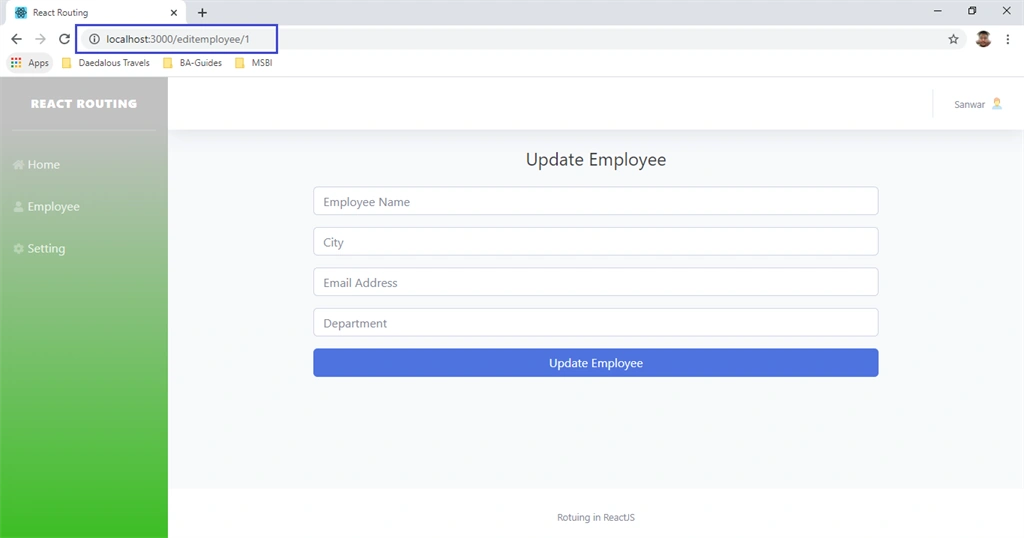
- { path: '/editemployee/:id', exact: true, component: editemployee },
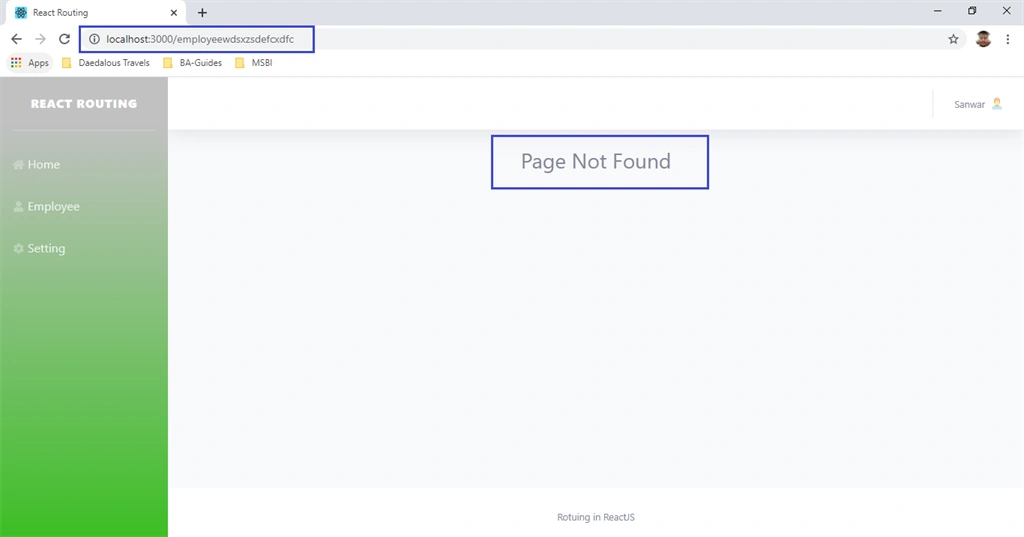
- { component:notfound }
- ];
- export default routes;
- import React, { Component } from 'react'
- import { Link } from 'react-router-dom'
- export class Header extends Component {
- render() {
- return (
- <div>
- <nav class="navbar navbar-expand navbar-light bg-white topbar mb-4 static-top shadow">
- <ul class="navbar-nav ml-auto">
- <li class="nav-item dropdown no-arrow d-sm-none">
- </li>
- <li class="nav-item dropdown no-arrow mx-1">
- </li>
- <div class="topbar-divider d-none d-sm-block"></div>
- <li class="nav-item dropdown no-arrow">
- <a class="nav-link dropdown-toggle" href="#" id="userDropdown" role="button" data-toggle="dropdown" aria-haspopup="true" aria-expanded="false">
- <span class="mr-2 d-none d-lg-inline text-gray-600 small">Sanwar</span>
- <img src="https://img.icons8.com/officel/16/000000/user.png" />
- </a>
- <div class="dropdown-menu dropdown-menu-right shadow animated--grow-in" aria-labelledby="userDropdown">
- <Link class="dropdown-item" to="/profile">
- <i class="fas fa-user fa-sm fa-fw mr-2 text-gray-400"></i>
- Profile
- </Link>
- <div class="dropdown-divider"></div>
- <a class="dropdown-item" href="#" data-toggle="modal" data-target="#logoutModal">
- <i class="fas fa-sign-out-alt fa-sm fa-fw mr-2 text-gray-400"></i>
- Logout
- </a>
- </div>
- </li>
- </ul>
- </nav>
- </div>
- )
- }
- }
- export default Header
Now open Footer.js component and add the following code.
- import React, { Component } from 'react'
- export class Footer extends Component {
- render() {
- return (
- <div>
- <footer class="sticky-footer bg-white">
- <div class="container my-auto">
- <div class="copyright text-center my-auto">
- <span>Rotuing in ReactJS</span>
- </div>
- </div>
- </footer>
- </div>
- )
- }
- }
- export default Footer
- import React, { Component } from 'react'
- import { Link } from 'react-router-dom';
- export class Leftside extends Component {
- render() {
- return (
- <div>
- <ul class="navbar-nav bg-gradient-primary sidebar sidebar-dark accordion" id="accordionSidebar">
- <a class="sidebar-brand d-flex align-items-center justify-content-center" href="index.html">
- <div class="sidebar-brand-text mx-3">React Routing </div>
- </a>
- <hr class="sidebar-divider my-0" />
- <hr class="sidebar-divider" />
- <li class="nav-item">
- <Link class="nav-link" to="/Dashboard"> <i class="fas fa-fw fa-home"></i>Home</Link>
- </li>
- <li class="nav-item">
- <Link class="nav-link" to="/employee"> <i class="fas fa-fw fa-user"></i>Employee</Link>
- </li>
- <li class="nav-item">
- <Link class="nav-link" to="/setting"> <i class="fas fa-fw fa-cog"></i>Setting</Link>
- </li>
- </ul>
- </div>
- )
- }
- }
- export default Leftside
- import React, { Component, Suspense } from 'react';
- import Leftside from './Leftside';
- import Header from './Header'
- import Footer from './Footer'
- import routes from '../routes';
- import * as router from 'react-router-dom';
- import {
- Route, Switch, Redirect
- } from 'react-router-dom';
- export class Layout extends Component {
- loading = () => <div className="animated fadeIn pt-1 text-center">Loading...</div>
- render() {
- return (
- <div>
- <div id="wrapper">
- <Leftside></Leftside>
- <div id="content-wrapper" class="d-flex flex-column">
- <div id="content">
- <Header />
- <Suspense fallback={this.loading()}>
- <Switch>
- {routes.map((route, idx) => {
- return route.component ? (
- <Route
- key={idx}
- path={route.path}
- exact={route.exact}
- name={route.name}
- render={props => (
- <route.component {...props} />
- )} />
- ) : (null);
- })}
- <Redirect from="/" to="/dashboard" />
- </Switch>
- </Suspense>
- </div>
- <Footer />
- </div>
- </div>
- </div>
- )
- }
- }
- export default Layout
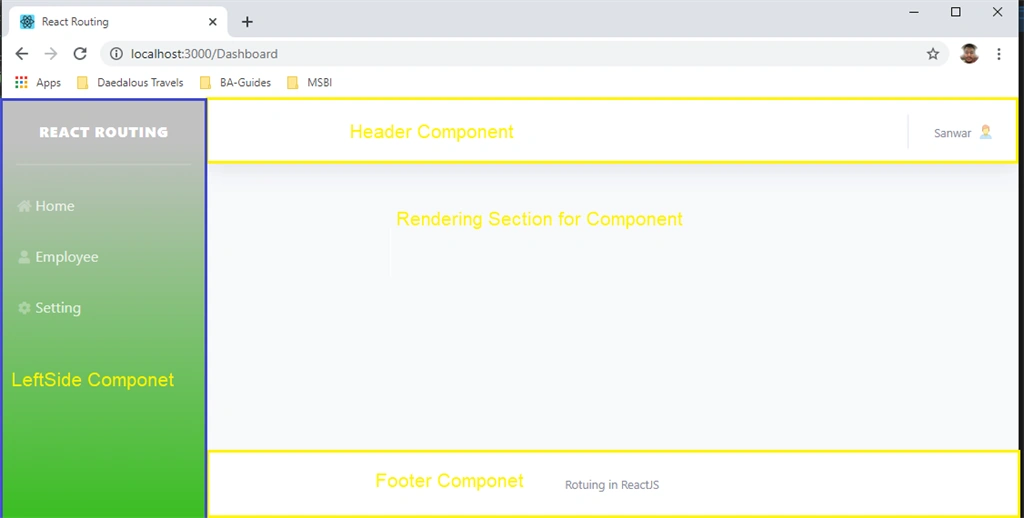
Layout structure
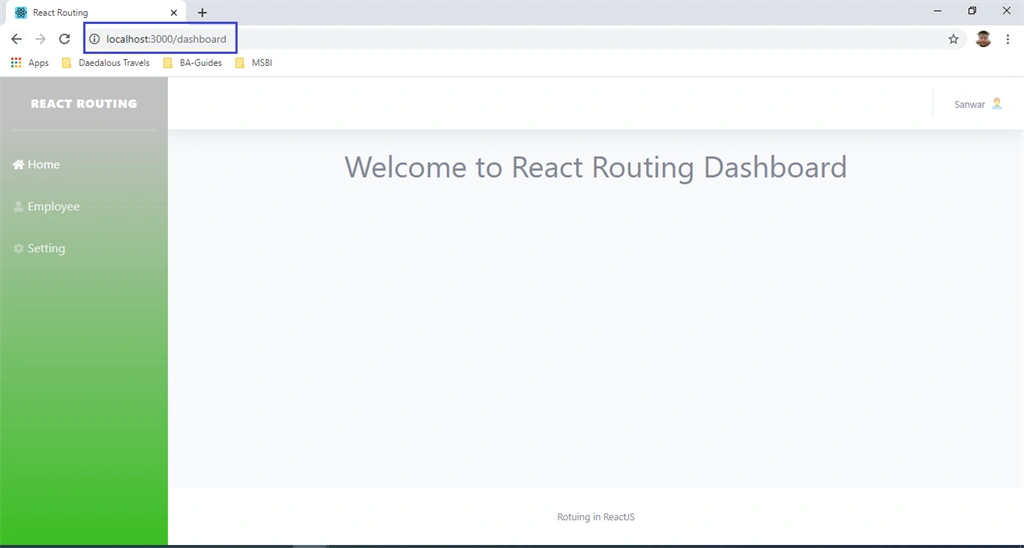
Now go to Views folder and open Dashboard.js component and add the following code.
Saravanakumar SekaranPosted Jun 29, 2020, 9:48 AM
Can u send me the code brother pls
Jin NecesarioPosted May 18, 2020, 9:11 AM
Nice article