Hello Team,
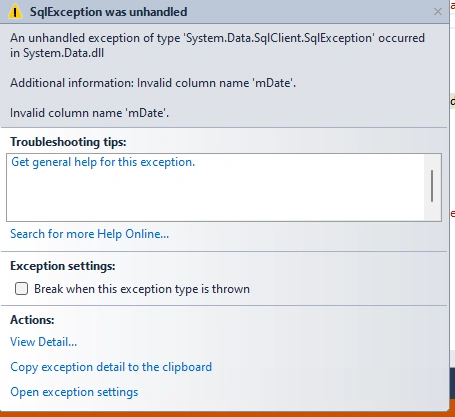
Please am working on Window Application and I have the following table tblProduct which contain the pName as product name , tblDetail contain qty, price and amount, and tblMain contain transaction date as mDate and when I call the data into dataGridView by clicking load buttong I get this error as shown in the screen shot, kindly help
private void btnLoadData_Click(object sender, EventArgs e)
{
double _total = 0;
int i = 0;
dataGridView3.Rows.Clear();
con.Open();
cmd = new SqlCommand(@"select p.ProID, p.pName,d.price,d.qty,sum(d.amount) from tblDetails as d inner join tblProduct as p on d.ProductID=p.ProID where mDate between'%" + dtSales1.Value.ToString("dd-MM-yyyy") + "'and '" + dtSales1.Value.ToString("dd-MM-yyyy") + "%'group by p.pName, d.price, d.qty, d.amount", con);
dr = cmd.ExecuteReader();
while (dr.Read())
{
i += 1;
_total += double.Parse(dr["amount"].ToString());
dataGridView3.Rows.Add(i, dr["ProID"].ToString(), dr["pName"].ToString(), Double.Parse(dr["price"].ToString()).ToString("#,##0.00"), dr["qty"].ToString(), Double.Parse(dr["amount"].ToString()).ToString("#,##0.00"));
}
dr.Close();
con.Close();
lblTotal.Text = _total.ToString("Ghc #,##0.00");
con.Open();
cmd = new SqlCommand("select isnull(sum(amount),0) from tblDetails where where mDate between'" + dtSales1.Value.ToString("dd-MM-yyyy") + "'and '" + dtSales2.Value.ToString("dd-MM-yyyy") + "'", con);
lblTotal.Text = Double.Parse(cmd.ExecuteScalar().ToString()).ToString("#,##0.00");
con.Close();
}
Prasad RaveendranPosted Nov 2, 2023, 10:44 PM
In the provided code, the
IndexOutOfRangeExceptionerror in thebtnLoadData_Clickmethod is likely due to the SQL query which attempts to selectSUM(d.amount)without providing an alias for the aggregated value. As a result, this can lead to an issue when accessing the columnamountin the SqlDataReader loop.When you use an aggregate function like
SUM(d.amount)in your SQL query, you should assign an alias to the result. Without an alias, the resulting column name in the data reader will be something like "Expr1000" or similar, making it unable to find the "amount" column.Here's a revised version of your SQL query by assigning an alias to the sum of amount:
This change ensures that the aggregated value is retrieved with an alias
TotalAmount, which can be accessed in your data reader without causing theIndexOutOfRangeExceptionerror on the "amount" column.Here's the updated part of the code where you should read the value from the modified query result:
By assigning an alias in the SQL query for the
SUM(d.amount)asTotalAmount, you should be able to retrieve this value without encountering theIndexOutOfRangeExceptionerror on the "amount" column.Emmmanuel FIADUFEPosted Nov 3, 2023, 6:11 PM
Thank you Prasad, it is working now
Emmmanuel FIADUFEPosted Nov 2, 2023, 3:39 PM
Hello Jignesh Kumar,
Please I applied your code and am error popup saying invalid mdate column
Emmmanuel FIADUFEPosted Nov 2, 2023, 3:37 PM
Hello Prasad,
please this is my code, as I sald when I remode the amount column that is loaded into the dataGridView but when I include the amount column the error popup. thank you
private void btnLoadData_Click(object sender, EventArgs e)
{
double _total = 0;
int i = 0;
dataGridView3.Rows.Clear();
con.Open();
cmd = new SqlCommand(@" SELECT p.ProID, p.pName, d.price, d.qty, SUM(d.amount) FROM tblDetails AS d
INNER JOIN tblProduct AS p ON d.ProductID = p.ProID
INNER JOIN tblMain AS m ON d.dMainID = m.MainID
WHERE m.mDate BETWEEN @StartDate AND @EndDate
GROUP BY p.ProID, p.pName, d.price, d.qty
", con);
cmd.Parameters.AddWithValue("@StartDate", dtSales1.Value.Date);
cmd.Parameters.AddWithValue("@EndDate", dtSales2.Value.Date);
dr = cmd.ExecuteReader();
while (dr.Read())
{
i += 1;
_total += Double.Parse(dr["amount"].ToString());
dataGridView3.Rows.Add(i, dr["ProID"].ToString(), dr["pName"].ToString(), Double.Parse(dr["price"].ToString()).ToString("#,##0.00"), dr["qty"].ToString(), Double.Parse(dr["amount"].ToString()).ToString("#,##0.00"));
}
dr.Close();
con.Close();
lblTotal.Text = _total.ToString("Ghc #,##0.00");
con.Open();
cmd = new SqlCommand("select isnull(sum(amount),0) from tblDetails where mDate between'" + dtSales1.Value.ToString("dd-MM-yyyy") + "'and '" + dtSales2.Value.ToString("dd-MM-yyyy") + "'", con);
lblTotal.Text = Double.Parse(cmd.ExecuteScalar().ToString()).ToString("#,##0.00");
con.Close();
}
Jignesh KumarPosted Nov 1, 2023, 3:41 AM
Hello,
Please change use Isnull check for your amount column,
Prasad RaveendranPosted Oct 31, 2023, 10:50 PM
Hello Emmanual, I may need the piece of code to check. Which line throwing this exception?
If you're encountering a
System.IndexOutOfRangeExceptionspecifically within theSystem.Datanamespace, it's likely related to working with data structures like DataTables, DataRows, or data access using indices that don't exist.For instance, this kind of exception might occur when working with DataTables or DataRows if you're trying to access a column that doesn't exist or trying to access a row that is out of the range.
Emmmanuel FIADUFEPosted Oct 31, 2023, 3:50 PM
Hello Prasad,
this is another error coming up and when I remove the amount column the dataGridView is able to fetch all the data except the amount and when I include the amount it brings the error again
Emmmanuel FIADUFEPosted Oct 31, 2023, 2:52 PM
Well noted with thanks Prasad, I will check and revert please
Prasad RaveendranPosted Oct 31, 2023, 3:44 AM
To resolve the error, here are a few things to check and potentially modify in your code:
Column Naming: Ensure that the column name "mDate" exists in the tables
tblMain,tblProduct, andtblDetails.Alias Usage: When you are performing a SQL join with multiple tables and filtering by date, make sure you use the correct alias for the date column. If
mDateis intblMain, use the correct alias when referencing it in the query.Here's an example based on your code:
This assumes that
mDateis in thetblMaintable, and it's linked to the other tables through a column likeMainID.Also, it's a good practice to use parameterized queries to prevent SQL injection and improve query performance.
Make sure to adjust the table and column names, as well as the join conditions (
ONclauses) according to your actual table structure.Additionally, always handle exceptions and error messages within a try-catch block to catch potential errors in your SQL queries and connections. This allows you to debug more effectively.
Remember to verify your table structure and adjust the SQL query according to your actual database schema to ensure accuracy.