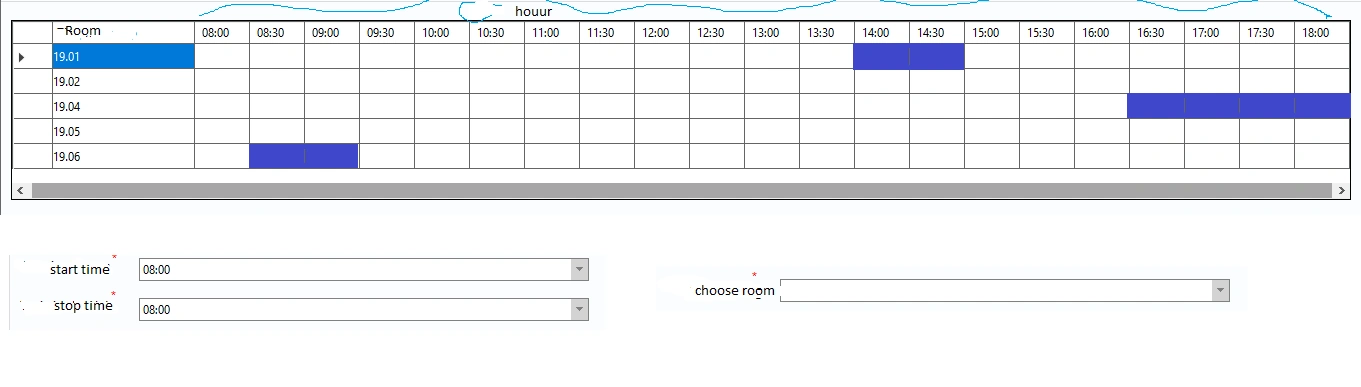
I want to look at the datagridview to know what time of the meeting is as shown in the picture. after selecting the start time and end time and choose the room
will automatically fill in the datagridview and have the background as shown. but the following code does not get that position, hope everyone can help.
private void selectAreaColor()
{
    string starttime1 = cboStarttime.Text;
    string stoptime1 = cboStoptime.Text;
    // Get the start time and end time inputs and the selected meeting room
    DateTime startTime =DateTime.ParseExact( starttime1,"HH:mm",null);
    DateTime endTime = DateTime.ParseExact(stoptime1,"HH:mm",null);
    string selectedRoom = cboRoom.SelectedItem.ToString();

    // Loop through the rows in the DataGridView and find the matching row
    foreach (DataGridViewRow row in grdMeeting.Rows)
    {
        if (row.Cells[0].Value.ToString() == selectedRoom)
        {
            // Loop through the columns and compare the start and end times with the time slots
            for (int i = 1; i < grdMeeting.Columns.Count; i++)
            {
                DateTime columnTime = DateTime.ParseExact(grdMeeting.Columns[i].HeaderText, "HH:mm", null);
                if (startTime == columnTime || endTime == columnTime)
                {
                    //MessageBox.Show("Are you OK ");

                    grdMeeting.CurrentCell.Style.BackColor = Color.Blue;//Can't get the location to create the background
                    return;
                }
            }
        }
    }
}
Manikandan RPosted Feb 17, 2023, 11:09 AM
Hello,
Try This
Tuhin PaulPosted Feb 18, 2023, 5:48 AM
Hi Honag,
See below the code if it can be of any help, after checing your code I tried some code at my end and I have come up with the following:
You can get the row index by checking the
Indexproperty of theDataGridViewRowobject in the outer loop, and you can get the column index by using thegrdMeeting.Columns.IndexOfmethod to find the index of the column that matches the current time slot. Here's an updated version of yourselectAreaColormethod with these changes: